
What if the least disruptive way to go paperless is not to digitize everything at once? Transitioning to a paperless dental practice can feel like one more demand on a busy team, especially when paper forms are hard to find and changing familiar routines risks slowing patient care. It’s reasonable to want clearer records without creating extra work or leaving patients without documents they need.
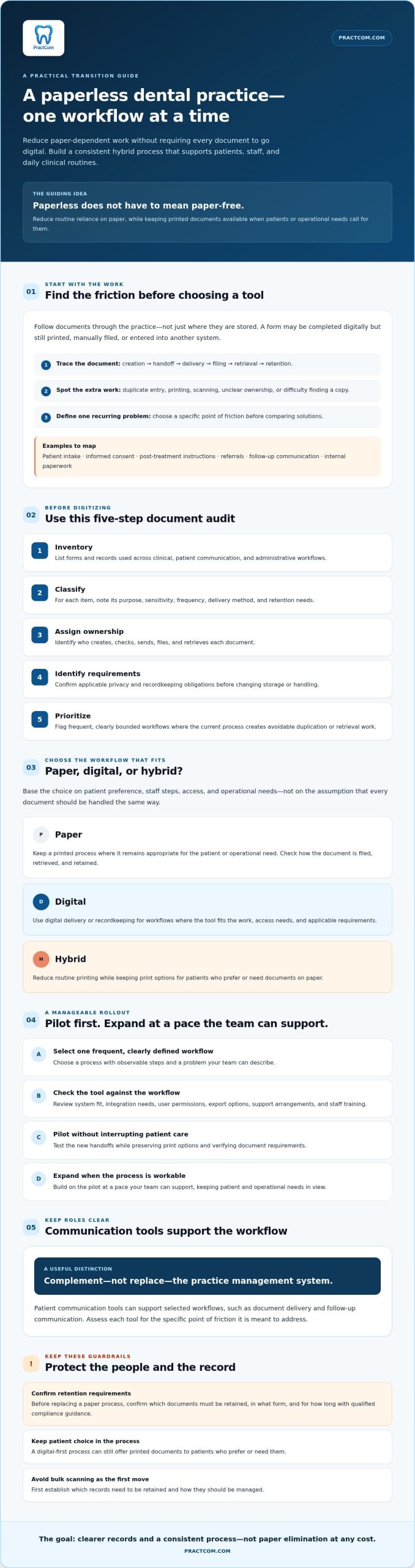
A phased approach can make the change manageable. Start with a high-volume communication workflow, assess tools for document delivery and recordkeeping, and expand at a pace your team can support. Plan for privacy and retention requirements while keeping printed documents available when appropriate. The goal isn’t to eliminate paper at any cost. It’s to build a consistent hybrid process that supports patients, staff, and daily clinical routines.
Key Takeaways
- Think of a paperless practice as reducing paper-dependent workflows, not eliminating every printed document.
- Before digitizing, inventory documents and sort them by purpose, sensitivity, frequency, delivery method, and retention needs.
- Choose paper, digital, or hybrid workflows based on patient choice, staff steps, access, and operational needs.
- Make transitioning to a paperless dental practice manageable by piloting one frequent, clearly defined workflow before expanding.
- Patient communication tools can support selected workflows, while a communication platform complements rather than replaces a full practice management system.
Why transition to a paperless dental practice, and what should change first?
A paperless dental practice doesn’t have to be a practice without paper. It means reducing reliance on paper for routine tasks so documents are easier to organize, route, and retrieve, while keeping print options for patients and operational needs. Digital records can make information more accessible, but the right setup depends on how your team works and which records you must maintain. For background, the Electronic Health Record (EHR) overview explains the broader role of digital health records.
Start by mapping where documents enter and move through your practice: patient intake forms, informed consent, post-treatment instructions, referrals, follow-up messages, and internal paperwork. A form may be completed digitally but still printed, manually filed, or entered into another system. Those handoffs can create extra work. Identify the workflow problem before choosing technology, and look for a tool that addresses a specific point of friction rather than adding another step.
Which dental workflows still depend on paper?
Trace each document from creation to delivery, filing, retrieval, and retention. Separate patient-facing materials, such as intake forms and aftercare instructions, from internal records and administrative paperwork. Note where the same information is entered twice, who owns each handoff, and which documents patients or staff often need to locate again. This gives you a practical view of the work, not just a list of forms.
Then define one recurring problem. If staff print post-treatment instructions for patients and later receive requests for another copy, review the delivery and retrieval process before choosing a digital option. If referrals regularly stall between teams, examine how they’re sent, tracked, and filed. A clear problem statement helps you compare solutions by workflow fit, not feature count.
Does paperless mean no paper at all?
No. A digital-first process can still offer printed documents to patients who prefer or need them. Reducing routine printing is different from changing record retention requirements. Before replacing a paper process, confirm which documents must be retained, in what form, and for how long with qualified compliance guidance. Keep the print option available while you verify those requirements and test the new workflow.
This balanced approach lets your team update communication without assuming every patient or document should be handled digitally. It also provides a manageable starting point: choose one workflow where the problem is clear, the steps are easy to observe, and patient care can continue without interruption.
How to assess documents, systems, and requirements before digitizing
A useful assessment starts with the work your team already does, not a software shortlist. As you prepare for transitioning to a paperless dental practice, trace how each document is created, handled, and retained. This can show where duplicate entry, unclear ownership, or missing handoffs could make a new workflow harder to use.
How should a practice inventory its paper records and forms?
Include new-patient paperwork, informed consent, post-treatment instructions, referrals, follow-up communication, and internal administrative documents. For each item, record its clinical purpose, sensitivity, frequency, patient delivery method, and retention needs. Note which systems create, store, transmit, or receive it, and whether staff routinely print, scan, re-enter, or retrieve copies.
Use this five-step audit sequence:
- Inventory: List the forms and records used across clinical, patient communication, and administrative workflows.
- Classify: Group each item by purpose, sensitivity, frequency, delivery method, and retention needs.
- Assign ownership: Identify who creates, checks, sends, files, and retrieves it.
- Identify requirements: Confirm applicable recordkeeping and privacy obligations before changing storage or handling.
- Prioritize: Flag frequent, clearly bounded workflows where the current process creates avoidable duplication or retrieval work.
Don’t begin with bulk scanning. First establish which records need to be retained and how they should be managed. If consent is printed, scanned, and then entered into another system, map every handoff and check the requirements for the resulting record before redesigning the process.
What should the team verify before selecting digital tools?
Check whether a tool fits your existing systems and supports the workflow you intend to change. Ask about integration needs, user permissions, export options, support arrangements, and staff training. For tools handling digital dental informed consent forms, clarify how the consent record is accessed and managed within your practice’s process. Ask vendors how they address applicable privacy and security obligations, then verify their claims independently. A feature list alone doesn’t establish that a tool meets your practice’s requirements.
Audit checklist: Document name and purpose; sensitivity; use frequency; patient delivery method; current systems; staff owner; duplicate steps; retrieval issues; retention requirements; integration and export needs; permissions; training and support questions.
Your transition baseline should capture the documents, owners, systems, handoffs, and verified retention needs involved. It will show where paper is used, where friction occurs, and which workflow is ready for a controlled pilot.
Paper, digital, or hybrid: compare options for dental practice workflows
No single format suits every document or patient. When comparing workflows as you transition to a paperless dental practice, consider how people access and retrieve information, what patients can use, and what staff must do to keep records organized.
| Factor | Paper | Digital | Hybrid |
|---|---|---|---|
| Access | Available where the physical file is stored. | May be accessed through the designated system, subject to permissions and connectivity. | Offers a digital route and a printed option, with clear rules for each. |
| Retrieval | Depends on consistent filing and locating the right folder. | Depends on reliable indexing, search, and staff access. | Requires staff to know whether the current copy is digital, printed, or both. |
| Patient choice | Familiar for patients who prefer paper. | Convenient for patients who can access and understand the format and language. | Can accommodate different preferences and access needs. |
| Staff steps | May involve printing, hand delivery, scanning, and physical filing. | May reduce paper handling, but still requires review, routing, and record management. | Needs a defined process for recording delivery method and managing copies. |
| Dependencies | Physical storage, supplies, and filing routines. | Suitable systems, permissions, connectivity, and privacy review. | Coordination between digital and print procedures. |
When does digital delivery fit a dental workflow?
Consider digital options for frequently distributed post-treatment instructions, follow-up messages, or consent workflows when patients can access the format and understand the language. Include secure dental messaging in your privacy assessment by reviewing how information is sent and who can access it. Delivery alone doesn’t prove a patient received, understood, or agreed to a document. Keep appropriate review and documentation steps in place.
When should a practice keep a hybrid option?
Keep a print pathway for patient preference, accessibility needs, or technology barriers. Decide how staff will record whether a document was sent digitally or printed, and where the related record belongs. Automated dental post-op instructions can be a focused workflow to assess, while printed instructions remain available when needed.
A patient communication platform may help deliver documents and messages, but it doesn’t replace a practice management system or clinical record. Choose the format that fits the workflow, then define how its output will be recorded and retrieved.
Phased Transition to a Paperless Dental Practice
A phased rollout lets your team test a new process without changing every document at once. When transitioning to a paperless dental practice, choose one frequent, clearly bounded workflow, such as sending post-treatment instructions, rather than starting with a full records conversion. Document how the workflow currently runs, including who prepares, reviews, delivers, and files each document.
- Choose one workflow: Select a recurring task with a clear beginning and end, and identify the staff and patients involved.
- Document the current process: Record each handoff, staff step, and print or filing action so you have a baseline for comparison.
- Run a pilot: Assign an owner, set a start date, define the user group, and schedule a review point.
- Review the results: Check staff steps, delivery completion, patient questions, and whether documents can be retrieved reliably.
- Train and refine: Address problems, standardize instructions, and provide refresher training before expanding to another workflow.
How can a practice run a low-disruption pilot?
Test the workflow in realistic conditions, not just the smoothest case. Include a failed delivery, a document that needs correction, a request for a printed copy, and a patient who needs another way to access the information. Gather feedback from staff and patients at the review point. If the pilot creates confusing handoffs or unreliable retrieval, adjust the process before adding more documents.
Use simple measures your team can observe consistently. Compare staff steps with the current process, note whether intended deliveries are completed, track the kinds of questions patients ask, and check whether the final document can be located when needed. These measures can help identify operational friction, but they don’t by themselves establish compliance or patient understanding.
How should the team train and standardize the new process?
Write concise instructions for creating, reviewing, sending, correcting, and documenting each document. Name the role responsible for every step, and state where staff should direct technical or clinical questions. Train the pilot group before launch, then offer refreshers and review the process after rollout. If the pilot reveals broader handoff issues, map the wider dental practice workflow before expanding.
Once the process is stable and staff can follow it consistently, use the same method to assess the next suitable workflow. For an overview of patient communication tools that could support a pilot, review PractCom’s communication platform.
How patient communication tools can support a paperless dental practice
Patient communication is a practical place to digitize selected document workflows. A post-treatment instruction library can help staff send consistent guidance. Digital informed consent forms can support consent workflows, while automated follow-ups and a patient portal offer additional ways to share information. These tools support communication and documentation tasks; they don’t automatically replace your clinical record or practice management system.
PractCom provides patient communication and documentation tools, including a library of more than 80 post-treatment instruction templates, digital informed consent forms, automated follow-ups, and a patient portal. Documents can be sent by email or text in 15 languages, and physical printing is available. For an overview, see PractCom platform details.
What should a dental practice look for in a communication platform?
Start with the workflow you identified, then assess whether the platform supports it from document creation through delivery and recordkeeping. Compare options against practical needs, including:
- Document coverage: Does it support the forms and instructions your team uses?
- Delivery and access: Which channels and language options are available, and can patients use them?
- Print and tracking: Can staff offer a printed alternative and determine what the platform records about delivery?
- Workflow fit: Are responsibilities and handoffs clear, or will staff need to repeat steps elsewhere?
- Privacy and data handling: Ask the vendor about access controls, security practices, and how information is handled. Verify relevant claims rather than treating a feature list as proof.
Also confirm how the platform works alongside your existing PMS and patient records. Clarify where the official record is maintained and how staff can retrieve the relevant document later. A communication suite can complement those systems without functioning as a full practice management system.
What are sensible next steps for evaluating a solution?
Use your audit and one defined workflow to guide a focused evaluation. For example, assess whether post-treatment instructions can be prepared, delivered through a suitable channel, printed when needed, and managed in a way that fits your recordkeeping process. Compare capabilities with documented needs rather than assuming an all-in-one replacement is necessary. Ask the staff who will use the tool to review the workflow before expanding it to other documents.
If the fit looks promising, explore PractCom and get started as a next step in evaluating patient communication tools for your practice.
Start with one workflow and build from there
Transitioning to a paperless dental practice doesn’t require removing every printed document or replacing every system at once. Identify a frequent workflow that creates extra handling, map its steps, check recordkeeping requirements, and pilot a digital or hybrid process. Review staff steps, delivery completion, patient questions, and retrieval before expanding.
Patient communication can be a manageable starting point. PractCom supports document delivery, digital informed consent, follow-ups, and patient access tools, complementing your existing practice management system rather than replacing it. Its product information includes more than 80 post-treatment instruction templates, delivery in 15 languages, and physical printing options.
Choose tools against the workflow you’ve documented, and keep a print pathway where it supports patient access. A clear, measured rollout gives your team room to learn while keeping daily care in view. Explore PractCom and get started to evaluate patient communication tools for your practice.
Frequently Asked Questions
What does transitioning to a paperless dental practice involve?
Transitioning to a paperless dental practice means reducing reliance on paper for selected workflows, not necessarily eliminating every printed document. A practice might digitize patient intake, consent, aftercare instructions, referrals, or follow-up communication while retaining print options and required paper records. The process also involves reviewing how documents are created, delivered, stored, retrieved, and retained so digital steps fit clinical routines and recordkeeping needs.
How do I start transitioning my dental practice to paperless workflows?
Start with an audit, then choose one frequent workflow with clear boundaries. Trace a document from creation to delivery and retrieval, noting duplicate entry, staff handoffs, and current systems. Confirm applicable recordkeeping needs before changing how the document is stored. Then pilot a digital or hybrid process, gather staff and patient feedback, and refine it before expanding. A defined starting point helps you evaluate tools against actual workflow needs.
Can a dental practice be paperless while still printing documents for patients?
Yes. A practice can use digital-first workflows while printing documents for patients who prefer paper, need an accessible format, or face technology barriers. Define how staff record the delivery method and manage the related document so the team can find the appropriate version later. Reducing routine printing doesn’t automatically change record retention needs, so confirm applicable requirements before replacing an established paper process.
Does paperless dental software replace practice management software?
Not necessarily. Patient communication and documentation tools can support tasks such as sending instructions, digital consent, follow-ups, or patient portal access without replacing a full practice management system or clinical record. Before choosing a tool, check how it works alongside your existing PMS, where documents are stored, and how staff retrieve them. PractCom provides communication and documentation capabilities, but it isn’t full practice management software.
How can a dental practice protect patient information when going paperless?
Review privacy and security throughout the workflow, from document creation and delivery to access, storage, and retention. Limit system permissions to appropriate users, train staff on handling patient information, and ask vendors how their tools address applicable privacy and security obligations. Verify vendor claims directly rather than assuming a feature or product label guarantees protection. Consult qualified compliance guidance to determine which requirements apply to your practice.
Should a dental practice digitize all paper records at once?
No. Start with a bounded, high-use workflow instead of attempting a full records conversion immediately. Before scanning or disposing of existing documents, confirm applicable retention and recordkeeping requirements. A small pilot lets your team test access, retrieval, delivery, and correction steps while continuing established processes where needed. Expand only after reviewing the results and clarifying how older paper records will be managed.
How do I help staff adopt paperless dental workflows?
Involve the staff who handle the documents before choosing or launching a new process. Explain each person’s responsibilities and provide concise instructions for creating, reviewing, sending, correcting, and documenting records. Assign a workflow owner, test common problems such as failed delivery or a request for a printed copy, and invite feedback. Refresher training and a scheduled review help the team resolve confusion before extending the process.

Article by
Cary Ganz DDS
Dr. Cary H. Ganz is a dentist, prosthodontist, entrepreneur, lecturer, and author with more than 50 years of experience in clinical dentistry and dental technology. Throughout his career, he has combined hands-on patient care with a deep understanding of how technology can improve dental practice operations, communication, documentation, and patient outcomes.
In addition to his clinical background, Dr. Ganz has held significant leadership roles in the dental technology industry, including Past Owner and Vice President of Clinical Affairs at DEXIS Digital Radiography and Past Vice President of Clinical Affairs at Denticon Practice Management Software. His business experience includes product development, clinical strategy, dental software innovation, practice management solutions, and educating dental professionals on the effective use of technology in modern dentistry.
Today, Dr. Ganz continues to focus on creating practical technology solutions for dental practices, including PractCom, a comprehensive dental practice communication platform designed to improve patient communication, documentation, compliance support, referrals, and overall practice efficiency. His work reflects a career-long commitment to helping dentists deliver better care while making their practices more organized, efficient, and protected.
No responses yet