
A polished smile preview can clarify a treatment conversation, but it can’t promise a clinical outcome. Patients may find it difficult to picture proposed changes from a verbal explanation alone. Cosmetic dentistry simulation software can provide a visual starting point for discussing possibilities, preferences, and limitations. The key is to treat the image as a communication aid guided by clinical judgment, not as a preview of a guaranteed result.
This guide explains how simulations can support patient conversations and what to compare when choosing a tool. You’ll assess practical fit, including how a solution may fit your consultation workflow and communication needs, and whether your team can use it consistently. You’ll also learn how to explain what an image can and can’t show, so patients understand that outcomes depend on clinical assessment and treatment factors. The aim is a repeatable, transparent conversation that helps patients make informed decisions without setting expectations the software can’t support.
Key Takeaways
- Use cosmetic dentistry simulation software to make possible changes easier to discuss, while basing diagnosis and treatment decisions on professional assessment.
- Give patient goals, clinician review, visualization, and treatment decisions distinct roles in the consultation.
- Compare tools by their visualization, usability, sharing options, and fit with your practice’s workflow.
- Ask vendors to demonstrate features that are unclear, and distinguish confirmed capabilities from marketing descriptions.
- Explain what may influence the eventual result, including clinical findings and treatment choices.
What Is Cosmetic Dentistry Simulation Software, and What Can It Show?
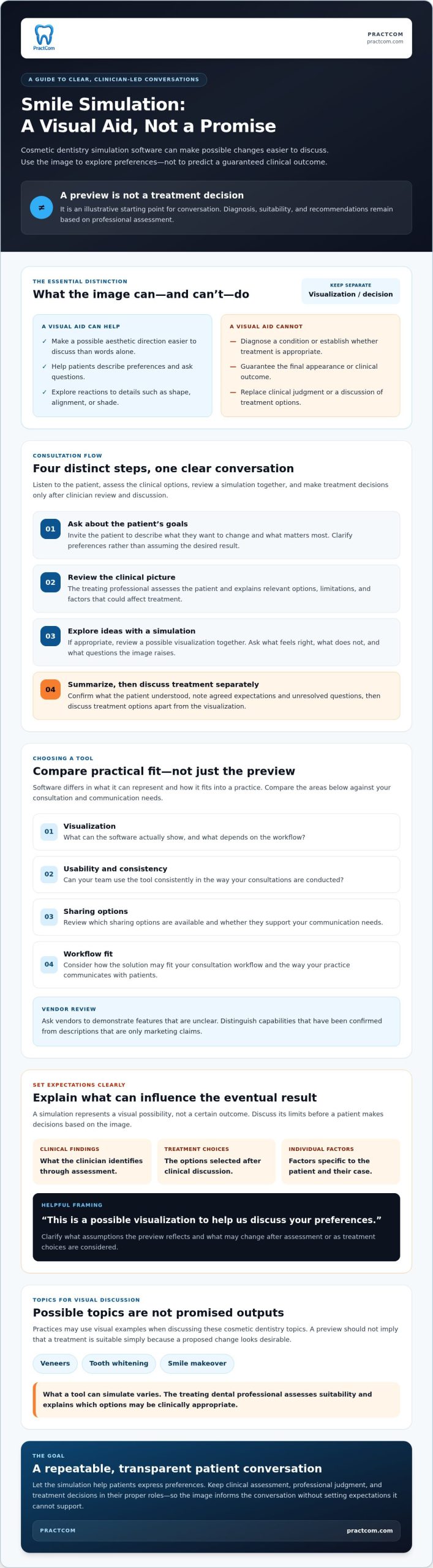
Cosmetic dentistry simulation software creates a visual preview of possible cosmetic changes to support communication between a dental professional and a patient. It can make a proposed aesthetic direction easier to discuss than a verbal description alone. The image is illustrative: it doesn’t diagnose a condition, determine whether treatment is appropriate, or guarantee the final appearance.
That distinction matters. A shared visual reference can help patients explain what they like or ask questions about shape, alignment, or shade. The clinician still assesses oral health, discusses suitable options, and makes recommendations based on the individual case. A compelling preview should guide the conversation, not replace clinical judgment.
What Does a Cosmetic Dentistry Simulation Actually Represent?
A simulation represents a visual possibility, not a certain outcome. It may show an aesthetic direction for discussion, but what can be visualized depends on the software and workflow. Digital dentistry also includes design and manufacturing processes such as CAD/CAM technology, which may be used to create restorations. That context doesn’t mean every simulation is a treatment plan or connects directly to fabrication.
Use the preview to clarify preferences. Ask what looks appealing, what feels too noticeable, and which details need more explanation. The eventual result depends on clinical findings, the treatment selected, and individual factors. Discuss those limits before a patient makes decisions based on an image.
Which Cosmetic Treatments Might Practices Discuss Visually?
Practices may use visual examples to discuss veneers, tooth whitening, or a broader smile makeover. These are topics for conversation, not guaranteed outputs. Software differs in what it can represent, and a tool may not simulate every procedure. A preview also shouldn’t suggest that a treatment is suitable simply because the proposed change looks desirable.
The treating dental professional must assess suitability and explain relevant options. For example, a patient interested in a brighter smile can use a visual reference to describe their preference, then discuss what approach may be clinically appropriate. Keeping those steps separate helps patients distinguish what they hope to see from what treatment may reasonably achieve.
How Does Smile Simulation Fit Into a Dental Consultation?
A useful consultation keeps four elements distinct: the patient’s goals, the clinician’s assessment, the visual aid, and the treatment decision. Listen to the patient, assess the clinical options, review a simulation together, and make treatment decisions only after clinician review and discussion. This sequence gives the patient room to express preferences without letting an image steer the clinical assessment.
A Practical Workflow From Patient Goals to Visual Discussion
- Ask what the patient wants to change. Invite them to describe their concerns in their own words and identify what matters most. Clarify preferences, such as a change in tooth shape or overall smile appearance, instead of assuming the desired result.
- Review the clinical picture. The treating professional evaluates the patient and explains relevant options, limitations, and factors that could affect treatment. A visual preference doesn’t establish clinical suitability.
- Use a simulation to explore ideas. If appropriate, review a possible visualization together. Ask what feels right, what doesn’t, and what questions the image raises. A Dental Advisor overview of cosmetic simulation software offers an example of how such tools may be used in a clinical setting.
- Summarize the discussion. Confirm what the patient understood, note agreed expectations and unresolved questions, then discuss treatment options separately from the visualization.
This structure makes cosmetic dentistry simulation software part of a clinician-led conversation, not a substitute for one. The image can help patients describe preferences that are difficult to express verbally, while the clinician explains what can and can’t be inferred from the preview.
How to Discuss a Preview Without Overpromising
Choose careful language. Say, “This is a possible visualization to help us discuss your preferences,” rather than, “This is your guaranteed result.” Explain what assumptions the preview reflects and what may change after assessment or as treatment choices are considered. If a patient interprets the image as a promise, pause and clarify its limits before moving forward.
Invite specific questions: Which details are illustrative? What needs further clinical review? What alternatives should be discussed? Note any concerns or expectations that remain unresolved, and revisit them before the patient makes a treatment decision. This pause helps prevent a persuasive visual from being mistaken for a clinical commitment.
If you’re considering a visual aid as part of your patient conversations, explore PractCom’s communication tools and assess whether they fit your practice workflow.
How to Compare Cosmetic Dentistry Simulation Software
Feature counts rarely show whether a tool will work well in a real consultation. Compare cosmetic dentistry simulation software by how it supports patient understanding and fits your team’s routine. Then confirm advertised capabilities directly with the vendor. A demonstration of the full workflow can reveal more than a feature list.
Which Features Matter in a Clinical Conversation?
Assess whether patients can understand the visualization and use it to discuss preferences. Ask vendors to demonstrate the process, from creating and reviewing a preview to making revisions and sharing it. Confirm device access, image requirements, team collaboration options, and any workflow or integration details that matter to your practice. Don’t assume a capability is available because marketing language suggests it.
Use the same questions for each option. Consistent comparisons help separate verified functions from claims that still need clarification.
| Comparison area | What to check |
|---|---|
| Visualization | Can patients clearly interpret the preview? Ask what it represents and which changes the tool can show. |
| Usability | Have the team try the steps needed to create, review, and revise a visualization. |
| Consultation flow | Does using the tool fit naturally into your patient discussion, or does it add extra steps? |
| Sharing | Verify how a visualization can be presented or shared, and who can access it. |
| Support | Ask what training and help are available, and how questions are handled. |
Standalone Simulation Tool or Broader Communication Platform?
A specialized tool may suit a practice focused on visual design. A broader patient communication platform may be a better fit if you also want to organize consent, follow-up, and patient education. The right choice depends on where your workflow needs support. A communication platform should not be assumed to replace practice management software.
PractCom includes a smile design tool that shows before-and-after cosmetic changes within a wider patient communication and documentation suite. Assess it against your needs rather than treating it as a standalone simulation tool or a full practice management system. Consider how visual discussions fit into the rest of your patient communication workflow, too.
Evaluate each option in a realistic demonstration. Ask a team member to walk through a typical consultation, then note where the patient can ask questions, where the clinician reviews the image, and which steps need clarification. This practical test helps you weigh visual quality alongside usability and patient understanding.
How to Set Realistic Expectations and Protect the Patient Conversation
A convincing preview can help patients express what they want, but it must never be presented as a guaranteed clinical outcome. Cosmetic dentistry simulation software shows a possible visual direction. It can’t account for every factor that may shape the result, including anatomy, clinical findings, the treatment chosen, and individual patient factors.
Keep the clinician’s assessment at the center of the conversation. Explain what the image represents, allow time for questions, and distinguish aesthetic preferences from clinical recommendations. If the patient’s expectations and the professional assessment don’t align, pause to discuss the difference instead of letting the image imply that a particular result is assured.
What a Simulation Cannot Confirm
A visualization doesn’t independently establish a diagnosis, confirm treatment suitability, or predict an exact result. Software may have product-specific limits, so review its documentation and ask the vendor what the simulation can and can’t represent. Practices should also verify applicable professional guidance and their own policies for consent, privacy, and handling patient information, rather than assume the same requirements apply in every situation.
A Clear Script for Presenting Possible Outcomes
Use plain, conditional language to introduce the image: “This is one possible visualization to help us discuss the aesthetic direction. It isn’t a promise of your final result. What looks right to you, and what feels unclear or different from what you expected?” Then explain any clinical questions that still need review before discussing treatment decisions.
Listen for assumptions the patient may be making. They might interpret a visual change as proof that a specific procedure will work for them, or that every detail can be reproduced. Clarify which parts are illustrative, answer what you can, and note questions that need follow-up. Don’t rush past uncertainty just to keep the consultation moving.
Before proceeding, summarize the patient’s preferences, the clinician’s assessment, and any points still to resolve. Confirm that the patient understands the preview’s limits and has had an opportunity to ask questions. This creates a clearer record of the discussion and keeps the visualization in its proper role: a communication aid, not a clinical commitment.
For practices reviewing ways to support patient communication, explore PractCom’s communication tools.
Choosing a Workflow That Fits Your Practice, Including PractCom
The right choice depends on the communication problem you need to solve. Some practices may want a focused visualization tool; others may want support for several parts of the patient communication process. Use a consistent evaluation before deciding, and check current product details with each provider.
A Short Evaluation Checklist Before You Choose
- Define the need. Identify where conversations get difficult. Are patients struggling to picture proposed changes, or does your team need a more consistent way to explain options?
- Test a realistic workflow. Walk through a typical consultation with your team. Assess how the visual is created and reviewed, whether it fits your routine, and whether patients can understand and discuss it.
- Verify the details. Confirm current features, device and image requirements, data handling, support, and pricing directly with the provider. Ask for clarification when product descriptions leave room for interpretation.
- Look beyond the preview. Decide whether your priority is visualization alone or support for broader communication processes, such as consent, patient follow-up, and education.
Keep the evaluation tied to your actual workflow. A polished visual may attract attention, but it won’t help if the team can’t explain it clearly or fit it into a clinician-led conversation.
Where PractCom’s Smile Design Tool May Fit
PractCom includes a smile design tool that shows before-and-after cosmetic changes. It is one feature in a broader patient communication and documentation suite, not a full Practice Management Software system. A practice considering it should verify the current workflow, supported devices, image handling, and other product details, then assess whether the wider platform matches its needs. Don’t assume it replaces specialized design software or offers simulation capabilities that have not been confirmed.
The wider suite includes a library of over 80 post-treatment instruction templates and digital consent forms, with documents available by email, text, or print in 15 languages. It also includes automated patient follow-ups and referral tracking. These tools address communication and documentation needs beyond a smile visualization. For more context, see the PractCom platform overview. Review the current PractCom free trial details and confirm access terms directly. You can also ask the team about the platform’s frequently asked questions before deciding whether it suits your practice.
A careful fit check keeps the decision practical: choose a tool that supports the conversations your patients need, works for your team, and makes its capabilities and limitations clear.
Make Your Next Patient Conversation Clearer
Cosmetic dentistry simulation software can help patients express their preferences and understand a proposed aesthetic direction. Its value depends on how well it fits your consultation workflow and how clearly your team explains its limits. Keep the visualization separate from clinical assessment, and give patients room to ask questions before discussing treatment decisions.
Compare tools by more than visual quality. Check usability, sharing, support, and whether the solution addresses your practice’s wider patient communication needs. PractCom includes a smile design tool for before-and-after cosmetic visualizations within a broader suite of patient communication and documentation tools. It isn’t full Practice Management Software, so assess whether that combination fits your workflow.
Ready to explore a communication-focused option? Explore PractCom and see whether it fits your patient communication workflow. A thoughtful evaluation can help your team make visual conversations clearer and more consistent, while keeping clinical judgment where it belongs.
Frequently Asked Questions
What is cosmetic dentistry simulation software?
Cosmetic dentistry simulation software helps dental professionals show patients a visual representation of possible cosmetic changes. The preview can help patients express preferences, compare ideas, and ask more informed questions. It does not establish whether a treatment is clinically suitable or guarantee a final result. The treating clinician should explain what the image can and can’t show, assess the patient’s individual circumstances, and keep professional judgment central to any treatment discussion.
How does smile simulation software work in a dental consultation?
Smile simulation software presents a visual concept for discussion alongside clinical findings and possible treatment options. The practice follows the workflow supported by its chosen product, then reviews the image with the patient and invites questions. Steps and required inputs vary by vendor, so confirm the process directly. A simulation is a communication aid, not a substitute for diagnosis, professional judgment, or a clear explanation of uncertainty before treatment decisions.
Can cosmetic dentistry software show exactly what my results will look like?
No. A simulation shouldn’t be treated as an exact promise of future results. It represents a possible aesthetic direction, while the actual outcome can depend on clinical findings, treatment choices, and individual patient factors. Ask your dentist what assumptions the preview reflects and which details may change. The clinician should explain the image’s limitations, answer your questions, and discuss uncertainty before you decide how to proceed.
Is cosmetic dentistry simulation software the same as treatment-planning software?
Not necessarily. Some products focus on visual communication, while others may support broader design or planning workflows. Capabilities and intended uses differ by vendor, and a visual preview alone doesn’t confirm a diagnosis or treatment suitability. Ask providers to demonstrate the specific workflow you need and explain what the software is designed to do. The treating clinician remains responsible for assessing your circumstances and discussing appropriate options.
What should a dental practice look for in smile design software?
Evaluate visual clarity, consultation usability, supported devices and inputs, sharing options, team workflow, and vendor support. Ask how clinicians review or revise a preview and how the tool’s limits can be explained to patients. Compare the answers with your practice’s actual needs rather than choosing by feature count alone. Verify technical details, data handling, privacy information, and current pricing directly with each provider before making a decision.
Can a patient see a cosmetic dentistry simulation before treatment?
Some practices use visualizations to discuss possible aesthetic changes before a patient makes a treatment decision. Whether and how this happens depends on the software and the clinician’s workflow. Ask what the image represents, what assumptions it uses, and what factors could affect the eventual result. A preview should support an informed conversation, not replace clinical assessment, a discussion of treatment options, or the consent process.
Does PractCom offer cosmetic dentistry simulation software?
PractCom includes a smile design tool that shows before-and-after cosmetic changes within its broader dental patient communication and documentation suite. PractCom is not a full Practice Management Software system. Practices considering the tool should confirm its current workflow and capabilities directly, then assess whether it suits their consultation and communication needs. Don’t assume it includes unverified image inputs, integrations, or specialist design functions without checking with the provider.

Article by
Cary Ganz DDS
Dr. Cary H. Ganz is a dentist, prosthodontist, entrepreneur, lecturer, and author with more than 50 years of experience in clinical dentistry and dental technology. Throughout his career, he has combined hands-on patient care with a deep understanding of how technology can improve dental practice operations, communication, documentation, and patient outcomes.
In addition to his clinical background, Dr. Ganz has held significant leadership roles in the dental technology industry, including Past Owner and Vice President of Clinical Affairs at DEXIS Digital Radiography and Past Vice President of Clinical Affairs at Denticon Practice Management Software. His business experience includes product development, clinical strategy, dental software innovation, practice management solutions, and educating dental professionals on the effective use of technology in modern dentistry.
Today, Dr. Ganz continues to focus on creating practical technology solutions for dental practices, including PractCom, a comprehensive dental practice communication platform designed to improve patient communication, documentation, compliance support, referrals, and overall practice efficiency. His work reflects a career-long commitment to helping dentists deliver better care while making their practices more organized, efficient, and protected.
No responses yet