
Successful technology adoption in dental practices starts with the workflow, not the newest tool. Choose technology that addresses a specific administrative bottleneck and fits your team’s routines, then allow time for practice and support. A clear purpose can make the transition more manageable and help reduce repetitive tasks.
It’s understandable to worry that a new system could add work before it saves time. A clear purpose, staff input, and planned training help your team understand what is changing and how the technology fits into daily routines. This article explains how digital tools can reduce manual administration, how to plan for the learning curve, and what to consider when choosing technology for your practice.
Key Takeaways
- Build digital adoption around the workflows your team needs to improve, and give staff a clear role in the transition.
- Centralized digital information can make records easier to find and reduce repetitive data entry.
- Plan for a learning curve with ongoing support, then use staff feedback to spot friction in everyday use.
- Assess fit by considering usability, compatibility, scalability, and how well a tool addresses your practice’s priorities.
The learning curve during digital transitions
Digital dentistry uses digital tools and processes for dental diagnosis and treatment. It can change how dentists capture, review, and share clinical information. For example, an imaging workflow may move a scan from capture to clinical review. That shift changes staff handoffs, not just the equipment at the chair. Technology adoption in dental practices can feel difficult initially because teams must learn both the tool and its workflow. Mapping each new task to an existing clinical step makes the transition easier to understand.
Digital imaging can support evaluation of dental caries, oral pathology, and presurgical or preorthodontic treatment needs. Digital X-rays, cone-beam CT, and intraoral scanners add distinct imaging methods to clinical work. Each requires staff to understand how images are captured, accessed, and used during care. Intraoral scanning can serve as a starting point for digitizing workflows. From there, a practice may consider connected solutions such as 3D printing. The key is to introduce a technology in relation to a clear clinical use, rather than treating it as a standalone device.
Connectivity also shapes the learning curve. Digital platforms can let staff access a completed intraoral scan from different devices within the clinic. Digital workflows can support access to files across multiple devices, helping teams retrieve information during handoffs. A practical transition step is to trace one scan through its workflow: capture, access, review, and use. This reveals where staff need instruction and where information could otherwise become difficult to locate. It also clarifies which team members need access at each stage.
Image exchange requires attention to standards as well as usability. DICOM is the standard for exchanging and using digital images in dentistry. Teams should understand how their imaging workflow handles DICOM files and where those files can be accessed. Artificial intelligence is an emerging area for guided dental diagnostics, so practices can assess tools against clinical needs. A designated technology champion can help colleagues with everyday questions. Practice leaders can support the transition by allocating time and resources, while technology providers can help address implementation and usability challenges.
Reducing manual data entry and administrative work
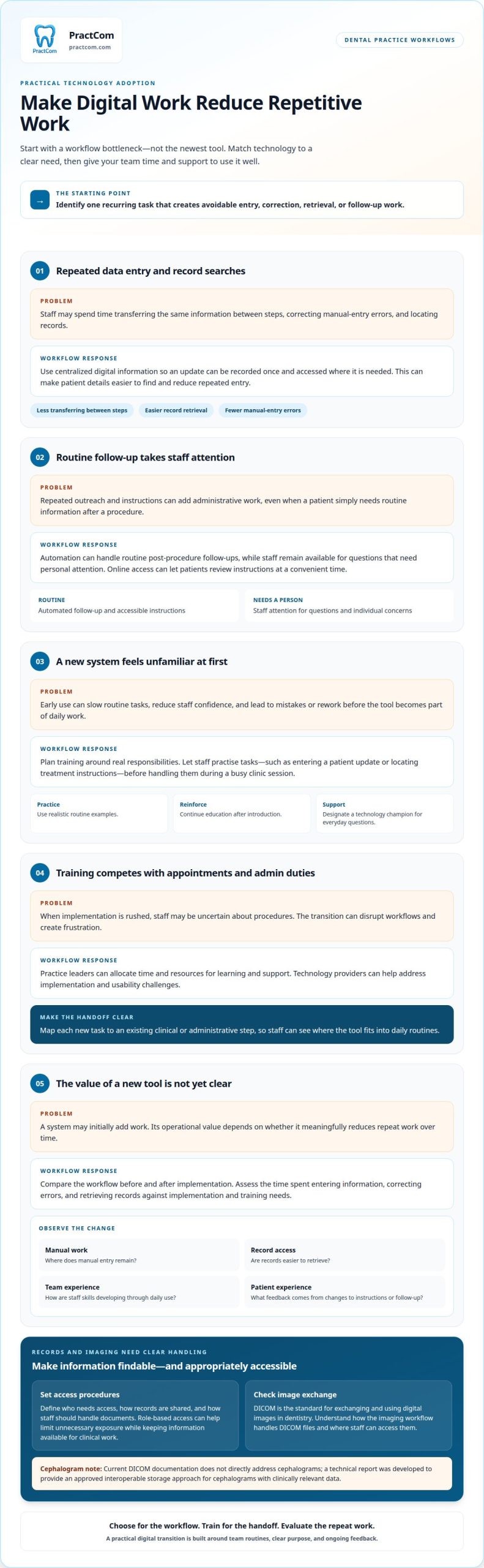
A system’s return on investment depends on whether it meaningfully reduces repeat work. Assess how much staff time goes to entering information, correcting errors, and retrieving records, then compare those demands with implementation and training needs. The strongest operational value comes when a tool supports recurring procedures and gives staff more time for patient-facing responsibilities.
Centralized digital information can make patient details easier to find and reduce repeated entry across administrative tasks. When a team records an update once and can access it where needed, staff spend less time transferring the same information between steps. Well-implemented digital systems can also reduce errors linked to manual entry. That matters for appointment coordination, patient communications, and organized documentation.
Automation can support routine tasks such as sending post-procedure follow-ups. A digital process can reduce repetitive outreach while leaving staff time for questions that need personal attention. That balance can support patient comfort and satisfaction without treating every interaction identically. Online access can also help patients review instructions at a convenient time. The practical test is whether the workflow removes avoidable steps without making the patient experience harder.
Information management also includes imaging data. A technical report was developed to give imaging equipment vendors an approved way to store cephalograms with clinically relevant data in an interoperable format. Since current DICOM documentation does not directly address cephalograms, practices should understand how their imaging systems handle these files. For data security, define who needs access, how records are shared, and how staff should handle documents. Clear procedures and role-based access can help limit unnecessary exposure while keeping information available for clinical work.
To evaluate results, compare the workflow before and after implementation. Track where manual entry remains, whether records are easier to retrieve, and how staff skills develop through daily use. Include patient feedback when a change affects instructions or follow-up. If communication and document handling create recurring administrative pressure, consider a digital workflow starting point that addresses those tasks.
Training, learning curves, and time constraints
New systems take time to learn, and teams may worry that early use will add work. Risks include disrupted workflows, entry mistakes, low staff confidence, and tools that don’t fit existing procedures.
Training and Learning Curves
A learning curve is the time and practice staff need to use new technology reliably. It matters because an unfamiliar tool can slow routine tasks before it becomes part of daily work. Plan education around specific responsibilities, such as entering a patient update or locating treatment instructions. A technology champion can demonstrate each task, answer questions, and help colleagues build practical skills.
Use realistic examples in training. Staff can practise a routine task in the new system before handling it during a busy clinic session. Reinforce the process through ongoing education rather than relying on a single introduction. This helps employees learn the correct steps and know when to ask for support if a screen or process differs from expectations.
Time Constraints and Adoption Risks
Training and implementation can compete with appointments and administrative duties. When time is limited, rushed adoption can leave staff uncertain about procedures, leading to rework and frustration. Practices may hesitate if they can’t tell whether a system will save time or initially create extra work. Leaders can reduce this uncertainty by allocating time for practice and support.
Technology adoption also carries practical risks beyond the learning curve. A tool may interrupt a handoff if staff don’t know where to find the next task, or fail to improve care if its workflow doesn’t match clinical routines. Test the process with a familiar example, such as sending post-treatment guidance after a procedure, and identify who owns each step. Gather staff feedback about confusing screens and repeated actions, then adjust training or the workflow.
Patient-facing changes need the same care. If digital instructions replace a printed explanation, staff should know how to guide patients through the process and answer questions. Clear communication can ease unfamiliarity and help patients understand what to expect after treatment. Review the process from both the patient’s and staff’s perspective before expanding it across the practice.
Choosing technology that fits a dental practice
The best fit solves a defined workflow problem without forcing disruptive changes. Compare tools based on clinical need, compatibility, ease of use, and outcomes.
Matching Technology to Practice Needs
Matching technology means choosing a tool around your practice’s needs and workflows. A good fit can streamline tasks, while a poor fit can add friction.
Start with one recurring problem, such as delays in sharing information or difficulty tracking follow-ups. Involve dentists, hygienists, and support staff to identify requirements for each role. Then evaluate usability, compatibility with current systems, scalability, and long-term value. A demonstration or trial can show whether the tool supports real procedures. A small pilot in one area can reveal workflow gaps before wider implementation. Define the outcomes you want to assess, such as easier access to information or fewer manual steps.
Adoption Across Practice Types
Adoption depends on staffing, workflows, resources, and connectivity, not just practice size or location. The same tool can require different implementation plans in different practices.
In 2012, U.S. EMR adoption rates were 56% in rural areas and 49% in urban areas. Those figures describe EMR adoption by area, not every dental technology or practice size. A smaller practice may need to prioritize ease of use and clear task ownership. A larger team may need to focus on consistent workflows across departments. Rural practices may weigh connectivity and access to support as part of fit. In each setting, staff input and a focused pilot can help reveal practical needs.
Setup and Ongoing Technology Costs
Technology costs include setup and ongoing expenses, which depend on the tool and the practice’s requirements. A purchase price alone won’t show the full resources needed.
Consider implementation, integration with existing systems, staff training, maintenance, and ongoing support. Compare those requirements with the workflow problem and the outcomes you expect. A pilot can expose setup needs before a practice expands use. Review productivity, efficiency, patient satisfaction, and return on investment regularly after implementation. Explore a tailored starting point for evaluating tools that fit your practice.
PractCom: Practice Performance Dashboard
PractCom offers a Practice Performance Dashboard and an all-in-one patient communication platform for dental practices. If your priority is reducing administrative friction, these tools offer a focused way to support practice performance and patient communications.
The platform includes a Post-Treatment Instruction Library and Digital Informed Consent Forms. These tools support routine communication and documentation, helping your team organize patient-facing information without replacing a full practice management system. The dashboard adds a performance-focused component for practices seeking a clearer view of operations.
Consider PractCom when you want to improve patient communication and related administrative workflows. Contact PractCom to discuss how the platform can support your practice.
Make your next digital step count
Technology adoption in dental practices works best as an ongoing operational choice, not a race to replace every manual task. Choose one workflow to improve, define what a better process should look like, and use staff experience to guide the next decision. This keeps the focus on changes that serve your team and patients rather than adding tools without a clear purpose.
PractCom’s Post-Treatment Instruction Library, Digital Informed Consent Forms, and Referral Management System address distinct communication and coordination needs. They can support improvements in sharing treatment guidance, managing consent documents, or organizing referrals. A focused conversation can help connect your needs with a practical next step for the practice.
Talk with PractCom about your practice and the workflows you’re looking to improve. Thoughtful, well-supported changes can help your team move forward with greater clarity.
Frequently Asked Questions
What technologies are dental practices adopting in 2026?
Dental practices are adopting tools for imaging, treatment planning, fabrication, and patient administration. Examples include digital X-rays, cone-beam CT, intraoral scanners, CAD/CAM, 3D printing, and virtual planning. Some practices also use online scheduling and digital communication platforms. The right mix depends on the clinical services offered and the administrative workflow the practice wants to improve, rather than on adopting every available tool.
How are AI tools used in dental practices, and what are their benefits and limitations?
AI tools are emerging for guided dental diagnostics, including support for reviewing digital images. Their value depends on how well they fit the clinical task and existing workflow. Treat AI output as support for professional review, not a substitute for clinical judgment. Practices should consider usability, staff training, and how they will assess a tool’s effects.
How can a dental practice assess and choose technology vendors?
Assess a vendor by testing whether its technology addresses a defined clinical or administrative need. Use a demonstration or trial to examine a realistic task, such as moving an image between team members or preparing patient communication. Consider ease of use, compatibility with current systems, scalability, implementation support, and long-term value. A focused evaluation helps distinguish useful capabilities from features that won’t improve the practice’s workflow.
What steps are involved in implementing new technology and training dental staff?
Begin by assigning an implementation lead and documenting the workflow the technology will change. Set up a limited pilot, identify staff roles, and prepare examples that reflect routine practice tasks. Train team members for their specific responsibilities, then provide ongoing education as questions arise. Before expanding use, review staff feedback, unresolved workflow issues, and whether the tool is being used consistently. This makes rollout a managed process rather than a one-time software change.
What HIPAA, cybersecurity, and patient privacy rules apply to dental technology?
Dental practices handling patient-related data must ensure that data entry complies with applicable privacy laws, including HIPAA. For cybersecurity and privacy, map where patient information is stored or shared, limit access to staff who need it, and keep account credentials confidential. Establish clear procedures for handling records and training employees. Review how a technology fits those practices before implementation, so convenience doesn’t come at the expense of careful information handling.

Article by
Cary Ganz DDS
Dr. Cary H. Ganz is a dentist, prosthodontist, entrepreneur, lecturer, and author with more than 50 years of experience in clinical dentistry and dental technology. Throughout his career, he has combined hands-on patient care with a deep understanding of how technology can improve dental practice operations, communication, documentation, and patient outcomes.
In addition to his clinical background, Dr. Ganz has held significant leadership roles in the dental technology industry, including Past Owner and Vice President of Clinical Affairs at DEXIS Digital Radiography and Past Vice President of Clinical Affairs at Denticon Practice Management Software. His business experience includes product development, clinical strategy, dental software innovation, practice management solutions, and educating dental professionals on the effective use of technology in modern dentistry.
Today, Dr. Ganz continues to focus on creating practical technology solutions for dental practices, including PractCom, a comprehensive dental practice communication platform designed to improve patient communication, documentation, compliance support, referrals, and overall practice efficiency. His work reflects a career-long commitment to helping dentists deliver better care while making their practices more organized, efficient, and protected.
No responses yet