
What if the next patient text took seconds to adapt instead of minutes to write from scratch? The right text message templates for dental patients can save staff time, but each message still needs to feel personal, make the next step clear, and fit the reason for reaching out.
Reusable wording is especially helpful for reminders, confirmations, and routine follow-ups. The key is to avoid sending a template unchanged when it needs patient-specific details, or using a short administrative text to deliver clinical guidance. Start by identifying the message’s purpose, add the relevant details, and state what the patient should do next.
This guide provides 12 ready-to-adapt examples, a practical editing checklist, and ways to choose between a text and a more detailed communication format. It also explains how to create a repeatable process for sending and recording communications. With customizable templates and tracked delivery logs, PractCom helps dental teams organize patient communication and documentation.
Key Takeaways
- Choose a text based on its purpose, and treat each template as a starting point for patient-specific judgment.
- Use a repeatable review sequence: personalize the message, state the next action, and check it before sending.
- Adapt text message templates for dental patients to common situations, from appointment reminders to follow-ups.
- Keep routine administrative texts distinct from longer clinical instructions so patients receive the right information in the right format.
- PractCom includes 80+ post-treatment instruction templates for common and complex procedures, supporting more consistent patient communication.
Why text message templates for dental patients need a clear purpose
A busy front desk may send the same appointment reminder several times before lunch, while every patient still needs timely, understandable information. Well-designed text message templates for dental patients reduce repetitive writing, but they work best as a starting point, not a substitute for patient-specific judgment.
Before choosing a template, decide what the message needs to do: inform the patient, confirm a detail, request a response, or direct the next step. Keeping to one purpose makes it easier to write a concise text and reduces the risk of turning an administrative message into a clinical conversation. Digital communication is one part of the wider use of technology in dental care, including teledentistry and patient communication.
Which dental patient moments benefit from a text template?
Templates are useful for administrative messages your team sends regularly. Keep the core wording consistent, then personalize details such as the patient’s name, appointment time, and requested response.
- Appointment confirmations: Share the date and time, then ask the patient to confirm.
- Reminders: Restate the appointment details and provide a clear way to ask a question or request a change.
- Rescheduling: Explain that a new time is needed and tell the patient how to get in touch.
- Follow-up requests: Ask the patient to reply or call if the team needs a response after a visit.
- Administrative aftercare follow-up: Ask whether the patient received their instructions or would like the practice to contact them. Keep the text administrative rather than adding procedure-specific advice.
Routine outreach is different from urgent or complex clinical communication. Don’t use a standard template to interpret symptoms, explain treatment decisions, or replace a clinician’s guidance. If a patient raises a clinical concern, direct the conversation to the appropriate member of the care team instead of trying to resolve it with a generic text.
What makes a patient text feel clear rather than automated?
Personalization doesn’t require a long message. Use the patient’s preferred name, identify the practice, and focus on one main point. Then state the requested action plainly, such as confirming an appointment or calling the office to discuss a change. The patient shouldn’t have to guess who sent the text or what to do next.
For example: “Hi [Name], this is [Practice]. Your appointment is [Date] at [Time]. Please reply to confirm or call us at [Phone] if you need to reschedule.” This message gives the patient useful context and a clear response path.
Keep the voice warm and professional. Avoid slang, pressure, and unnecessary clinical detail. A template should make a routine exchange easier while leaving room to adjust the wording when a patient’s needs or circumstances call for a more personal response.
How to adapt a dental patient text message template
A reusable message saves time only when its details are right for the person receiving it. Start with the communication goal, tailor the wording, and verify the details before sending. A quick review can catch an outdated appointment time, an unfilled placeholder, or an unclear request.
A useful template is purpose-specific wording that tells the patient exactly what action to take next. Keep placeholders in square brackets so staff can spot what needs replacing: [Name], [Date], [Time], [Practice], [Phone], and [Approved Link]. Use the same format across your message library. Consistent placeholders make edits easier to scan and missed fields easier to catch.
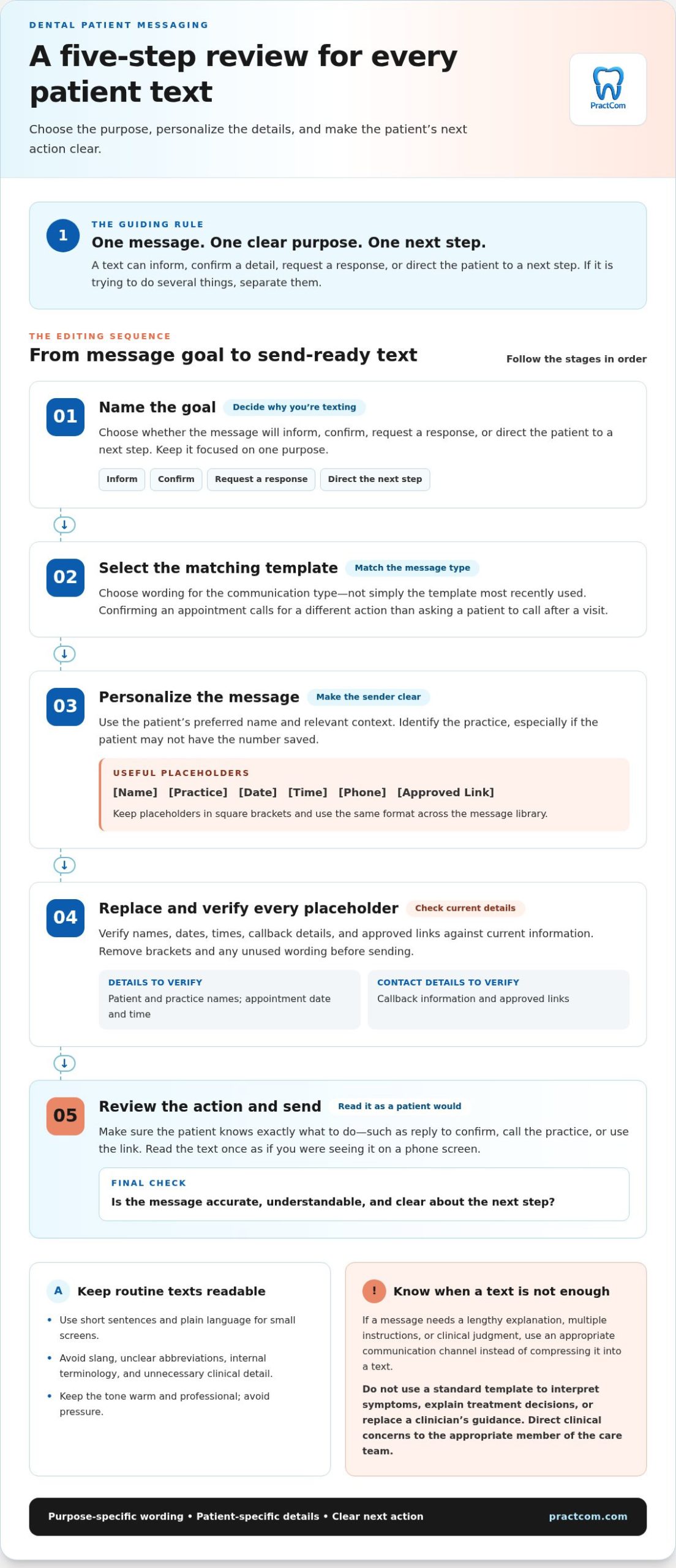
A five-step checklist for editing a dental text
Follow these steps in order, from deciding whether the message is appropriate to checking that it is complete. This helps ensure a polished-sounding text is also accurate and useful.
- Name the goal. Decide whether the text will inform, confirm, request a response, or direct the patient to a next step. If it’s trying to do several things, separate them.
- Select the matching template. Choose wording for the communication type, not simply the one most recently used. A request to confirm an appointment needs a different action from a follow-up asking the patient to call.
- Personalize it. Add the patient’s preferred name and relevant context. Keep [Practice] in the message so the sender is clear, especially if the patient may not have the number saved.
- Replace and verify every placeholder. Check names, dates, times, callback details, and approved links against current information. Remove brackets and any unused wording before sending.
- Review the action and send. Make sure the patient knows what to do, such as reply to confirm, call the practice, or use the link. Read the text once as if you were seeing it on a phone screen.
Keep texts personal, readable, and privacy-conscious
Short sentences and plain language are easier to read on a small screen. Avoid abbreviations that could be misunderstood, internal terminology, and details that don’t help the patient complete the requested action. If a message needs a lengthy explanation, multiple instructions, or clinical judgment, use an appropriate communication channel rather than compressing it into a text.
For example, a concise request might read: “Hi [Name], this is [Practice]. Please call us at [Phone] about your recent visit.” It identifies the sender and gives one next step without adding unnecessary clinical details. Tailor the wording to the patient’s situation, and include only information needed for the message’s purpose.
Before sending or recording patient information, ensure patient-related data entry complies with applicable privacy laws, including HIPAA. A review checklist can support consistent habits, but it doesn’t replace your practice’s privacy procedures or professional judgment.
Practices can use the same editing sequence to standardize reusable patient messages and documents. PractCom’s communication tools help organize that workflow. Explore PractCom’s communication tools.
Which dental text message template fits each patient situation?
The right template depends on what the patient needs to know and do. A short text can prompt a response or point to information, but it shouldn’t replace detailed, clinician-approved instructions. Consider both the situation and the amount of information involved when choosing the message and its format.
Scenario: Appointment reminder or confirmation
Message goal: Share essential appointment details or request confirmation.
Text suitability: Good fit for brief administrative information.
Recommended next step: Ask the patient to confirm or contact the practice to make a change.
Scenario: Rescheduling
Message goal: Let the patient know a new appointment time is needed.
Text suitability: Useful for a simple scheduling prompt.
Recommended next step: Give a callback number or an approved scheduling link.
Scenario: Routine follow-up request
Message goal: Invite a reply or prompt the patient to contact the team.
Text suitability: Appropriate when the request is simple and administrative.
Recommended next step: State whether the patient should reply or call.
Scenario: Procedure-specific aftercare
Message goal: Deliver detailed instructions for the patient’s care.
Text suitability: Don’t compress the full instructions into a routine text.
Recommended next step: Direct the patient to clinician-approved instructions in a suitable format.
Scenario: Complex clinical concern
Message goal: Connect the patient with appropriate clinical communication.
Text suitability: A generic template isn’t a substitute for a clinical conversation.
Recommended next step: Direct the patient to the practice’s appropriate contact channel.
When is a short text enough, and when is more detail needed?
Use a text for a brief reminder, confirmation, scheduling action, or simple follow-up prompt. Its job is often to prompt action, not to carry every detail. If the patient needs procedure-specific guidance, send detailed instructions approved by the treating clinician rather than reducing them to a few lines. A text can point the patient to automated dental post-op instructions or another approved resource, while the instructions themselves remain clear and complete.
PractCom documents can be delivered by email, text, or print. This gives the practice options for sharing fuller information without crowding the prompt with more detail than a patient can easily read on a phone screen.
Text, email, or print: how should practices choose?
Match the format to the message’s length, purpose, and the patient’s preference. A brief text can direct the patient to confirm, call, or open an approved link. Longer material may be easier to review as an email or printed document. Choose the format to support understanding, not just convenience.
For post-treatment communication, separate the short delivery prompt from the clinical document. Tell the patient what was sent and where to find it instead of rewriting the instructions in the text. To compare how communication tools support different workflows, see PractCom’s communication platform comparison. This decision framework helps teams use text message templates for dental patients for the right purpose and keep detailed patient information in a format suited to it.
12 Text message templates for dental patients to adapt
Use these examples as starting points for routine communication. Replace every bracketed placeholder with accurate details, remove unused fields, and make sure each text has one clear purpose and patient action. Keep clinical instructions in clinician-approved materials rather than adding them to a brief administrative message.
Appointment and scheduling text message examples
- Appointment confirmation: “Hi [Name], this is [Practice]. Your appointment is [Date] at [Time]. Please reply to confirm.”
- Upcoming appointment reminder: “Hi [Name], a reminder from [Practice]: your appointment is [Date] at [Time]. Reply if you need to make a change.”
- Request to reschedule: “Hi [Name], this is [Practice]. We need to reschedule your appointment on [Date]. Please call us at [Phone] to arrange a new time.”
- Missed appointment follow-up: “Hi [Name], we missed you at your appointment with [Practice] today. Please call [Phone] to discuss rescheduling.”
- Cancellation update: “Hi [Name], your appointment with [Practice] on [Date] has been canceled. Please call [Phone] if you’d like to arrange another time.”
- Open appointment slot: “Hi [Name], [Practice] has an appointment available on [Date] at [Time]. Reply [Reply Word] if you’d like us to follow up about this opening.”
Follow-up, aftercare, and patient relationship examples
- Post-visit check-in: “Hi [Name], this is [Practice] checking in after your visit. Please call us at [Phone] if you have questions for the care team.”
- Aftercare instructions: “Hi [Name], your approved instructions from [Practice] are available here: [Approved Link]. Please contact us at [Phone] if you need help accessing them.”
- Recall prompt: “Hi [Name], it may be time to plan your next visit with [Practice]. Please call [Phone] or use [Approved Link] to arrange an appointment.”
- Feedback request: “Hi [Name], thank you for visiting [Practice]. Would you share feedback here? [Approved Link]”
- Patient document prompt: “Hi [Name], [Practice] has a document for you to review: [Approved Link]. Please contact us at [Phone] if you have trouble opening it.”
- Response follow-up: “Hi [Name], [Practice] is following up on our recent message. Please reply [Reply Word] or call [Phone] so we can help with the next step.”
Before sending, confirm that the patient, date, time, practice name, phone number, and link are correct. The first example also works as a self-contained reminder: it gives the appointment date, time, practice identity, and a direct confirmation request. Tailor each message to the patient and situation, then remove unused placeholders so none are accidentally sent as written.
For a more consistent process around patient messages and documents, explore a patient communication workflow.
How PractCom supports consistent dental patient messaging
Templates help staff communicate consistently, but a repeatable workflow also needs a way to prepare, deliver, and track patient documents. PractCom Communications combines post-treatment instructions, informed consents, referral management, and a patient portal in one communication platform. Customizable templates and practice branding help teams create consistent materials while tailoring messages to each patient.
PractCom includes 80+ post-treatment instruction templates covering common and complex procedures, along with 80+ informed consent templates for documentation and 60+ management and medication forms, including Med Cards, Problems & Emergencies Sheets, and Compliance & Refusal Forms. Teams can use these materials as a starting point and tailor communication to the patient. Patient-related data entry must comply with applicable privacy laws, including HIPAA.
How PractCom connects instructions, delivery, and records
Dental Aftercare Notes is a cloud-based platform for post-treatment instructions. Practitioners have full control of every form: edit, download, print, or email it. Instructions can also be sent by text, and print-ready handouts support patients who prefer paper. Documents are translated into 15 languages, and templates can be customized with practice branding, language choices, and saved favorites.
Tracked delivery logs show what was sent, how it was sent, and when. Staff can use these records as a reference when following up or reviewing a communication. Delivery records can also be exported as CSV for any date range. The Patient Portal gives patients access to their documents 24/7/365. Scheduled maintenance or outages may occur, so availability should not be treated as uninterrupted.
For example, a team can send a concise text directing a patient to approved instructions, deliver the full document in the selected format, then use the delivery record to see what was sent and when. This complements text message templates for dental patients by giving routine prompts and detailed patient documents distinct roles in the communication workflow.
A practical next step for evaluating the workflow
Consider how your team currently creates instructions, sends documents, and records follow-up. PractCom supports patient communication and documentation, but it is not full Practice Management Software. Compare its tools with your current process to see how they could fit into your workflow.
Build a clearer process for reusable messages and patient documents with Start the 15-day free trial – no credit card needed.
Make your next patient message easier to manage
Choose one recurring communication and make the process clear from start to finish. Decide who prepares the message, who checks its details, and how the team will respond if the patient asks a question or needs a different next step. A shared process gives staff a reliable reference point without making every interaction feel identical.
Then review the workflow as a team. Look for delays, unclear handoffs, and wording that needs adjustment for your practice. Small, considered improvements can make patient communication more organized while preserving the human judgment behind each exchange.
When your team is ready to organize dental patient communication and documentation in one platform, start the 15-day free trial – no credit card needed.
With a clear process in place, your team can communicate with greater confidence, one patient interaction at a time.
Frequently Asked Questions
Can dental practices text patients about appointments?
Yes, dental practices can use texts for brief appointment administration, including reminders, confirmations, and rescheduling requests. Identify the practice and the reason for the message, then give the patient a clear way to respond, such as replying to confirm or calling the office. Follow applicable privacy requirements and the patient’s communication preferences. Keep routine appointment texts focused on scheduling, not unnecessary clinical details.
How long should a dental patient text message be?
Keep a dental text only as long as needed to communicate its purpose and action. An appointment update may need the practice name, date, time, and a request to reply or call. If you find yourself adding several explanations, move the fuller information to a suitable document or conversation. Preview the message on a phone screen to catch awkward line breaks or wording that’s hard to scan.
Should dental offices use abbreviations or emojis in patient texts?
Plain language is usually the clearest choice for patient texts. Avoid shorthand that could be interpreted in more than one way, particularly for appointment details or instructions about what to do next. Emojis aren’t necessary. If your practice uses them, consider whether they suit the subject and professional tone. A quick review by a colleague can catch wording that seems obvious to staff but may confuse a patient.
What should a dental team do when a patient replies to a text?
Read the reply, identify what the patient needs, and route it to the responsible team member. A simple confirmation can be recorded according to your usual process, while a question about care may need a clinician or another appropriate contact channel. Decide who monitors incoming replies and how relevant communication is documented. Don’t assume a message is routine just because it came in response to an appointment text.
Can a dental practice use the same text template for multiple patients?
Yes, a reusable template can support consistency, but staff should check every outgoing message individually. Confirm the intended recipient and review names, appointment details, and any included link before sending. A useful safeguard is to compare the final text with the patient’s current record rather than relying on a previous message. Never include another patient’s information or assume recipients share the same preferences or circumstances.
Should a dental text include an opt-out option?
Dental practices should have a clear process for recording and honoring patient communication preferences, including requests to stop receiving texts. The appropriate wording may depend on the message and applicable communications requirements, so don’t assume one opt-out line covers every use. Assign responsibility for updating preferences and make sure staff know how to handle a patient’s request. Review the process before using a template across different kinds of outreach.
Is it appropriate to text detailed post-treatment instructions?
A text can direct a patient to post-treatment instructions, but it shouldn’t replace detailed guidance approved by the treating clinician. For example, send a brief note identifying where the patient can access the instructions, then use the appropriate document or communication channel for the full content. This keeps the prompt easy to act on while preserving the context and detail needed for procedure-specific information.

Article by
Cary Ganz DDS
Dr. Cary H. Ganz is a dentist, prosthodontist, entrepreneur, lecturer, and author with more than 50 years of experience in clinical dentistry and dental technology. Throughout his career, he has combined hands-on patient care with a deep understanding of how technology can improve dental practice operations, communication, documentation, and patient outcomes.
In addition to his clinical background, Dr. Ganz has held significant leadership roles in the dental technology industry, including Past Owner and Vice President of Clinical Affairs at DEXIS Digital Radiography and Past Vice President of Clinical Affairs at Denticon Practice Management Software. His business experience includes product development, clinical strategy, dental software innovation, practice management solutions, and educating dental professionals on the effective use of technology in modern dentistry.
Today, Dr. Ganz continues to focus on creating practical technology solutions for dental practices, including PractCom, a comprehensive dental practice communication platform designed to improve patient communication, documentation, compliance support, referrals, and overall practice efficiency. His work reflects a career-long commitment to helping dentists deliver better care while making their practices more organized, efficient, and protected.
No responses yet