
A digital smile preview can make a treatment plan easier to picture, but it can’t predict the final result. Patients may struggle to imagine cosmetic changes from a verbal explanation, especially when clinical terms dominate the conversation. Digital smile design for patient consultation gives the team and patient a visual starting point to discuss possible changes.
The goal isn’t to sell a particular outcome. It’s to help patients understand a proposed direction, share what matters to them, and make informed decisions with clinical guidance. A preview supports that conversation, but it remains a simulation, not a promise.
This guide covers how to introduce a digital smile design, invite patient feedback, and explain where the preview may differ from what treatment can achieve. It also shows how to keep clinical judgment central and use a visual aid such as PractCom’s smile design tool, which shows before-and-after cosmetic changes, as part of a broader patient communication workflow.
Key Takeaways
- Use digital smile design for patient consultation to make possible cosmetic changes easier to discuss and invite patients to share their preferences.
- Follow a clear sequence: understand the patient’s goals, assess clinical suitability, review the preview, and agree on next steps.
- Set realistic expectations by explaining what a visualization can show and what only clinical assessment can determine.
- Assign team responsibilities and document the discussion consistently to support a clear, patient-centered workflow.
- Connect the visual discussion with ongoing patient communication. PractCom’s smile design tool shows before-and-after cosmetic changes.
What Digital Smile Design Adds to a Patient Consultation
A patient may understand that a proposed change could affect tooth shape, shade, or alignment without being able to picture it. Digital smile design gives the conversation a visual reference, helping the dental team explain a possible cosmetic direction and helping the patient respond to something more concrete than clinical terms alone.
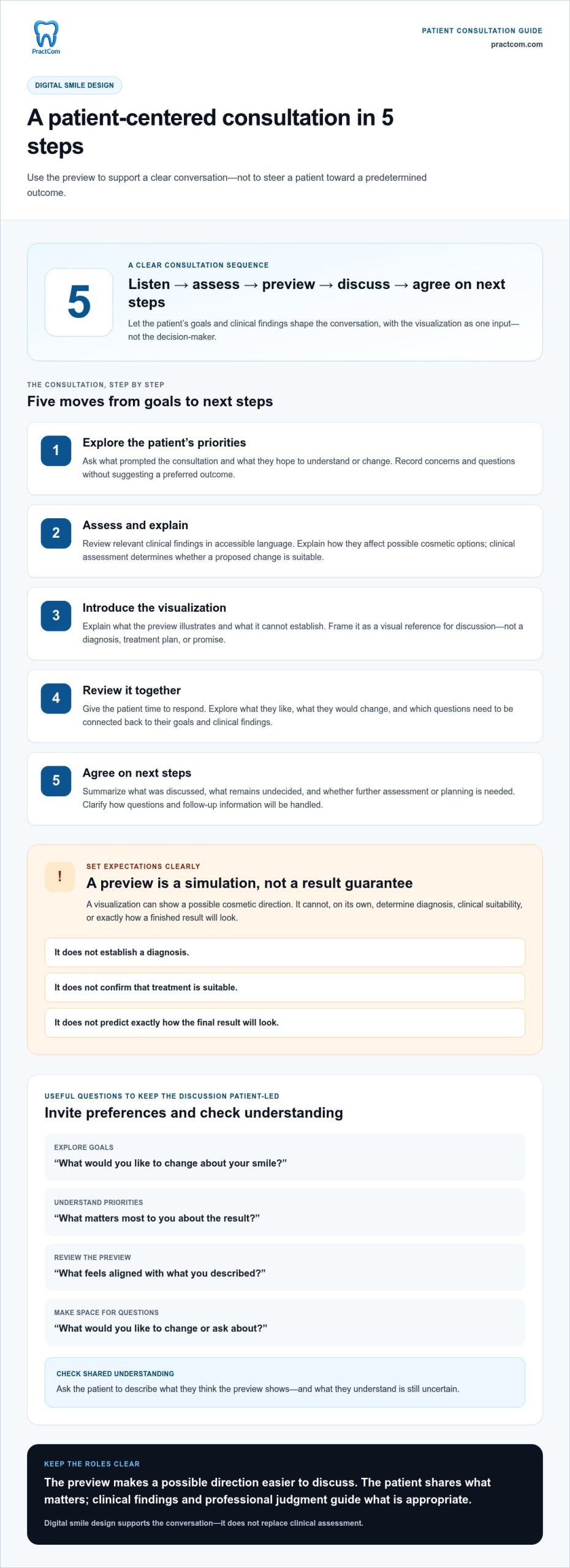
Digital smile design is a visual planning aid for discussing possible cosmetic changes. Its preview illustrates an idea, not a guaranteed clinical result. It can support shared understanding, but it doesn’t establish a diagnosis, confirm that treatment is suitable, or predict exactly how a finished result will look.
What patients can learn from a digital smile preview
A visual reference can help patients identify what they like, what they would change, and what they want to understand better. For example, a patient might compare a proposed tooth shape with their current smile, then ask how that visual change relates to the clinician’s recommendation. This gives the team a concrete way to explore preferences without presenting the preview as a promise.
Introduce it in plain language: “This image shows one possible direction. Your examination helps us determine what’s appropriate, and the final result may look different.” Invite questions about the proposed appearance, then connect the answers to clinical findings and realistic options. The preview is an input to discussion, not a diagnosis or treatment plan.
Where digital smile design fits in cosmetic planning
Use visualization as one step in a connected process: listen to the patient’s goals, assess oral health and clinical suitability, use an image to illustrate a possible direction, discuss preferences and limitations, then develop a treatment plan based on the assessment. The patient’s priorities belong in the conversation, but they don’t replace professional judgment.
Possible cosmetic considerations include tooth shade, shape, or alignment. These aren’t changes every patient needs, and an image alone can’t determine whether an approach is suitable. Keep the discussion anchored in both the patient’s goals and the clinician’s findings, so aesthetic preferences and oral health are considered together.
Digital tools also sit within a broader shift in dentistry. Digital dentistry encompasses technologies such as intraoral scanners and computer-aided design and manufacturing. These tools can support digital workflows, but the role of an image in consultation remains straightforward: make a possible direction easier to discuss, not make the clinical decision. That’s the practical value of digital smile design for patient consultation.
How to Use Digital Smile Design During a Patient Consultation
A useful consultation gives the patient room to explain their goals before the team presents a visual direction. Keep the sequence consistent, while letting those goals and the clinical findings shape the discussion. The visualization should help everyone consider options, not steer the patient toward a predetermined choice.
In brief: listen, assess, preview, discuss, and agree on next steps.
Start with goals, questions, and clinical assessment
Begin with open-ended prompts such as, “What would you like to change about your smile?” and “What matters most to you about the result?” Record the patient’s concerns and questions. Then explain relevant examination findings in accessible language. This establishes what’s clinically appropriate before introducing a proposed design.
- Explore the patient’s priorities. Ask what prompted the consultation and what they hope to understand or change. Avoid suggesting a preferred outcome in the question.
- Assess and explain. Review relevant clinical findings and clarify how they affect possible cosmetic options. The patient’s preference matters, while clinical assessment determines whether a proposed change is suitable.
- Introduce the visualization. Explain what the preview illustrates and what it can’t establish. Make clear that it’s a visual reference, not a diagnosis, treatment plan, or promise of the final result.
- Review it together. Ask, “What feels aligned with what you described?” and “What would you like to change or ask about?” Give the patient time to respond rather than treating agreement as the expected answer.
- Set out next steps. Summarize what you discussed, what remains undecided, and whether further assessment or planning is needed. Confirm how questions and follow-up information will be handled.
Review the visualization together and agree on next steps
Keep the discussion specific. If a patient likes one feature but questions another, acknowledge both and relate the conversation to their goals and clinical findings. Explain which elements are illustrative and which questions require additional planning. To check understanding, ask the patient to describe what they think the preview shows and what they understand is still uncertain.
Before the visit ends, recap the patient’s priorities, the points discussed, and any decisions or open questions. This gives the team a consistent record and the patient a clear reference for what comes next. A structured approach to digital smile design for patient consultation keeps the image useful without letting it replace clinical judgment.
For teams looking to include visual discussions in a broader patient communication workflow, explore PractCom’s patient communication tools.
Does a Digital Smile Preview Guarantee the Final Result?
No. A digital smile preview is an illustration for discussion, not a guarantee of the final result. It can help a patient and clinician consider a possible cosmetic direction, but it can’t establish whether treatment is suitable or show exactly how the outcome will look. Clear expectations help patients use the image to ask questions without mistaking it for a promise.
The eventual result depends on clinical findings, the patient’s individual anatomy, and treatment choices made after assessment. Material behavior and changes during treatment can also affect how the result compares with a preview. The clinician should explain which factors matter in the specific case rather than presenting a general image as a precise prediction.
What can change between a preview and treatment
A proposed design may need to change once the clinician considers the patient’s oral health and other relevant findings. The appropriate approach may differ from the visual concept, or further planning may be needed before a treatment decision. A preview makes an idea easier to discuss; it doesn’t replace examination or determine the treatment plan.
Keep explanations specific to the patient and have clinical details reviewed by a qualified clinician. Don’t imply that a particular material or procedure will produce an exact appearance simply because the preview shows it.
How to set clear expectations without undermining trust
Use neutral, direct language: “This image illustrates one possible direction. Your assessment guides what’s appropriate, and the final result may differ.” Then pause. Invite the patient to ask what the image represents, what remains uncertain, and what they’d like clarified before deciding. An honest explanation gives the patient a sound basis for considering options.
- What the preview can do: provide a shared visual reference and help patients describe preferences or questions.
- What it can’t do: confirm clinical suitability, guarantee an outcome, or establish that a patient will accept a proposed treatment.
A digital design can make possibilities easier to discuss, while its limits keep clinical judgment central. After reviewing it, document the discussion through the practice’s appropriate process, including questions raised, points explained, and agreed next steps. This keeps the record aligned with what the patient understood and decided during the digital smile design for patient consultation.
Build a Clear, Patient-Centered Digital Smile Design Workflow
A consistent workflow helps the team present a visualization clearly without making the consultation feel scripted. Agree on how the image will be introduced, who will explain its purpose, and how patient questions and next steps will be recorded. Responsibilities vary by practice, but clinical interpretation and treatment suitability should remain with the clinician.
Prepare the team and consultation materials
Before the appointment, use a shared checklist to prepare relevant records, note the patient’s stated concerns, and identify questions that need clinical discussion. Team members coordinating the visit can support preparation and follow-up; the clinician assesses findings and explains their significance. Clear roles help prevent conflicting explanations.
Agree on concise, accessible language for introducing the visualization. For example: “This shows a possible cosmetic direction for us to discuss. It doesn’t predict or guarantee the final result.” Use the same explanation across the team, while directing clinical questions to the clinician. A consistent introduction helps prevent the preview from being mistaken for a treatment commitment.
Keep communication consistent after the visit
Build time for patient questions into the consultation rather than treating them as optional. A repeatable sequence can keep the conversation organized:
- Prepare: Gather relevant materials and identify the patient’s goals and questions.
- Present: Explain what the visualization shows and how it will be used in the discussion.
- Discuss: Invite the patient to share what feels aligned, what doesn’t, and what remains unclear.
- Document: Record key discussion points and unresolved questions using the practice’s established process.
- Follow up: Summarize agreed next steps and provide appropriate information through the practice’s usual communication workflow.
After the visit, align follow-up with what was actually discussed. Reinforce the patient’s questions, decisions, and next steps without presenting the visualization as a promised outcome. If consent documentation is part of the process, handle it through the practice’s established consent workflow. It doesn’t replace clinical advice or a conversation about options.
This structure gives the team a practical foundation for digital smile design for patient consultation: consistent preparation, clear roles, space for patient input, and dependable follow-up. To support visual discussions within a broader patient communication workflow, explore PractCom’s patient communication tools.
Connect Digital Smile Design with Ongoing Patient Communication
A visual discussion can clarify a patient’s preferences, but it shouldn’t carry the entire conversation. Clinical discussion remains essential for explaining what’s appropriate, answering questions, and agreeing on next steps. After the visit, clear written information can help patients revisit what the team discussed without turning an illustrative design into a promised outcome.
Use visual discussion alongside clear patient information
PractCom’s smile design tool shows before-and-after cosmetic changes, giving the team a visual aid for consultation. Written materials serve a different purpose: they can reinforce relevant information and support communication after the appointment. PractCom’s post-treatment instruction library and digital informed consent forms are separate platform capabilities, not extensions of the smile preview. The appropriate information depends on the patient’s care and the team’s discussion.
Accessible language matters at each step. Keep written explanations consistent with what the clinician has discussed, and make it easy for patients to identify questions that need follow-up. For broader context on clear, trust-building communication throughout the dental visit, see The Dental Patient Experience: A 2026 Guide to Clinical Communication and Trust.
Explore a communication platform that includes smile design
PractCom brings patient communication and documentation tools together in a platform for dental practices. Its smile design tool shows before-and-after cosmetic changes. Separately, the platform supports document delivery in 15 languages. These capabilities support different parts of the patient communication process and shouldn’t be described as the same feature. PractCom is a patient communication and documentation platform, not full practice management software.
Consider how a visual consultation aid fits alongside the information patients receive before and after a discussion. Keep clinical judgment central, use written materials to reinforce the conversation, and make follow-up clear. Teams reviewing their broader approach may also find it helpful to explore the patient-experience guidance above.
To see how PractCom’s communication and documentation capabilities can support your workflow, explore the PractCom patient communication platform.
Make Every Smile Design Conversation Clearer
Digital smile design for patient consultation works best when it opens a discussion, not when it dictates an outcome. Start with the patient’s priorities, use the preview as a visual reference, and let clinical assessment guide treatment decisions. Explaining what the image can and can’t show helps patients consider options with realistic expectations.
A consistent team workflow carries that clarity beyond the consultation: capture questions, document the discussion, and reinforce agreed next steps with accessible information. PractCom’s smile design tool shows before-and-after cosmetic changes. The broader platform also includes more than 80 post-treatment instruction templates and document delivery in 15 languages.
These communication and documentation tools can support your workflow while clinical judgment and patient preferences remain central. With clear visuals, thoughtful explanations, and room for questions, your team can make cosmetic discussions more collaborative. Start with one clear conversation, then build a process that helps every patient feel heard and informed.
Explore the PractCom patient communication platform to see how its capabilities can support patient conversations and follow-up.
Frequently Asked Questions
Can digital smile design show patients what their final smile will look like?
No. It can illustrate possible cosmetic changes, but shouldn’t be presented as an exact prediction or guarantee. The clinician should explain what the image represents and how examination findings shape the treatment plan. Some aspects may remain uncertain until planning progresses. Invite the patient to ask questions, then check that they understand the difference between a visual preview and an expected clinical result before discussing next steps.
Does digital smile design guarantee treatment acceptance?
No. A visualization can’t guarantee that a patient will accept treatment. It may make a proposed direction easier to discuss, but decisions also reflect the patient’s goals, clinical needs, preferences, and circumstances. Keep the conversation informative rather than persuasive: explain options and limitations, answer questions, and give the patient room to decide. A useful preview supports understanding; it shouldn’t be treated as evidence that the patient is ready to proceed.
How does digital smile design work during a dental consultation?
A consultation typically starts with the patient’s goals and a clinical assessment, then moves to reviewing relevant visual information and discussing a proposed design. The clinician invites questions and feedback, explains how the visualization relates to possible planning, and clarifies what decisions remain. The exact process varies by practice and patient. In digital smile design for patient consultation, the preview is a discussion aid, while clinical assessment guides treatment decisions.
Is digital smile design suitable for every dental patient?
Not necessarily. Whether a visualization is useful depends on the patient’s concerns, the purpose of the consultation, and the clinician’s assessment. It may help explain cosmetic possibilities, but it doesn’t determine whether a particular treatment is appropriate. First understand the patient’s goals and relevant clinical findings. The clinician can then decide whether a visual aid would clarify options or whether another way of discussing the care would be more useful.
Can patients request changes to a digital smile design preview?
Yes. Patients can share preferences, ask questions, and explain what feels right or different from their goals. The clinician can discuss that feedback in light of clinical findings and possible treatment approaches. Not every requested change will be suitable, so explain the reasons respectfully and in plain language. Before ending the discussion, record the agreed direction and any questions that still need an answer through the practice’s usual process.
What should a dentist explain before showing a digital smile preview?
Explain why you’re using the visualization, what it’s intended to illustrate, and what it can’t promise. Start by asking about the patient’s goals, and make clear that clinical assessment and treatment planning guide decisions. Use accessible language and invite questions throughout. These steps help patients interpret the image as a way to explore possibilities, rather than as a guarantee of suitability or a specific final result.
How can dental practices follow up after a digital smile design consultation?
Before the visit ends, summarize the patient’s goals, the points discussed, unanswered questions, and agreed next steps. Follow the practice’s established documentation and communication processes, using clear language that doesn’t overstate what the preview predicts. Written information can reinforce the conversation. PractCom offers patient communication tools, including patient documents and automated follow-ups, to support communication after the consultation.

Article by
Cary Ganz DDS
Dr. Cary H. Ganz is a dentist, prosthodontist, entrepreneur, lecturer, and author with more than 50 years of experience in clinical dentistry and dental technology. Throughout his career, he has combined hands-on patient care with a deep understanding of how technology can improve dental practice operations, communication, documentation, and patient outcomes.
In addition to his clinical background, Dr. Ganz has held significant leadership roles in the dental technology industry, including Past Owner and Vice President of Clinical Affairs at DEXIS Digital Radiography and Past Vice President of Clinical Affairs at Denticon Practice Management Software. His business experience includes product development, clinical strategy, dental software innovation, practice management solutions, and educating dental professionals on the effective use of technology in modern dentistry.
Today, Dr. Ganz continues to focus on creating practical technology solutions for dental practices, including PractCom, a comprehensive dental practice communication platform designed to improve patient communication, documentation, compliance support, referrals, and overall practice efficiency. His work reflects a career-long commitment to helping dentists deliver better care while making their practices more organized, efficient, and protected.
No responses yet