
A smooth dental visit starts before the patient reaches the front desk. A reliable dental front desk patient intake workflow gathers pre-visit forms, updates patient information, explains when to arrive and what to bring, and verifies identity discreetly. Clear handoffs also tell the clinical team when a patient is ready.
Even a well-run practice can lose time when forms are incomplete, details need correcting, or patients aren’t sure what to expect. A consistent process helps staff prepare for each arrival while keeping check-in calm, accurate, and respectful of privacy.
This article explains how to organize intake from pre-visit communication through check-in. You’ll learn how to manage digital forms and record updates, set arrival expectations, confirm identity, and protect private information so patients and staff know what happens next.
Key Takeaways
- Keep patient details, consent forms, and pre-check information connected to the correct record to support a clean handoff.
- Set a clear process for sending forms before appointments and following up when information is still incomplete.
- Make confirmations useful by spelling out arrival expectations, required documents, and how to communicate changes.
- Build discreet identity checks and privacy-aware communication into check-in, including when someone accompanies the patient.
Integrating patient information with practice management software
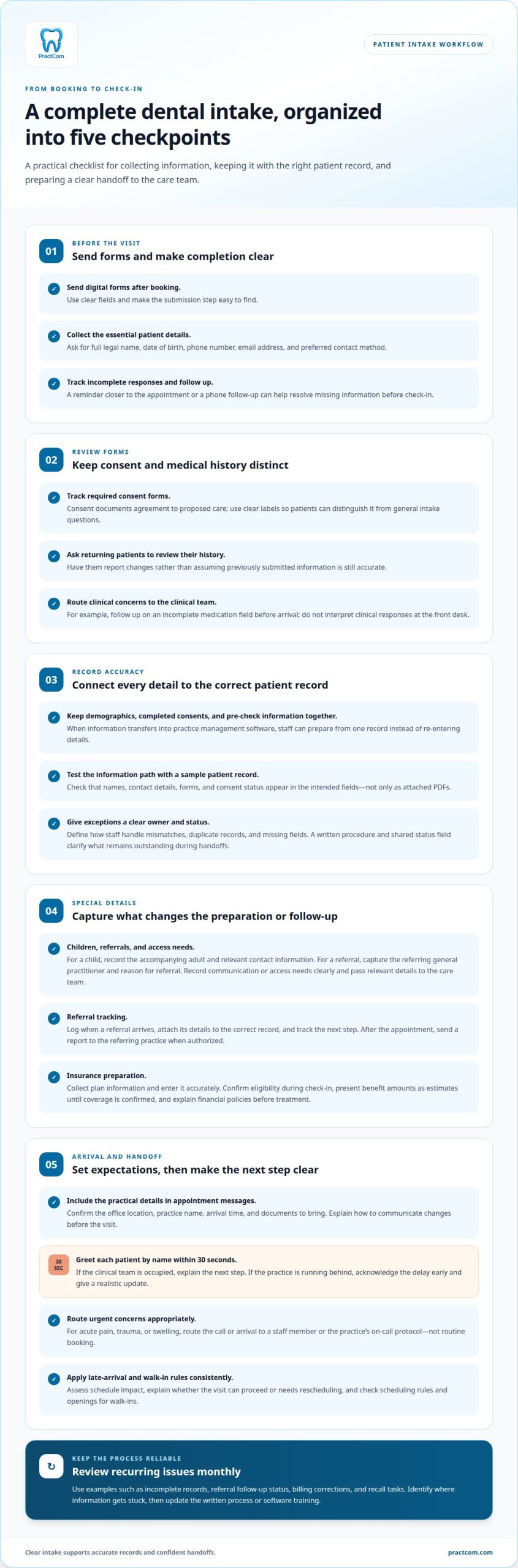
A reliable dental front desk patient intake workflow connects each patient’s demographics, completed consents, and pre-check information to the correct practice management record. When intake software transfers these details, staff spend less time re-entering data and can prepare billing and scheduling information from one record. Integration should support accurate handoffs, not create another place to store forms.
Test the information path with a sample patient record. Confirm that names, contact details, forms, and consent status appear in the intended fields, not just as attached PDFs. Then define how staff handle mismatches, duplicate records, and missing fields. A brief written procedure helps resolve exceptions consistently and prevents software updates from becoming a source of guesswork.
Children, referrals, and patients with special needs may require different intake details. For a child, record the accompanying adult and relevant contact information. For a referral, capture the referring general practitioner and reason for referral. Ask patients about communication or access needs, record them clearly, and pass relevant information to the care team.
For a general-practitioner referral, log when it arrives, attach its details to the correct patient record, and track the next step. After the appointment, send a report to the referring practice when authorized. This closes the loop and makes referral status easier to follow.
To prepare for insurance conversations, collect the patient’s plan information and enter it accurately. Dental front desk staff should confirm insurance eligibility during check-in. Present benefit amounts as estimates until coverage is confirmed, and explain the practice’s financial policies before treatment.
Common bottlenecks include duplicate entry, forms saved outside the patient record, and unclear referral ownership. Assign a staff role to each exception and use a shared status field to show what remains outstanding. This makes the next action clear during shift handoffs.
Review workflow performance monthly using examples such as incomplete records, referral follow-up status, billing corrections, and recall tasks. Compare recurring issues, identify where information is getting stuck, and update the written process or software training. A focused review turns repeated intake errors into specific, manageable workflow improvements.
Digital forms and pre-visit information
Digital intake works best when patients receive clear forms after booking and know what to complete before arriving. A receptionist can track outstanding responses and follow up before the visit.
Digital Intake Form Completion
Digital patient intake forms collect key details before an appointment. Ask for the patient’s full legal name, date of birth, phone number, email address, and preferred contact method. The provider can review submitted information before the visit, while the front desk identifies missing answers early. Use clear fields and make the submission step easy to find.
Send forms after booking, then follow up with patients who haven’t completed them. A practice may send a reminder closer to the appointment or follow up by phone. Timing and method can vary, but leave enough time to resolve incomplete information before check-in.
Consent and Medical History Forms
Consent forms document a patient’s agreement to proposed care, while medical history forms gather health information relevant to the visit. The receptionist should track whether required consent forms are signed and whether the patient has submitted the requested history. Clear labels help patients distinguish consent from general intake questions.
Returning patients also need an up-to-date medical history. Ask them to review their existing information and report changes rather than assuming previous answers are still accurate. If a response raises a clinical concern, route it to the clinical team instead of interpreting it at the front desk.
For example, if a patient leaves a medication field incomplete, follow up before arrival. If intake software sends submitted details into practice systems, confirm that the information appears in the correct record. This keeps staff from relying on a separate file to prepare for the visit.
For a more organized digital intake process, explore a digital patient communication setup that supports forms and follow-ups.
Arrival expectations and cancellation policies
Clear arrival instructions help patients plan and give front-desk staff a consistent basis for check-in. Confirm appointment details and explain how to communicate changes before the visit.
Arrival and Check-In Timing
Arrival expectations tell patients when to arrive and what to do at check-in. A specific arrival time helps the team prepare and avoids confusion. There’s no single check-in duration for every visit: completed forms, identity confirmation, and administrative questions all affect how long it takes.
Confirm the office location, practice name, arrival time, and documents to bring in the appointment message. Greet each patient by name within 30 seconds, then explain the next step if the clinical team is occupied. If the practice is running behind, acknowledge the delay early and give a realistic update.
Walk-Ins and Emergencies
A walk-in needs a brief scheduling assessment before staff offer an appointment time. Check the practice’s new-patient scheduling rules and available openings, then explain the options clearly. For acute pain, trauma, or swelling, immediately route the call or arrival to a staff member or the practice’s on-call protocol, not routine booking.
For late arrivals, apply the practice’s stated policy consistently and assess how the delay affects the schedule. Explain whether the appointment can proceed or needs to be rescheduled. This keeps administrative decisions clear while ensuring urgent clinical concerns reach the right team.
Explain cancellation and late-arrival policies before the appointment, including any stated consequences for inadequate notice. Use direct, consistent wording in booking conversations and written confirmations. Patients should know how to notify the office if plans change, rather than guess which channel to use.
Send confirmations and reminders that patients can respond to. If a patient reports a conflict, record the change and connect it to the schedule so staff can manage the opening. A patient communication system can help organize these conversations and follow-ups through a coordinated intake process.
Arrival, identity verification, and privacy
Check-in should confirm that the person, appointment, and patient record match. Discreet verification and careful form handling help protect private information in a busy reception area.
Identity Verification at Arrival
Identity verification means matching a patient’s stated details to the correct practice management record. Ask the patient to provide identifying information discreetly, then confirm the demographics attached to the booking. For a new patient, don’t announce personal details across the waiting room. Accurate matching helps prevent information from being added to the wrong record.
Keep the interaction brief and private. If a spouse, parent, or adult child answers questions, don’t assume they’re authorized to discuss or receive the patient’s information. Direct questions to the patient when appropriate, and follow the practice’s process for documenting permission.
Privacy in Intake Form Handling
Privacy-aware form handling prevents unnecessary exposure of patient information during check-in. Handle paper forms, digital records, and front-desk conversations discreetly to protect patient information. Keep documents and screens out of public view, and discuss sensitive details where other patients can’t overhear.
HIPAA-related intake procedures should guide who can access forms and how staff share information. A companion’s presence alone doesn’t establish permission to receive private details. Limit access to appropriate staff, and route questions about clinical information to the clinical team.
Handle insurance documents with the same care as other intake information. During insurance verification, match the patient and plan details to the correct record, then keep printed materials out of other visitors’ view. If a form or document is left at reception, return it to the patient or secure it according to practice procedures instead of leaving it unattended.
Reminders and digital submissions can reduce repetitive paper handling, but staff still need a clear process for exceptions. For example, if a patient reports that contact details changed after booking, update the appropriate record and confirm the change discreetly. Explore a more coordinated patient intake workflow for forms and communication.
PractCom: The All-in-One Patient Communication Platform for Dental Practices
PractCom helps dental practices organize patient communication throughout the care journey. Its digital informed consent forms support consent collection, while the Referral Management System helps manage referral communication. The Post-Treatment Instruction Library gives practices a central resource for sharing care instructions after visits.
These tools can complement a defined intake process when staff need a clearer way to manage documents, referrals, and follow-up communication. PractCom supports patient communication alongside a practice’s existing systems, helping teams make handoffs more consistent without replacing practice management software.
If you’d like to discuss how these tools can support your practice, contact PractCom.
Make the next improvement easy to maintain
Choose a recurring intake friction point to improve first, such as an unclear handoff or an unfinished task after check-in. Assign a clear owner, record the agreed process, and review whether it’s working during a regular team discussion. Small, visible adjustments help your dental front desk patient intake workflow stay practical as staffing and daily schedules change.
The goal isn’t to add another layer of administration. It’s to make the next step clear for patients and staff, then refine the process using real examples from the front desk. When communication tools could help support that work, consider how they fit alongside your practice’s existing systems and responsibilities.
Contact PractCom to discuss your front desk and consider a suitable next step for your practice.
Frequently Asked Questions
What Should an AI Front Desk Handle for a Dental or Oral Surgery Practice?
An AI front desk should handle routine administrative communication, not clinical judgment. It can answer standard questions about office hours, location, and basic insurance information, offer appointment times, or transfer a conversation to staff. It should identify itself as AI and provide a clear way to reach a person. Calls about acute pain, trauma, or swelling should go to staff or an established on-call protocol, not routine booking.
What are the steps in a dental front desk patient intake workflow?
A practical sequence starts when an inquiry arrives: capture its reason and preferred contact method, record the appointment decision, and track outstanding forms. Before the visit, check whether the information is complete and note unresolved administrative questions for the team. At arrival, match the patient to the correct record and pass relevant updates to the clinical team. After the visit, document any unfinished tasks.
What information should dental offices collect during patient intake?
Collect enough information to identify and contact the patient, understand the appointment request, and prepare for the visit. Registration details include the patient’s full legal name, date of birth, phone number, email, and preferred contact method. The office may also need insurance details, relevant medical history, and referral information. Keep updates distinguishable from original entries so staff can see what changed and when.
What forms and consent documents are required for new dental patients?
There isn’t one universal form set for every new patient or procedure. Offices commonly gather registration details and medical history, and provide consent documents relevant to planned care. The clinical team determines which consent applies to the proposed treatment; administrative staff can track completion without interpreting clinical content. Use clear labels to distinguish general intake questions from documents that explain and record consent.
How can patients complete dental intake paperwork online before their visit?
Patients can use their dental office’s online forms or patient portal, enter the requested details, review their responses for accuracy, and submit the forms before arrival. If a question is unclear or a form won’t submit, contact the office rather than guessing or sending sensitive details through an unrelated channel. PractCom’s Patient Portal provides access to patient documents and supports digital communication with the practice.

Article by
Cary Ganz DDS
Dr. Cary H. Ganz is a dentist, prosthodontist, entrepreneur, lecturer, and author with more than 50 years of experience in clinical dentistry and dental technology. Throughout his career, he has combined hands-on patient care with a deep understanding of how technology can improve dental practice operations, communication, documentation, and patient outcomes.
In addition to his clinical background, Dr. Ganz has held significant leadership roles in the dental technology industry, including Past Owner and Vice President of Clinical Affairs at DEXIS Digital Radiography and Past Vice President of Clinical Affairs at Denticon Practice Management Software. His business experience includes product development, clinical strategy, dental software innovation, practice management solutions, and educating dental professionals on the effective use of technology in modern dentistry.
Today, Dr. Ganz continues to focus on creating practical technology solutions for dental practices, including PractCom, a comprehensive dental practice communication platform designed to improve patient communication, documentation, compliance support, referrals, and overall practice efficiency. His work reflects a career-long commitment to helping dentists deliver better care while making their practices more organized, efficient, and protected.
No responses yet