A reminder should do more than announce an appointment: it should make it easy for patients to confirm or request a different time. Effective email templates for dental appointment reminders include the visit date, time, location, and purpose, plus a clear way to reply, reschedule, or contact the practice.
It’s easy to see why a simple, consistent message matters: patients need the right details at a glance, and your team needs a clear way to respond when plans change. A reminder sent about a week ahead can share forms and directions, while a message 24 hours before the visit can reinforce the appointment and invite confirmation.
This guide offers practical templates for routine visits, new patients, and specific procedures, along with advice on timing and tailoring each message. You’ll also learn how to give patients a direct way to confirm or reschedule, so appointment details are clear.
Key Takeaways
- Make it easy for patients to confirm or request a new appointment by including clear reply and rescheduling options.
- Use a consistent reminder schedule, with each message timed to give patients useful notice.
- Adapt the details and instructions to the visit type, from a routine checkup to a first appointment or procedure.
- Use concise, ready-to-customize examples to make appointment communication clearer for patients and easier for your team to manage.
Can patients confirm or reschedule directly from a reminder message?
Yes. A reminder can let patients confirm, cancel, or request a different time. Include the appointment date, time, location, and purpose, then add a reply instruction, rescheduling link, or office phone number. Use a specific subject, such as “Confirm your cleaning appointment,” and ask for a simple response, such as “Reply C to confirm or R to reschedule.”
Situation: A patient misses a scheduled visit. Action: Send a courteous follow-up that acknowledges the missed appointment and offers a direct way to book again. Result: The patient can choose a next step without guessing whether to call or reply. Keep the message neutral and avoid blame. For a recurring appointment, ask patients to call at least 48 hours ahead of the visit to move it. If someone expects to be more than 15 minutes late, direct them to call the office to discuss rescheduling.
Situation: A patient requests a change through a link or reply. Action: Send a separate confirmation that says whether the original visit was canceled and gives the new date and time, if scheduled. Result: The patient and team have a clear record of the appointment status. If the patient only requests a change, don’t suggest that a new time is booked. Include the office number as a fallback if the link fails or the patient has questions.
According to the Federal Communications Commission, the healthcare exemption limits automated reminders to 3 automated reminders per week. Treat this as a reminder-scheduling constraint, not a reason to omit a clear cancellation route. A prompt response lets staff review an open slot and decide whether it can be offered to another patient. This gives the team a practical way to manage schedule changes and protect appointment capacity, rather than leaving a cancellation unanswered.
Timing and consistency of email reminders
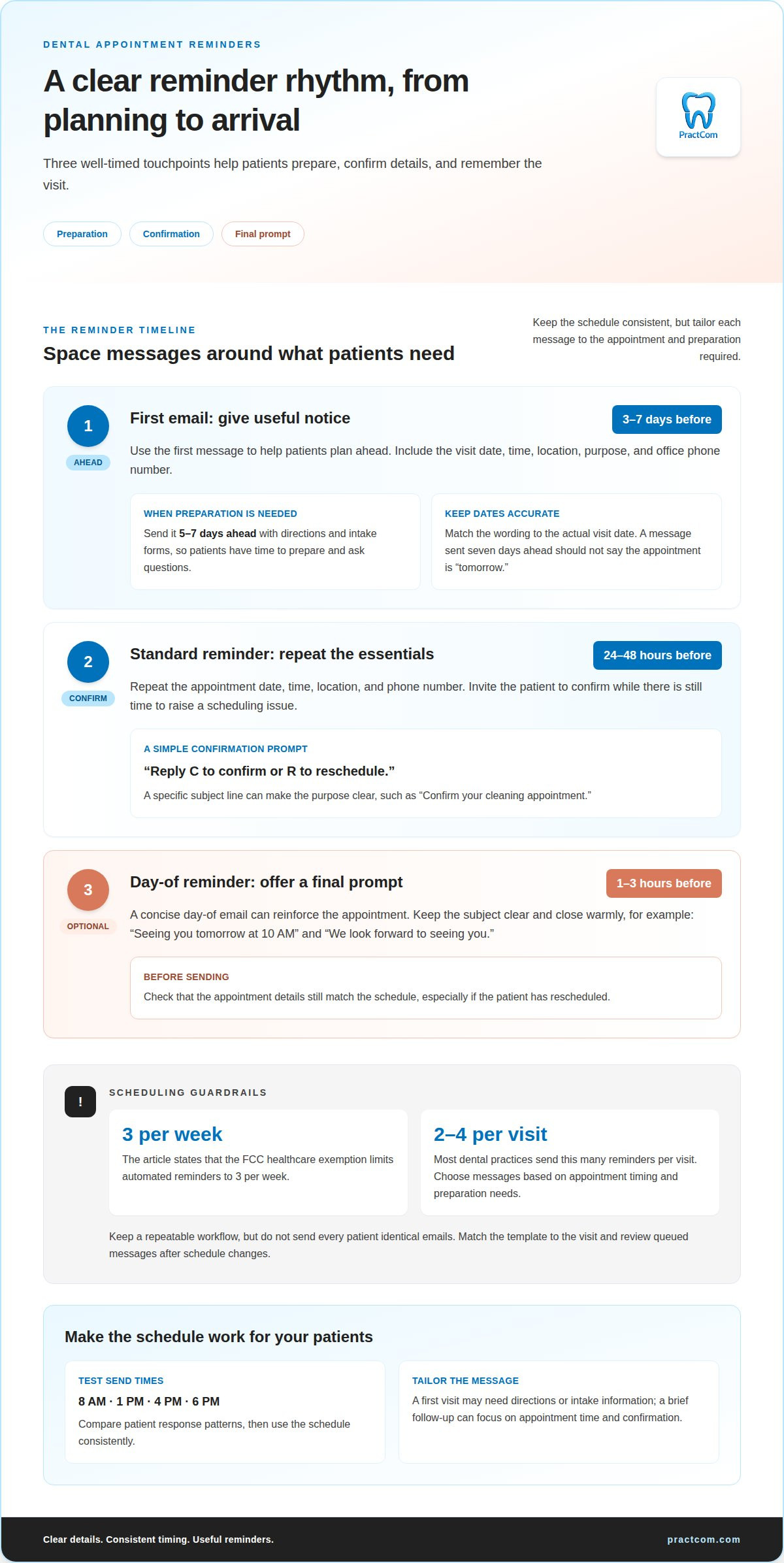
Send the first email 3-7 days before the appointment, then send a standard reminder 24-48 hours before the visit; the FCC healthcare exemption limits automated reminders to 3 per week. A day-of reminder can arrive 1-3 hours before the appointment. This cadence gives patients notice, then places the appointment details closer to the visit.
A week-ahead message works well for preparation. Include directions, intake forms, and the office phone number, so patients can plan ahead. For example: “Your appointment is coming up next week. Please complete your forms before tomorrow’s visit.” Adjust the wording to match the actual appointment date. A message sent seven days ahead should not mistakenly call the visit “tomorrow.”
Situation: A patient needs forms or directions. Action: Send the first email 5-7 days ahead with those details. Result: The patient has time to prepare and can forward questions to the practice before arrival. Use the next email, sent 24-48 hours ahead, to repeat the appointment time and invite confirmation.
Consistency matters as much as timing. Set a repeatable schedule in practice management workflows, then apply it across visits. Most dental practices send 2 to 4 reminders per visit. Use appointment timing and preparation needs to decide which messages add value, rather than sending every patient identical emails.
Situation: A patient’s appointment is tomorrow. Action: Send a concise reminder 24 hours before, with the date, time, location, and phone number. Result: The patient can confirm details while there’s still time to raise a scheduling issue. A day-of email sent 1-3 hours before can serve as a final prompt. Keep the subject clear, such as “Seeing you tomorrow at 10 AM,” and close warmly: “We look forward to seeing you.”
Test send times against your patients’ response patterns. Consider 8 AM, 1 PM, 4 PM, or 6 PM, then use the same schedule consistently. A patient communication workflow can help organize those touchpoints.
Should reminder templates be the same for every appointment type?
No. Keep a consistent structure, but tailor the details to the visit, patient, and preparation needed. Automated appointment reminders can reduce no-shows by up to 29% across healthcare settings, but a relevant message still needs accurate appointment information and useful instructions.
For a 6-month hygiene visit, give patients more notice than for a recently booked follow-up. The first visit may need directions or intake information, while a brief follow-up reminder can focus on the appointment time and confirmation. Matching content to the booking makes each email more useful and avoids sending instructions that don’t apply.
Situation: A new patient has an appointment on the calendar. Action: Use a template that identifies the visit, includes the practice’s contact details, and explains any required forms. Result: The patient can prepare without sorting through unrelated instructions. For an orthodontic visit, the message might remind patients to brush around brackets or aligners and bring current aligners if they’re following an Invisalign plan.
Automation helps the team send the right message consistently. Set the software to select a template by appointment type, then populate the patient’s name, date, time, and location from the booking details. Add a review step for schedule changes. If an appointment moves, update or pause the queued message so it doesn’t contain outdated details.
Situation: A patient reschedules after an automated email is queued. Action: Update the calendar record and review the next scheduled message. Result: The patient receives information for the correct visit, not the old booking. Keep a separate template for cosmetic consultations, too. Invite patients to bring questions about whitening, veneers, or bonding instead of sending generic treatment instructions. This makes automation more reliable while keeping messages relevant.
Basic dental appointment reminder email templates
A useful reminder has a clear subject, the practice name, appointment details, and one next step. Personalize it with the patient’s first name and booked visit. Keep clinical details out of ordinary email; use a secure link when patients need sensitive information.
Email gives you room to include directions and preparation instructions. Text works well for a short prompt, while a phone call lets staff speak directly with a patient. Choose the channel based on the visit’s needs and the patient’s communication preferences.
Name the practice and purpose in the subject line: “Appointment reminder from Oak Street Dental” or “Confirm your dental visit tomorrow.” These examples identify the sender and visit without unnecessary detail. Avoid vague subjects such as “Important message.”
- Routine visit: “Hi Sarah, your appointment at Oak Street Dental is October 12 at 10:00 AM. Reply to confirm or call 555-0199 to reschedule. We look forward to seeing you.”
- New patient: “Hi Michael, we’re looking forward to your first visit on October 15 at 2:00 PM. Please arrive five minutes early with photo ID and relevant medical history or previous X-rays.”
- Schedule change: “Hi Jessica, your appointment has moved to October 18 at 11:30 AM. Please reply to confirm these updated details, or call 555-0199 with questions.”
Situation: A patient may forget a routine visit. Action: Send the routine template with the date, time, and confirmation route. Result: The patient can quickly find the details and respond. For a cancellation, ask patients to reschedule or cancel at least 24 hours ahead, as advised in the 48-hour reminder template.
For email consent and unsubscribe requests, explain what appointment messages patients can expect and record their preferences. Make opt-out instructions easy to find, and update communication records when a patient unsubscribes. Keep appointment reminders separate from unrelated promotional messages.
Use a clear template as a starting point, then tailor instructions to the booked visit. Set up a more consistent patient communication workflow with PractCom to organize appointment messages.
PractCom: Email and Text For All Documents in 15 Languages
PractCom helps dental practices organize patient communication and document delivery. Its Email and Text For All Documents in 15 Languages offering supports sending documents by email, text, or print in 15 languages, helping practices communicate with patients in their preferred language.
For practices building a consistent communication process, PractCom Communications brings patient-facing tools together. Its Post-Treatment Instruction Library provides aftercare instructions, while digital informed consent forms support consent workflows. These tools complement appointment messages by helping teams share relevant information before or after a visit.
PractCom can help when patient communications and document delivery are fragmented across manual processes. Contact PractCom to discuss its communication tools and find a practical next step for your practice.
Make your reminder process easier to maintain
Make templates part of a dependable patient communication process, not isolated messages someone must remember to send. Assign responsibility for keeping appointment details current, matching instructions to visit types, and handling replies or schedule changes. Clear ownership helps your team maintain communication as daily demands shift.
Think beyond reminders, too. The same communication workflow can support referrals and follow-up. PractCom’s Referral Management System helps organize referrals alongside other patient communications, supporting a coordinated flow of information between steps in care.
Use the examples in this guide as a starting point, then shape your email templates for dental appointment reminders around the needs of your practice and patients. If you’re ready to discuss a more organized communication workflow, contact PractCom about your practice. A clear next step can make everyday communication easier to manage.
Frequently Asked Questions
How do I customize these templates for my practice?
Adapt email templates for dental appointment reminders to your practice’s tone and workflow. Replace placeholders with accurate appointment details, the practice name, and a working contact method. Include only instructions relevant to the visit. Before sending, check how names, dates, and times appear in the final message, especially when your system fills those fields automatically.
What should a HIPAA-compliant dental reminder message include?
Keep routine reminders focused on scheduling, and avoid linking a patient’s name with a diagnosis, medication, or specific condition. If the patient needs clinical details, direct them to a secure link rather than including them in a standard email. Use a neutral subject line and share only what patients need to identify the appointment.
What should a dental appointment reminder email include?
Give patients enough information to identify the visit and take the next step: the practice name, appointment date and time, visit purpose, and a way to confirm or request a change. Add the office’s contact details and relevant preparation instructions. If intake paperwork is needed, explain where to find it and how to submit it.
What are examples of dental appointment reminder email templates?
Try a concise, personalized message: “Hi [First Name], we’re checking in about your upcoming visit with [Practice Name]. Reply if you need help with your appointment.” For a post-visit follow-up, write: “Hi [First Name], we hope you’re settling in after your appointment. Reply with questions about your written aftercare instructions.” Keep clinical specifics out of ordinary email.
How many appointment reminders should a dental practice send?
A common cadence is 2 to 4 reminders per visit. Send them at useful points in the scheduling timeline, and avoid another message after the patient confirms or changes the appointment. A communication log helps staff see what has already gone out and prevent duplicate reminders. Adjust the sequence when a visit is booked close to its scheduled date.
How can dental reminder emails be personalized for different appointments?
When tailoring email templates for dental appointment reminders, use the patient’s name, the visit purpose, and only relevant instructions. A first-visit message can explain where to find new-patient paperwork; a follow-up can focus on the next scheduled step. Keep separate, clearly labeled templates for each visit type so staff can choose the right message without rewriting it each time.

Article by
Cary Ganz DDS
Dr. Cary H. Ganz is a dentist, prosthodontist, entrepreneur, lecturer, and author with more than 50 years of experience in clinical dentistry and dental technology. Throughout his career, he has combined hands-on patient care with a deep understanding of how technology can improve dental practice operations, communication, documentation, and patient outcomes.
In addition to his clinical background, Dr. Ganz has held significant leadership roles in the dental technology industry, including Past Owner and Vice President of Clinical Affairs at DEXIS Digital Radiography and Past Vice President of Clinical Affairs at Denticon Practice Management Software. His business experience includes product development, clinical strategy, dental software innovation, practice management solutions, and educating dental professionals on the effective use of technology in modern dentistry.
Today, Dr. Ganz continues to focus on creating practical technology solutions for dental practices, including PractCom, a comprehensive dental practice communication platform designed to improve patient communication, documentation, compliance support, referrals, and overall practice efficiency. His work reflects a career-long commitment to helping dentists deliver better care while making their practices more organized, efficient, and protected.
No responses yet