
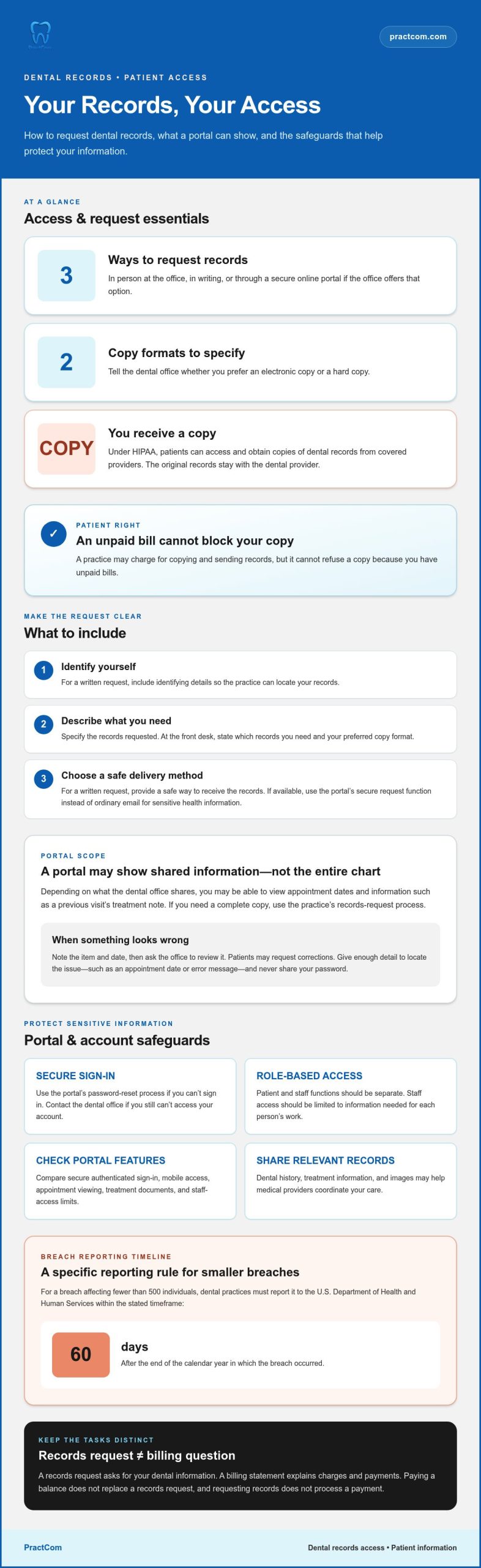
A secure patient portal for dental records can let you view appointments and information your dental office has shared, and request a copy of your records online when that option is available. In the United States, HIPAA gives patients the right to access and obtain copies of their dental records. You receive a copy; the original records stay with your provider.
Keeping your dental history accessible is useful, and sharing it with a medical provider can matter just as much. Dental records may help your care team understand relevant treatment, images, or history. A secure way to access them helps protect sensitive information.
This guide explains what you may see in a portal, how to request records in person, in writing, or online, and practical ways to protect your account. You’ll also learn how to share records with medical providers and what to consider when choosing a portal. Clear steps can make access and care coordination more manageable, whether you’re preparing for an appointment or helping your providers see a fuller picture of your health.
Key Takeaways
- Use your dental office’s portal to review the appointments and treatment details it has shared with you.
- Request records through the method your dental office offers, and specify whether you prefer an electronic or hard copy.
- Protect your account with strong password habits and multi-factor authentication where available.
- Look for safeguards such as encryption and secure messaging when accessing or sharing dental information.
- Share relevant records with medical providers to support coordination across your care team.
Patient access to appointments and treatment history
Popular dental patient portals differ in the records and appointment tools they provide. Compare whether each supports secure sign-in, mobile access, appointment viewing, treatment documents, and controlled staff permissions. These features show how easily patients and care teams can use health information.
Under the HIPAA Privacy Rule, patients have the right to access and obtain copies of their dental records from covered healthcare providers. This includes records the practice maintains, such as treatment notes or images. Patients receive copies; the original records stay with the provider. A practice cannot refuse a copy because a patient has unpaid bills, though it may charge for copying and sending records.
A portal may display appointment dates and information the dental office has shared. For example, you might review a previous visit’s treatment note before discussing follow-up care. The portal shows the information available there, not necessarily everything in the practice’s record. If something looks inaccurate, ask the office to correct it. You may also ask how your information is used or shared, and for what purpose.
Practice access serves a different purpose. A front-desk employee may need the schedule to confirm an appointment, while a treating dentist needs relevant clinical information. Assigning access by role helps staff see the records needed for their work and limits exposure to unrelated patient information. Practices should give each user only the minimum information needed to do their job.
For providers, secure browser-based access can make schedules and patient information available through an authenticated account. A clinician can sign in at a practice workstation, review assigned information, and sign out when finished. Mobile access can support work away from that workstation, but still requires appropriate account safeguards. Practices should monitor access and remove permissions when someone’s role changes.
A secure patient portal for dental records should separate patient and staff functions. Patients may view records shared with them, while staff permissions depend on job responsibilities. For example, a scheduling role may need appointment details without access to every clinical document. Role-based access supports the least-privilege principle and reduces unnecessary access to sensitive health information.
Security procedures also address what happens after a breach. For a breach affecting fewer than 500 individuals, dental practices must report to the U.S. Department of Health and Human Services within 60 days of the end of the calendar year. Patients can use portal access for routine records and appointments, then follow the practice’s process when they need a complete copy or want to discuss a correction.
Compare portals for secure, authenticated sign-in, mobile access, appointment viewing, treatment documents, and role-based limits on staff access. Patient and staff functions should be separate, with each user able to access only the information needed for their role.
Requesting records in person, in writing, or through a secure online portal
Patients can request dental records in person, in writing, or through a secure portal if the office offers that option. Choose a method that protects sensitive information and suits your preferred delivery format.
Records Request Methods
At the front desk, state which records you need and whether you want paper or electronic copies. For a written request, include your identifying details, the records requested, and a safe way to receive them. If the office accepts requests through its portal, use that secure function instead of sending sensitive health information through ordinary email.
Ask for a copy, not the original chart, which stays with the dental provider. A lengthy file may be easier to receive electronically; you may also provide a USB drive for storage. Providers may charge for copying and sending records, but unpaid bills cannot be used to refuse your copy.
Portal Access and Error Resolution
If you can’t sign in, use the portal’s password-reset process. If you still can’t access your account, contact the dental office’s front desk. If an appointment, statement, or treatment detail looks wrong, note the item and date, then ask the office to review it. Patients may request corrections to their records.
For either issue, give the practice enough detail to locate the problem without sharing your password. For example, identify the appointment date or describe the error message. The office can direct your request to the right staff member and keep communication clear.
Keep record requests separate from billing questions. You may request a copy of your records even if a balance remains, while a billing statement explains charges and payments. Review the statement for the date of service, listed procedures, payments received, and remaining balance. If an item is unclear, ask the billing team about that specific entry.
Online patient payments can make settling a statement more convenient, but use the dental practice’s own payment route. For a HIPAA-compliant patient portal that accepts bill payments, PCI compliance is mandatory. Before paying, confirm the statement is yours, review the amount, and save the payment confirmation for your records.
Online bill payment and record delivery are separate tasks. Paying a balance doesn’t replace a records request, and requesting records doesn’t process a payment. If you need both, submit the records request and complete payment through their respective portal functions. Dental practices can also review patient communication workflows to organize these interactions clearly.
Encrypted messaging and account security
Encryption helps protect dental health information as it moves between you, the dental practice, and its portal. Review how the portal handles messages, stored records, account access, and backups.
Encrypted Messaging
Use the portal’s messaging feature for questions that include sensitive details, such as a treatment concern or record request. Dental patient portals should use TLS to protect information in transit. Before sending a message, confirm that you’re signed in to the correct profile and have the right recipient. Avoid unnecessary personal details, and sign out after using a shared device.
For example, a message about an appointment can identify its date and the question you need answered without including unrelated health information. If the practice sends an email or text notification, open the portal directly instead of putting sensitive details in an ordinary reply. Keep your contact information current so notices reach the right account holder.
Encryption and Key Management
Encryption should protect patient data both while it’s transmitted and while it’s stored. Protection matters when a record travels to your browser and while it remains in the portal’s systems. A practice should also manage encryption keys carefully, limit access to authorized personnel, and protect the keys separately from the information they unlock.
Ask how the practice’s portal protects information at rest and in transit. The HIPAA Security Rule calls for administrative, physical, and technical safeguards to protect the confidentiality, integrity, and availability of electronic protected health information. Encryption supports that work alongside account controls, staff procedures, and system oversight. No single setting replaces a broader security process.
Backups and Recovery
Backups help a dental practice restore records if its primary systems become unavailable. Patient data backups should be kept in multiple off-site locations, separate from the organization’s main IT infrastructure. That separation can help limit the impact of an incident affecting the main environment. Practices should also protect backup copies and restrict who can access them.
When reviewing a portal, consider whether its security approach covers both everyday access and recovery. A backup is useful only if the practice can restore information and maintain its integrity. Ask how patients can get help if a record won’t open or a portal update interrupts access. When downloading a file, use a private device and save it in a protected location, not a shared folder.
You can strengthen your account with simple habits. Use a unique password, don’t share it, and avoid saving it on a public computer. Keep your profile details current, especially your email address and mobile number. If you receive an unexpected sign-in alert, change your password through the portal and contact the dental practice through its established communication channel.
Multi-factor authentication and password protection
A password is one safeguard, not the whole account security process. Multi-factor authentication, session controls, and access monitoring add separate checks to help protect digital patient information.
Multi-Factor and Two-Factor Authentication
Multi-factor authentication asks you to prove your identity using more than one factor. These may include a password, a code sent to a device, or another authentication method. Two-factor authentication is a specific form that uses two factors. For example, a portal may ask for your password and then a temporary code before opening your account.
Dental practices should require multi-factor authentication for administrators and clinicians. This helps protect accounts with access to electronic protected health information. Patients can enable the option if the portal provides it, and should keep their verification device or contact method current. Read the portal’s sign-in instructions before consenting to digital access.
Password Protection
Choose a unique password for your dental portal instead of reusing one from email or another account. A password manager can help store distinct credentials securely. Don’t share your password with family members or practice staff. If you think someone else has accessed your account, change your password through the portal and contact the practice.
Healthcare patient portals should require users to enter their password again after 30 minutes of inactivity. That session control can reduce the risk of someone viewing records on an unattended device. For healthcare employees, automatic password resets every 60 to 90 days are recommended. These controls work best alongside multi-factor authentication, not as a replacement for it.
Account security also depends on how the system handles each user profile. Practices should authenticate every action taken by a profile that can access electronic personal health information. They should monitor for suspicious behavior, such as unusual access patterns or repeated failed sign-ins. A review process helps staff identify activity that needs investigation.
A zero-trust approach treats every access request as something to verify, rather than assuming a familiar account or device is safe. In practice, that means checking identity and permissions before allowing access to a record or function. For example, a clinician opening patient information may need stronger verification than someone viewing a public page.
For your account, use the portal’s sign-out function after each session, especially on a shared device. Don’t approve a verification prompt you didn’t initiate. If your phone number or email changes, update your profile so authentication notices reach you. These steps make unexpected access easier to spot and help keep account recovery information current.
Which dental patient portals are HIPAA compliant?
A portal’s compliance depends on how the dental practice and its vendors protect patient information. Look beyond a “HIPAA compliant” label: review access controls, encryption, privacy procedures, and how the practice manages information shared through the portal.
HIPAA applies to covered dental practices handling protected health information. The U.S. Department of Health and Human Services requires covered entities to obtain business associate agreements from vendors that create, receive, maintain, or transmit electronic protected health information on their behalf. The agreement outlines responsibilities for handling that information, but does not replace the practice’s own safeguards.
Check how the practice limits access. Staff should have permissions suited to their roles, and the practice should restrict access to the minimum information needed for each job. Ask how it removes access when staff responsibilities change. For example, a scheduling role may require appointment details, while clinical documentation access serves a different purpose.
Privacy information matters, too. HIPAA-covered dental practices must provide a Notice of Privacy Practices explaining how information may be used and disclosed, patients’ rights, and contact information. Read the notice and the portal’s opt-in agreement before using the service. The agreement should explain privacy and security risks and the measures used to address them.
Review the security features that protect information during use. These include encryption in transit and at rest, secure sign-in, multi-factor authentication for staff, and monitoring for suspicious access. A portal should also use TLS to protect information moving between your browser and the service. Ask how the practice handles backups and security reviews, including testing after significant system changes.
If the portal accepts online bill payments, check that its payment process follows applicable security standards. Payment protection and health-record privacy address related but distinct risks. Check that the payment process is part of the practice’s intended portal workflow, rather than entering sensitive details on an unexpected page or in a message.
No single portal name guarantees compliance in every practice. A dental office’s configuration, staff procedures, vendor agreements, and ongoing risk analysis all matter. Practices should include portals, electronic health records, mobile apps, and integrations in their risk analysis. Patients can review the privacy notice, understand the portal’s sign-in process, and use the practice’s established access route.
For a dental practice assessing patient communication workflows, explore a patient communication platform that includes a portal alongside other patient-facing tools.
PractCom: Post-Treatment Instruction Library
PractCom brings patient communication tools together for dental practices seeking a more organized way to share information and support follow-up. Its Patient Portal gives practices a channel for patient communication, while the Post-Treatment Instruction Library helps present care guidance consistently. Digital Informed Consent Forms and the Referral Management System support other steps in the patient journey.
Consider these tools when your practice wants to manage treatment information and communication more easily alongside patient records. They complement a portal’s role in patient access; they don’t replace your practice’s responsibility to manage privacy and security safeguards.
To explore how PractCom could fit your practice’s communication workflow, visit practcom.com.
Make Your Next Patient Communication Step Count
Good record access is only one part of coordinated care. The next step is helping patients understand what happens after treatment and making communication with their care team easier to manage. A clear, consistent process can help patients find guidance, complete consent documents, and understand how referrals fit into their care.
PractCom offers a Post-Treatment Instruction Library, Digital Informed Consent Forms, and a Referral Management System. These tools support patient communication alongside a portal, while your practice remains responsible for protecting health information and managing access appropriately. If you’re considering how a secure patient portal for dental records could fit your communication workflow, start by identifying the patient tasks you want to make clearer and easier to access.
Contact PractCom about patient portals to explore a practical next step for your practice. Thoughtful communication can make the patient experience more connected, one clear interaction at a time.
Frequently Asked Questions
What is a secure patient portal for dental records?
It’s an online account where you can access dental information your practice makes available. A secure patient portal for dental records may let you review appointments, shared treatment documents, or messages using a personal login. For example, you might open a post-treatment instruction before following your care plan. The portal’s available tools depend on how your dental office uses it and which records it shares.
How do dental patient portals protect records and patient data?
Portals can protect information through safeguards such as encryption, sign-in verification, and restricted user permissions. For example, TLS helps protect information moving between your browser and the portal, while multifactor authentication adds another identity check. Your habits matter, too: use a unique password, avoid shared devices for sensitive records, and sign out when finished. A portal’s protections work alongside the dental practice’s privacy and security procedures.
What dental records can patients access through a portal?
You may be able to view appointments, treatment notes, images, or documents your dental office has shared. Available material can differ between practices and patient accounts. For instance, a portal might show an appointment summary and an image from a specific visit, but not everything in the provider’s chart. If you need a particular document, identify it clearly when contacting the practice.
How can patients sign up for and access a dental records portal?
Start with the dental office’s portal invitation or sign-up instructions. Follow the prompts to create an account, verify your identity, and set a password. Use the email address or mobile number associated with your practice records if requested. Once registered, bookmark the official sign-in page on your private device, and avoid opening account links from unexpected messages.
How can patients download or transfer dental records from a portal?
Sign in and look for a download, export, or records-request option. If the document you need isn’t available there, ask the dental office for an electronic copy and specify which records you need. To share records with a medical provider, use a secure delivery method supported by the practice or receiving provider. For lengthy records, ask whether electronic delivery or a USB drive would suit your needs.
How do popular dental patient portals compare on security and features?
Compare portals for secure, authenticated sign-in, mobile access, appointment viewing, and treatment documents. Also check whether staff access is limited by role and whether patient and staff functions are separate.

Article by
Cary Ganz DDS
Dr. Cary H. Ganz is a dentist, prosthodontist, entrepreneur, lecturer, and author with more than 50 years of experience in clinical dentistry and dental technology. Throughout his career, he has combined hands-on patient care with a deep understanding of how technology can improve dental practice operations, communication, documentation, and patient outcomes.
In addition to his clinical background, Dr. Ganz has held significant leadership roles in the dental technology industry, including Past Owner and Vice President of Clinical Affairs at DEXIS Digital Radiography and Past Vice President of Clinical Affairs at Denticon Practice Management Software. His business experience includes product development, clinical strategy, dental software innovation, practice management solutions, and educating dental professionals on the effective use of technology in modern dentistry.
Today, Dr. Ganz continues to focus on creating practical technology solutions for dental practices, including PractCom, a comprehensive dental practice communication platform designed to improve patient communication, documentation, compliance support, referrals, and overall practice efficiency. His work reflects a career-long commitment to helping dentists deliver better care while making their practices more organized, efficient, and protected.
No responses yet