
A practical patient portal implementation guide for dental practices starts by matching portal functions to daily patient and staff workflows: digital intake, secure messaging, appointment scheduling and reminders, records access, and follow-up. The portal should work alongside existing practice management software and electronic health records, so patient information and communication fit into established processes. Staff roles, privacy safeguards, and patient instructions also need to be clear before the portal becomes part of routine care.
Adding technology alone will not resolve front-desk bottlenecks or make patient communication consistent. This patient portal implementation guide for dental practices explains how to choose useful portal functions, organize digital forms and messaging, plan integrations, and help patients and staff use the system. It also shows how these elements can work together to support a more organized experience from intake through follow-up.
Key Takeaways
- Choose digital intake forms and secure messaging that fit your front-desk workflow, and set clear processes for handling patient information.
- Map how portal data should move between your existing practice management system and EHR to reduce duplicate work and keep records consistent.
- Make adoption easier with clear patient instructions, useful educational content, and regular opportunities to share feedback.
- Prioritize portal functions that address everyday needs, such as appointment reminders, access to records, treatment information, and follow-up.
Digital intake forms and secure messaging
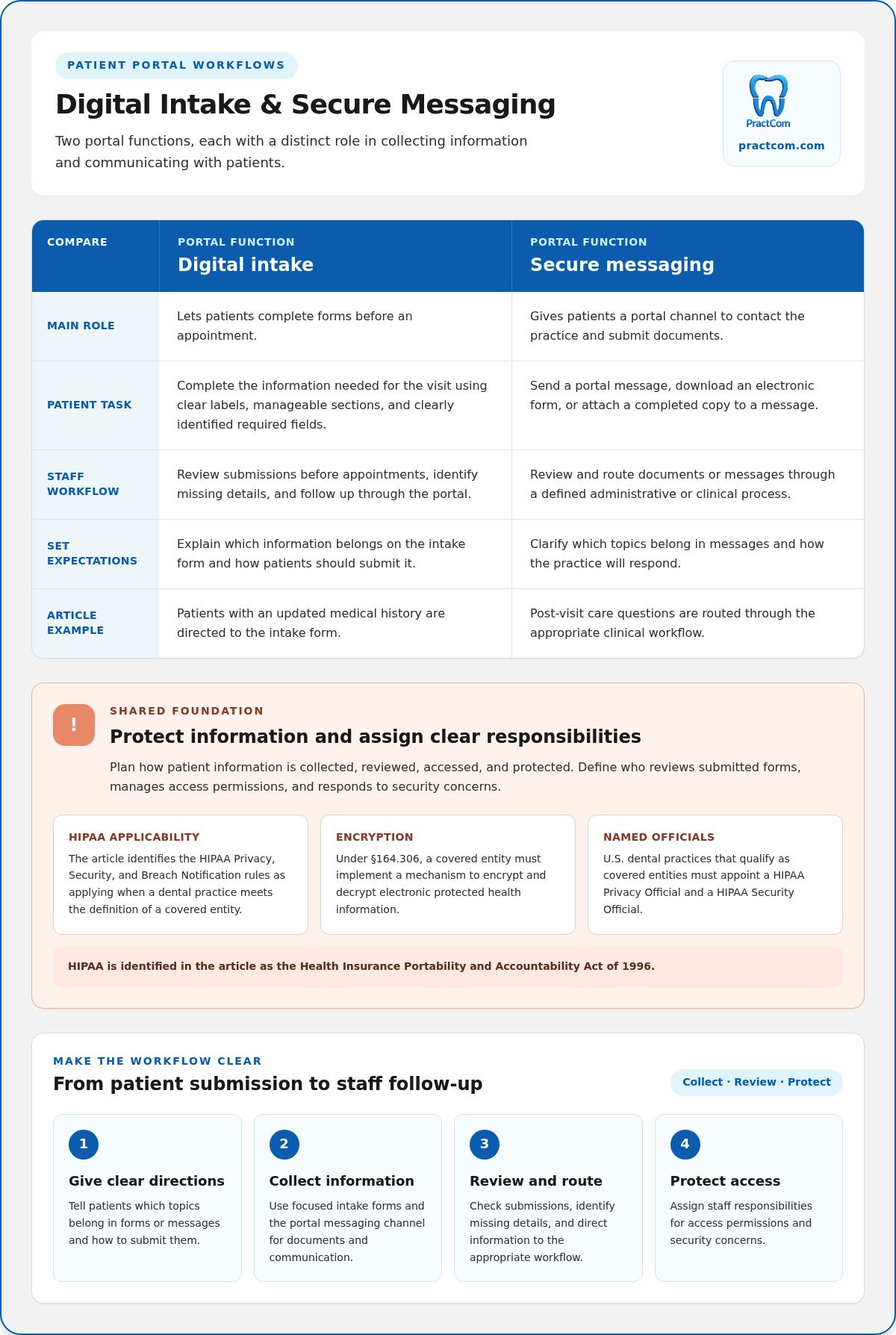
Digital intake lets patients complete forms before an appointment, while portal messaging gives administrative and clinical communication a clear channel. Plan both around defined workflows for collecting, reviewing, and protecting patient information.
Patient Data Privacy and Security
Patient data privacy and security means protecting personal and electronic health information from improper access, use, or disclosure. The Health Insurance Portability and Accountability Act of 1996 is identified by the United States Congress. Its Privacy, Security, and Breach Notification rules apply to a dental practice when it meets the definition of a covered entity. Under §164.306, a covered entity must implement a mechanism to encrypt and decrypt electronic protected health information.
Assign accountability: U.S. dental practices that qualify as covered entities must appoint a HIPAA Privacy Official and a HIPAA Security Official. Define who reviews submitted forms, manages access permissions, and responds to security concerns. Clear responsibilities make privacy safeguards part of routine administration, even on a busy clinic day.
Secure Patient Communication
Secure messaging gives patients a portal channel for contacting the practice and submitting documents, rather than sending sensitive details through an unsuitable route. Patients can download electronic forms and attach completed copies to portal messages, creating a more organized record for staff to review and route.
Set expectations before launch. Explain which topics belong in portal messages, how to submit a form, and how the practice will respond. For example, direct patients with an updated medical history to the intake form, and route post-visit care questions through the appropriate clinical workflow. Clear directions help prevent confusion.
Keep digital intake focused on information needed for the visit. Use plain labels, group questions into manageable sections, and identify required fields clearly. Staff can review submissions before appointments, spot missing details, and follow up through the portal. This moves paperwork out of the waiting room while helping the team see what has been received.
Integration with practice management systems and EHRs
To migrate patient records, map the fields in the current system to corresponding records in the new system, then test accuracy before staff rely on the data. Configure the portal by deciding what patients can access and how submissions fit into scheduling, billing, and clinical workflows.
Integration matters because dental practice management software can bring patient management, scheduling, billing, and electronic health records together. A portal that connects with existing systems can reduce duplicate entry and make information easier to access for administrative and clinical tasks. First, identify which system is the source of truth for each data type, such as contact details, appointment status, or treatment notes.
Compare vendors by how well their software supports your workflow, not by feature count alone. Ask for a demonstration of how a patient record moves between the portal, practice management system, and EHR. Test routine tasks, such as updating contact details or changing an appointment, and note whether staff have to enter the same information more than once.
Cloud-based dental practice management software is another model to evaluate. Consider how staff access records, manage user permissions, and handle backups. These details affect daily use and continuity when the practice relies on digital records. Include billing and oral health documentation in your evaluation, since both depend on accurate, accessible patient information.
- List systems currently used for scheduling, billing, and EHR records.
- Match the patient fields and workflows that need to connect.
- Test sample records and appointments before full migration.
- Train staff on where to enter, review, and update information.
Use a small test group of records to spot mismatched fields or missing history before expanding the transfer. Document the process for corrections, and assign a staff lead to coordinate testing. A clear integration map gives your practice a practical resource for troubleshooting and future workflow changes. Plan your portal workflow around the systems your team already uses.
Patient portal adoption and digital engagement
Use this patient portal implementation guide for dental practices to connect portal adoption with useful, everyday patient tasks. Train staff to introduce features clearly, then invite patients to try one relevant function at a time.
Patient Engagement and Education
Portal communication and educational resources can help patients take an active role in oral health care. Relevant guidance can make treatment easier to understand and clarify what patients should do between appointments.
Make each digital message useful to the patient’s care journey. For example, share an educational resource alongside treatment information, or invite feedback after an appointment. Online scheduling can make the portal valuable before a visit. In the United States, 2 out of 3 adults are interested in receiving dental records through a portal, so explain how patients can access their records and use the information.
Staff Training for Portal Adoption
Staff training helps team members introduce portal features consistently and answer common questions. Role-play can help reception staff explain sign-in, while clinical staff practice directing patients to relevant education and follow-up information.
Use a 10-minute team meeting before the workday begins to review one feature and resolve workflow questions. Start the approach with one or two patients each day, then record staff observations and patient questions. A 30-day tracker can reveal where instructions need refinement. Maintain the focus for 90 days, with one staff lead coordinating coaching and updates.
Digital engagement tools can complement a portal when communication and education work together. Define which messages belong in each channel, such as appointment reminders, treatment information, or feedback requests. This patient portal implementation guide for dental practices can help your team make each channel’s purpose clear.
Assess adoption by tracking specific behaviors, such as completed portal tasks, requests for help, or responses to educational messages. Use what you learn to improve explanations and the sign-up conversation. A focused review helps make portal use a practical part of routine care.
Patient portal functions in dental offices
Use this patient portal implementation guide for dental practices to prioritize functions around common patient tasks. Start with the workflows your office needs most, then test access and staff responsibilities before introducing the portal to patients.
Core options may include viewing health information, requesting prescription refills or record copies, and accessing treatment plans. Appointment scheduling, reminders, bill payment, test results, secure messaging, and educational resources may also support routine care. Choose functions based on how patients and staff will use them during care.
Accessibility and Language Options
Accessibility and language options help patients navigate portal services and understand the information they receive. Clear labels and plain-language instructions make tasks easier to find, especially when patients need to review records or follow treatment guidance.
Offer language choices for important instructions and keep labels consistent across portal pages. For example, use the same plain-language term for appointment reminders wherever they appear. Staff can note recurring patient questions and use them to improve instructions and navigation.
Access for Patients Without Smartphones
Access for patients without smartphones means offering a practical route to essential information without requiring a mobile device. This matters because patients may rely on a computer, printed material, or staff assistance instead.
Patients can access a portal through an internet connection and a web browser on a mobile phone or tablet. Explain alternatives supported by the practice for those without these devices, such as completing paperwork in person or receiving printed documents. Keep essential appointment and follow-up communication available through established practice channels.
A patient portal implementation guide for dental practices should help teams select functions that solve everyday needs without clutter. Organize content so patients can find a reminder, locate a record, or understand their next care step. Explore patient portal options for dental practices.
PractCom: Post-Treatment Instruction Library
PractCom’s Post-Treatment Instruction Library helps your team provide consistent guidance patients can revisit after care. Its library includes over 80 post-treatment templates, supporting clear follow-up communication across common procedures.
For practices organizing portal workflows, PractCom also offers a Patient Portal, Digital Informed Consent Forms, and a Referral Management System. Documents can be delivered by email or text, or printed, in 15 languages. This gives your team practical ways to share instructions and consent materials with patients using different communication preferences.
Consider tools that bring post-treatment guidance, consent, referrals, and portal communication into a more consistent patient experience. These tools support patient communication workflows; they do not replace full practice management software.
Contact PractCom to discuss how its tools can support your dental practice.
Make Your Next Portal Decision Deliberate
Choose one patient journey and make its digital handoffs clear. Start with a common moment, such as preparing for treatment or receiving care instructions afterward. Decide what patients need to do, who on the team owns each step, and how you will gather feedback. This gives your team a manageable way to refine the experience before expanding portal use.
PractCom’s Post-Treatment Instruction Library, Digital Informed Consent Forms, and Referral Management System support connected patient communication workflows. A patient portal implementation guide for dental practices is most useful when it leads to practical choices that fit the team’s routines and patients’ needs.
When you’re ready to explore how PractCom’s tools may fit your practice, contact PractCom to discuss your portal. A thoughtful, patient-centered approach can help your team build a more consistent digital experience, one clear workflow at a time.
Frequently Asked Questions
What features should a dental practice patient portal include?
A useful portal supports tasks patients and staff handle regularly, with access controls suited to each task. Consider secure messages, digital forms, appointment requests, reminders, record access, and educational materials. Decide which functions patients can complete independently and which need staff review. For example, patients can submit a form online while staff verify that updates are attached to the correct record.
What patient portal software integrates with dental practice management systems?
Choose portal software that can exchange the patient and appointment information your existing dental practice management system needs. Compatibility depends on how the systems connect and which records or actions must sync. During evaluation, test a routine task, such as changing a patient’s contact details, and confirm that the update appears where staff expect it. Clarify how errors or failed transfers are flagged and corrected.
What are the HIPAA requirements for dental patient portals?
HIPAA requirements apply when a dental practice meets the definition of a covered entity. The Health Insurance Portability and Accountability Act of 1996 is identified by the United States Congress. Its rules address the use, disclosure, and safeguarding of electronic protected health information. Under §164.306, covered entities must implement a mechanism to encrypt and decrypt that information, and qualifying practices must appoint Privacy and Security Officials.
How should dental practices secure patient portal accounts and health information?
Protect accounts by limiting access to authorized users and keeping credentials confidential. Match permissions to staff responsibilities and remove access when roles change. Protect electronic protected health information in backups with security and authorization controls, and store backup copies securely in multiple locations. A documented access review and recovery process helps staff know who can reach records and how to respond to data loss.
How can patients use a dental portal for appointments, forms, payments, and messaging?
Patients may use a portal to request or schedule appointments, complete available forms, review balances, and message the practice through its designated channel. For example, a patient could submit updated contact information before a visit, review an appointment reminder, and ask a question about preparation. Explain which tasks are available online and how patients can get help through the practice’s usual communication process.
What are common patient portal implementation challenges and risks for dental offices?
Common challenges include mismatched or missing data during migration, duplicate entry between the portal and existing systems, and unclear workflows for reviewing forms and routing messages. Privacy and security risks include improper access, use, or disclosure of patient information. Unclear instructions can also make adoption harder for patients and staff.

Article by
Cary Ganz DDS
Dr. Cary H. Ganz is a dentist, prosthodontist, entrepreneur, lecturer, and author with more than 50 years of experience in clinical dentistry and dental technology. Throughout his career, he has combined hands-on patient care with a deep understanding of how technology can improve dental practice operations, communication, documentation, and patient outcomes.
In addition to his clinical background, Dr. Ganz has held significant leadership roles in the dental technology industry, including Past Owner and Vice President of Clinical Affairs at DEXIS Digital Radiography and Past Vice President of Clinical Affairs at Denticon Practice Management Software. His business experience includes product development, clinical strategy, dental software innovation, practice management solutions, and educating dental professionals on the effective use of technology in modern dentistry.
Today, Dr. Ganz continues to focus on creating practical technology solutions for dental practices, including PractCom, a comprehensive dental practice communication platform designed to improve patient communication, documentation, compliance support, referrals, and overall practice efficiency. His work reflects a career-long commitment to helping dentists deliver better care while making their practices more organized, efficient, and protected.
No responses yet