
A generic “we miss you” reminder can be easy to send and easy for a patient to ignore. Reactivation is more useful when it offers a relevant next step, such as booking a preventive visit or discussing treatment already recommended by the clinician. If inactive patients are hard to prioritize and staff outreach is inconsistent, a clear process can help. Automated dental post-op follow-up supports communication after treatment, but it is different from reactivation outreach and should use instructions that reflect the patient’s care plan.
This guide compares seven practical patient reactivation campaign ideas for dental practices. You’ll see how to match outreach to a patient’s situation, choose a suitable channel, and make the next step clear without sending repetitive messages. It also explains how to assign staff responsibilities and review delivery and responses. From routine recall reminders to post-treatment check-ins, the goal is to make each message useful to the patient and manageable for the team.
Key Takeaways
- Prioritize inactive patients by their recorded care context, then choose an appropriate next step instead of sending everyone the same reminder.
- Compare seven campaign ideas by the patients they’re intended to reach and the action each message invites.
- Keep messages clear and respectful, with one practical next step patients can understand.
- Separate recall outreach from automated dental post-op follow-up, which supports communication after treatment rather than serving as a general reactivation campaign.
- Build a repeatable workflow with clear staff ownership, clinician review of clinical content, and a consistent way to review outreach.
Why Patient Reactivation Campaigns Matter in a Dental Practice
A patient who hasn’t booked recently isn’t automatically a patient who needs care. Records can help identify someone who may need a timely next step, but the reason for reaching out should come from the patient’s care context, not a blanket assumption. Patient reactivation is relevant outreach to a patient who may benefit from an appropriate next step in care. That step might be arranging a preventive visit or discussing treatment previously recommended by the clinician.
Reactivation is distinct from other practice communications. Post-op instructions explain how to care for oneself after a procedure. An automated dental post-op follow-up supports communication connected to treatment and recovery. An appointment reminder confirms an existing booking. Reactivation, by contrast, invites a patient without a current appointment to consider a care-related next step. Promotional messaging has a different purpose: it promotes services rather than addressing a specific care need.
The distinction matters because the reason for contact should shape the message. Dentistry includes preventive and restorative care, among other areas described in this broad overview of Dentistry. A useful outreach message states its purpose and avoids presenting a general booking request as a clinical recommendation.
Which patients might benefit from a reactivation message?
Start with practice records and clinician-approved care plans. They can help your team identify patients who may be overdue for preventive care, have treatment that was recommended but not scheduled, or have a follow-up plan that indicates a next step. These groups have different needs, so they shouldn’t automatically receive identical messages.
Check the record before reaching out. A patient may have completed care elsewhere, postponed treatment, or no longer need the visit suggested by an old note. Inactivity alone doesn’t establish an unmet clinical need. If the record doesn’t provide a clear, current reason for contact, resolve that uncertainty through your practice’s review process rather than implying the patient needs treatment.
How patient-centered outreach differs from a generic recall blast
A vague message such as “It’s time to book, call us today” gives little context. A more useful message briefly explains why the practice is contacting the patient and offers a fitting next step. If the record supports it, invite the patient to arrange a preventive visit or speak with the team about previously discussed treatment. Keep clinical claims aligned with the clinician-approved plan.
Plain language helps patients understand a message without decoding clinical terms. Keep the tone courteous, avoid pressure, and make it easy for the patient to decide whether to respond. A clear invitation respects the patient’s decision while giving staff a consistent basis for follow-up. The aim isn’t to treat every inactive record as a missed opportunity. It’s to make relevant care easier to consider.
How to Prioritize Patients Before Starting a Reactivation Campaign
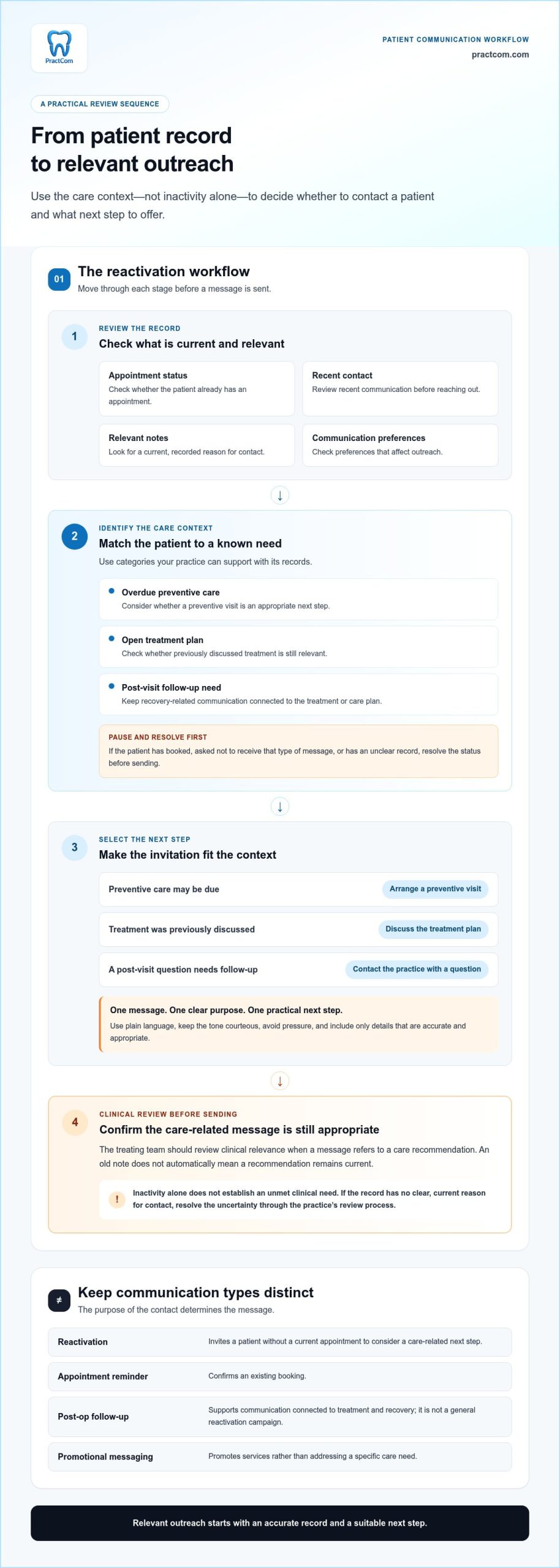
A patient list is a starting point, not a clinical decision. Before preparing outreach, review the record, establish why the patient might need contact, and choose a next step that fits the context. This brief review helps staff avoid treating every inactive record as an unmet care need and gives clinicians a chance to check care-related messages.
Use a simple sequence:
- Review the record. Check appointment status, recent contact, relevant notes, and recorded communication preferences.
- Identify the care context. Separate overdue preventive care from unscheduled treatment and follow-up needs after a visit or procedure.
- Select the next step. Choose an appropriate invitation, such as arranging a preventive visit, discussing a treatment plan, or contacting the practice with a post-visit question.
The treating team should review clinical relevance before staff send messages that refer to care recommendations. A patient list upload alone doesn’t establish who should be contacted, why they should be contacted, or which message is appropriate. Those decisions depend on accurate records and a practice-defined review process.
Prioritize by patient status and known care need
Use categories your practice can support with its records, such as overdue recall, an open treatment plan, or a post-visit follow-up need. Then check for recent contact, an existing appointment, and patient preferences that affect outreach. If a patient has already booked, asked not to receive a particular type of message, or has an unclear record, pause and resolve the status before sending.
Keep clinical recommendations under the treating team’s review. A record may show that treatment was discussed, but staff shouldn’t assume an old recommendation remains current. Likewise, an automated dental post-op follow-up belongs to a defined treatment or recovery workflow. It isn’t a substitute for deciding whether an inactive patient needs a separate reactivation message.
Prioritization should reflect the care plan, not just the time since the last visit. For general background on dental-health research, the National Institute of Dental and Craniofacial Research is part of the National Institutes of Health.
Make the outreach relevant without over-personalizing
Use only details that are accurate and appropriate for the message. Avoid including unnecessary sensitive information in a text or email. Give each communication one purpose and one practical next step, such as calling the practice to discuss an existing care plan or booking a preventive visit. If the patient needs a conversation, provide a staff contact route rather than relying only on a link.
Before using patient information in a communication workflow, ensure data entry complies with HIPAA and other applicable privacy laws. Consistent communication tools can support a practice-designed process. Explore PractCom’s patient communication tools to see how its patient-facing materials and follow-up features can support that process.
7 Patient Reactivation Campaign Ideas for Dental Practices
A campaign is a communication approach, not a promise of a booking. Choose an idea only when the patient’s record supports the reason for contact, and have the treating team review clinical references. Each message should explain its purpose and offer a next step that fits the patient’s situation.
Campaign ideas for overdue care and unfinished treatment
These outreach options address specific scheduling gaps. Keep the message focused on the recorded care context and make it easy for the patient to ask a question before deciding what to do.
- Preventive-care check-in. For patients whose records indicate preventive care may be due. Briefly explain that the practice is reaching out about a checkup, then invite the patient to book or reply to discuss scheduling.
- Unscheduled-treatment follow-up. For patients with a treatment plan recorded as open. Acknowledge that the practice would like to follow up on the plan without implying urgency or making a new clinical recommendation. Invite questions or offer a way to discuss appointment options.
- Missed-appointment reconnection. For patients who missed an appointment and haven’t rescheduled. Use a neutral tone, avoid blame, and provide a straightforward route to choose another time or contact the team.
- Referral-status check-in. For patients whose records show a referral and a follow-up need. Ask whether they need help with the next step, such as discussing the referral with the practice team. Don’t assume the referral remains outstanding if the record is unclear.
Campaign ideas for post-treatment and ongoing engagement
These messages support continuity after a visit or offer useful information. Keep clinical guidance aligned with the treating team’s instructions, and give patients a clear way to raise concerns.
- Post-treatment check-in. For patients with a planned follow-up after treatment. Ask whether they have questions and direct clinical concerns to the practice team. An automated dental post-op follow-up can support this communication workflow, but it should reflect the clinician’s instructions rather than act as a general recall message.
- Relevant patient-education note. For patients whose records or care plan make a topic useful, such as understanding a recommended preventive-care step. Share a brief, plain-language explanation and invite the patient to contact the practice with questions. Avoid sending broad educational content just because a patient is inactive.
- Long-inactive patient re-engagement. For patients with no recent visit and no clear current care context. Use a low-pressure message asking whether they’d like to hear from the practice about arranging care. Offer a simple reply or contact option, and respect the patient’s choice not to continue the conversation.
Before sending any of these messages, confirm that the patient’s status and communication preferences are current. If the record doesn’t support a clear purpose, hold the message for review rather than guessing. That pause helps keep outreach relevant, respectful, and connected to the patient’s actual care context.
How to Plan, Send, and Evaluate a Dental Reactivation Campaign
A dependable campaign needs more than a message and a patient list. Define why you’re reaching out, confirm who the outreach is for, and decide in advance who will handle replies. This preparation gives the team a clear workflow and makes it easier to review what happened without assuming every patient will respond or book.
- Define the purpose. State the specific care-related reason for contact, such as a preventive visit or a discussion about previously recommended treatment.
- Review the audience. Check records for relevant care context, current appointment status, recent contact, and communication preferences. Set aside records that need clarification before outreach.
- Draft the message. Use plain language, one clear purpose, and one practical next step. Have a clinician review clinical content for accuracy and relevance.
- Assign ownership. Identify the staff member or role responsible for sending messages, responding to scheduling questions, routing clinical concerns, and recording outcomes.
- Review results. Track delivery, responses, and scheduled next steps using records available to the practice. Use the findings to refine the next campaign.
Build a repeatable message and response workflow
Keep each message concise and specific. State the general reason for contact, then invite the patient to reply, call, or arrange a visit. Choose email, text, or printed handouts according to the practice’s communication workflow and the patient’s recorded preferences. Avoid including unnecessary sensitive details. For broader practice communications and promotional newsletters, services like Fismbot – Grow your business: AI social content and email tools, plus expert support for marketing, websites and technology that just works. can assist teams in drafting digital outreach and email campaigns.
Before sending, document how staff will handle common replies. A scheduling response can go to the person responsible for appointments; a clinical question should reach the appropriate practice team member. For teams managing multichannel outreach across phone, email, and chat, platforms like GraiaCX help coordinate inquiries with AI-driven contact center automation. Record how opt-out requests are handled, too, and make sure staff know where to document them. A written response plan helps prevent messages from sitting unanswered or being passed between team members without clear ownership.
Consistent communication records also make review easier. PractCom’s tracked delivery logs show what was sent, how it was sent, and when. Use these records to review communication activity, not as proof that a patient read a message or that a reactivation campaign produced a particular clinical or financial outcome. Users must ensure patient data entry complies with HIPAA and other applicable privacy laws.
Review results and refine the next outreach
Review each campaign according to its purpose. For preventive-care outreach, note delivery and replies, then track whether a next step was scheduled. For unfinished treatment, record questions or requests for a conversation. These measures show how the workflow is functioning; they don’t establish why a patient did or didn’t respond.
Look for practical adjustments. If messages were delivered but replies were limited, consider whether the purpose and next step were clear. If staff couldn’t manage responses promptly, clarify ownership or escalation. Compare campaigns with similar purposes rather than treating post-visit follow-up and overdue-care outreach as equivalent. Then update audience criteria, wording, or staff procedures based on what the records show.
For a consistent foundation for patient communication, explore PractCom’s communication approach.
Use PractCom to Support Consistent Patient Communication
A practice-designed workflow is easier to manage when staff can use consistent, patient-friendly materials and keep a record of what was sent. PractCom Communications brings together communication and documentation tools, including automated patient follow-ups, a Patient Portal, and a library of post-treatment instructions. These resources support clear communication around care and help your team maintain an organized process. They don’t replace your practice’s decisions about whom to contact or what a reactivation campaign should say.
Keep the distinction clear: PractCom’s instruction templates are designed for aftercare, not as ready-made recall campaign messages. Your team should select the appropriate material and determine the purpose of each patient communication.
Use templates and delivery records to keep communication organized
The Dental Aftercare Notes library includes 80+ post-treatment instruction templates covering common and complex procedures. They give staff a consistent starting point for aftercare communication, while clinical content should remain aligned with the treating team’s instructions. PractCom also includes 80+ informed consent templates and 60+ management and medication forms, including Med Cards, Problems & Emergencies Sheets, and Compliance & Refusal Forms.
Staff have full control of each form: edit, download, print, or email it, with version history. Templates can also be customized with practice branding, saved favorites, and language preferences. Tracked delivery logs show what was sent, how it was sent, and when. For automated dental post-op follow-up, reusable aftercare materials and delivery records can support an orderly communication workflow while leaving clinical decisions with the treating team.
Support different patient communication needs
Patient needs and practice workflows vary, so one delivery method won’t suit every situation. Documents can be sent by email or text, or provided as print-ready handouts. Digital delivery may fit a practice’s existing communication process, while print offers a physical document for patients who prefer paper. Choose the method that fits the patient’s preference and the practice’s workflow.
Documents are translated into 15 languages, helping practices provide information in languages patients can use. The Patient Portal provides access to patient documents 24/7/365, so patients can return to available materials when they need them. This describes portal access, not a guarantee of uninterrupted service.
PractCom also includes a five-click referral management system with tracking and delivery logs, with referrals created for email or print. To use these resources effectively, establish who selects materials, who reviews clinical content, and who handles patient replies. Users must ensure patient data entry complies with HIPAA and other applicable privacy laws. Clear ownership and accurate records help keep communication consistent while leaving clinical judgment with the dental team.
Start with PractCom to support your practice’s patient communication workflow.
Make Your Next Patient Outreach Easier to Manage
Your next step doesn’t need to be a large campaign. Choose one patient group with a clear care-related reason for contact, assign a staff owner, and decide how your team will handle replies before the first message goes out. A small, well-defined workflow gives you a practical way to learn what patients ask and where staff need clearer steps.
Keep each communication purpose distinct. Automated dental post-op follow-up supports post-treatment communication, while reactivation outreach invites a patient to consider an appropriate next step in care. Both work best when the message is clear, the next step is useful, and the practice has a process for responding.
Consistent communication comes from deliberate choices, not simply sending more messages. Start with the workflow that would reduce friction for your team and make the patient’s next step easier to understand. Start with PractCom to take a practical step toward more organized patient communication.
Frequently Asked Questions
What is a patient reactivation campaign in dentistry?
A patient reactivation campaign is planned outreach to help a patient consider an appropriate next step in dental care. For example, a practice might contact someone whose record shows a preventive visit may be due, then offer a way to discuss or arrange it. It’s different from sending post-treatment instructions or confirming an appointment already booked. The practice should base the message on current records, not inactivity alone.
How do dental practices identify patients for reactivation?
Use practice records to find patients with a relevant, unresolved next step, then verify their status before outreach. Check whether they already have an appointment, recently contacted the practice, completed care elsewhere, or expressed a communication preference. A patient list upload can help organize records, but it doesn’t determine clinical priority by itself. Have the treating team review care-related recommendations, especially when a treatment plan may have changed.
What should a dental patient reactivation message say?
State who the message is from, why the practice is reaching out in plain language, and what the patient can do next. For instance: “Our records indicate you may be due for a preventive visit. Reply or call the office if you’d like to discuss scheduling.” Keep details appropriate to the channel, avoid implying a diagnosis, and provide a staff contact option for questions that need a conversation.
How often should a dental practice contact an inactive patient?
There isn’t one contact schedule that fits every patient or situation. Set a practice-defined follow-up plan based on the reason for outreach, the patient’s preferences, and applicable communication requirements. Avoid repeating the same message without reviewing the record. Pause outreach when the patient responds, books, asks not to be contacted, or the reason for contact is no longer relevant. Record those changes.
Can automated follow-ups replace personal calls from the dental team?
No. Automated messages can help deliver consistent information, but they can’t replace staff judgment or a personal conversation when a patient has concerns. Use automation for straightforward communication, such as sharing approved instructions or inviting a scheduling response. Route clinical questions, unexpected replies, or signs of distress to the appropriate team member. An automated dental post-op follow-up should support the care process, not make clinical decisions.
How can dental practices evaluate whether a reactivation campaign is working?
Review operational measures that match the campaign’s purpose. For example, compare how many messages were delivered, how many patients replied, and how many scheduled a next step. Track these separately for preventive-care outreach and unfinished-treatment follow-ups, since they invite different responses. Note staff time or unresolved replies as workflow signals, too. These measures help refine the process, but don’t prove that outreach caused a clinical or financial result.
How should dental offices handle patient information in reactivation messages?
Use only the patient details needed to explain the outreach, and avoid including sensitive clinical specifics unless the channel and workflow are appropriate. Limit access to patient information to staff who need it for their role, and follow the practice’s privacy procedures. Users must ensure patient data entry complies with HIPAA and other applicable privacy laws. Marketing and treatment-related communication may have different requirements, so distinguish their purpose before sending.

Article by
Cary Ganz DDS
Dr. Cary H. Ganz is a dentist, prosthodontist, entrepreneur, lecturer, and author with more than 50 years of experience in clinical dentistry and dental technology. Throughout his career, he has combined hands-on patient care with a deep understanding of how technology can improve dental practice operations, communication, documentation, and patient outcomes.
In addition to his clinical background, Dr. Ganz has held significant leadership roles in the dental technology industry, including Past Owner and Vice President of Clinical Affairs at DEXIS Digital Radiography and Past Vice President of Clinical Affairs at Denticon Practice Management Software. His business experience includes product development, clinical strategy, dental software innovation, practice management solutions, and educating dental professionals on the effective use of technology in modern dentistry.
Today, Dr. Ganz continues to focus on creating practical technology solutions for dental practices, including PractCom, a comprehensive dental practice communication platform designed to improve patient communication, documentation, compliance support, referrals, and overall practice efficiency. His work reflects a career-long commitment to helping dentists deliver better care while making their practices more organized, efficient, and protected.
No responses yet