
What if your team could answer three questions about any referral without searching through paper, email, and spreadsheets: what was sent, how it was delivered, and when? That is the practical test of dental referral management software. A referral process should make those details easier to create and retrieve, not add another trail of records for staff to manage.
If your current process makes it hard to find a referral’s delivery history, a more consistent workflow can help. A focused system can guide staff through creating a referral and keep its delivery details together. It can also complement your practice management system rather than replace it.
This guide explains what to look for when evaluating referral software, how to organize referral creation and delivery records, and how PractCom supports the process. You’ll learn how its five-click referral system, email or print delivery, tracking, and delivery logs fit into a broader communication platform. The goal is a clear, practical process that suits your team without expecting one tool to do everything.
Key Takeaways
- Map each referral handoff, from preparing documents to sending them and retaining delivery details, to spot gaps in your current process.
- Evaluate dental referral management software by how well it supports your workflow, delivery methods, records, and document control, not by feature count alone.
- Define who prepares, sends, and reviews referral documents before adopting a new process, so responsibilities are clear.
- Separate software capabilities from your practice’s procedures when deciding how referrals will be handled and documented.
- PractCom brings referral creation, email or print delivery, and delivery logs together in a communication platform. It is not a replacement for a full PMS.
What Dental Referral Management Software Should Actually Manage
Referral administration is a handoff, not the whole patient journey. Dental referral management software should help your team organize the practical steps: gathering the necessary details, preparing the relevant document, sending it through an appropriate channel, and retaining a record of that delivery. Its job is to support the administrative work, not make clinical decisions or determine what happens next.
A consistent process makes routine questions easier to answer. If a colleague asks whether a referral was sent, staff should be able to find the document and its delivery information without piecing together paper notes, inboxes, and spreadsheets. A delivery log can show what was sent, how it was sent, and when. It does not establish that the receiving office acted on the referral or that the patient scheduled or received treatment.
Which referral tasks need a consistent process?
Start by listing the administrative handoffs your team performs. The details depend on your practice’s procedures, but a useful sequence is:
- Gather the referral details and identify the document needed.
- Prepare the referral document using the information and format chosen by your practice.
- Send it using the method selected for that referral, such as email or print.
- Retain the document and available delivery information so staff can review the handoff later.
An internal checklist can remind staff to complete each step, but it depends on someone recording and maintaining the information separately. Software-maintained delivery records keep available details about the document and its delivery together for later review. PractCom supports referral creation, email or print delivery, tracking, and delivery logs. Forms can be edited, downloaded, printed, or emailed, with version history.
Keep the boundaries clear. Referral software can organize documents and delivery records. It does not decide whether a referral is clinically appropriate, make treatment decisions, manage patient scheduling, or prove that a referral led to treatment. Those activities are separate from documenting the administrative handoff.
Referral software versus a dental PMS
A dental practice management system (PMS) may support a broad range of practice operations. A focused referral tool has a narrower role: organizing referral documents and related communication records. The distinction matters when your team is trying to solve a specific handoff problem. You may need a more consistent way to prepare and review referral deliveries, not another system intended to manage the entire practice.
PractCom is a communication and documentation platform, not a full PMS. Its Referral Management System focuses on creating referrals and recording delivery information. Use it alongside the systems and procedures that support your broader practice operations. Do not assume referral records automatically synchronize with a PMS; define where each record is maintained in your workflow. Users must ensure patient data entry complies with applicable privacy laws, including HIPAA.
How Dental Referral Management Software Creates a Clearer Handoff
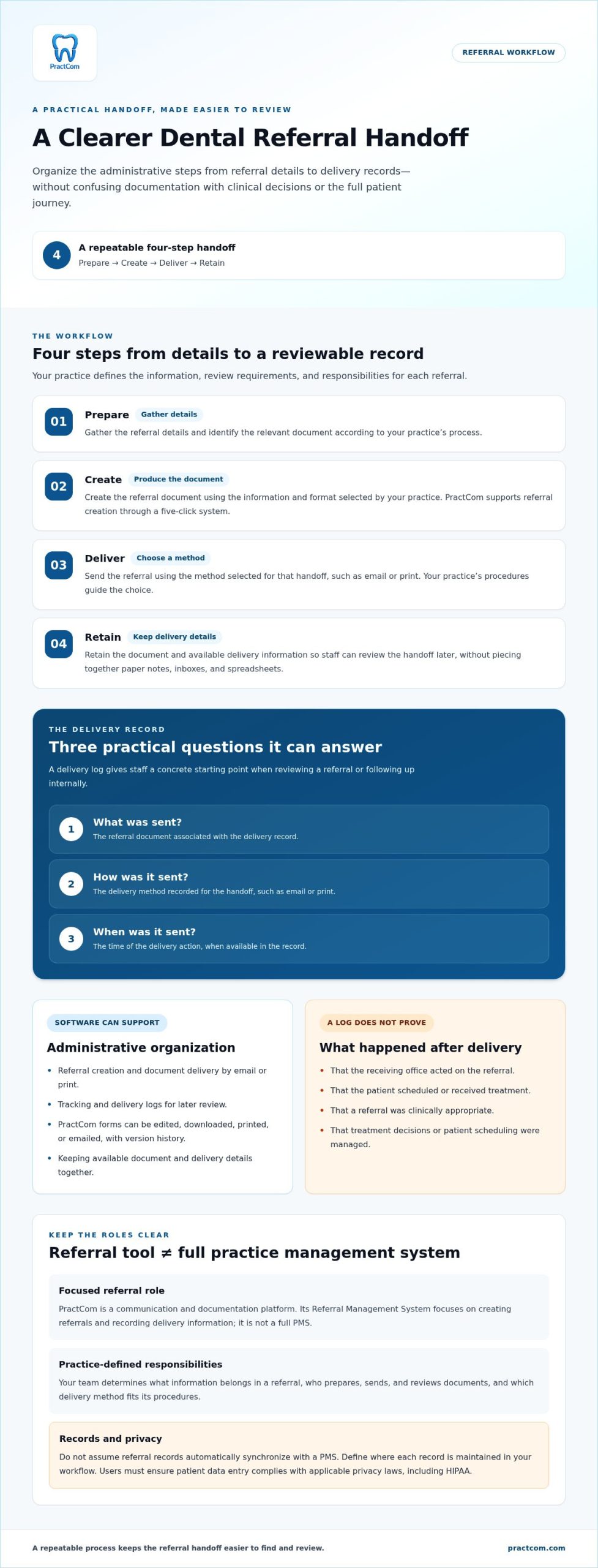
A referral handoff is easier to review when each administrative step follows a repeatable sequence. Staff prepare the referral, create the document, choose email or print for delivery, and retain the available delivery record. Software can organize supported actions and records. Your practice still determines what information belongs in a referral, who reviews it, and which delivery method fits its procedures.
- Prepare: Gather the referral details and relevant document information according to your practice’s process.
- Create: Produce the referral document through the system’s creation workflow.
- Deliver: Choose an available method, such as email or print.
- Retain: Use the available delivery record when staff need to review the handoff.
This sequence helps separate the work the software supports from decisions that remain with the practice. A tool may provide document controls and delivery logs, but it does not set clinical criteria, determine which details staff should enter, or assign responsibility for checking a referral before it is sent. Include those decisions in your team’s procedures.
From referral details to a deliverable document
A consistent creation process gives staff a familiar path to follow, even during a busy day. PractCom’s five-click referral system supports referral creation, with email or print delivery for referral documents. Your practice’s review steps guide how information is prepared before sending.
Keep the handoff practical: prepare the relevant details, create the document, select email or print, then retain the available delivery information. The Dental Referral Management: A Practical Guide also discusses referral stages, tracking, and communication, useful context for considering how these steps fit together.
What tracking and delivery logs can show
A referral delivery log records what was sent, how it was sent, and when it was sent. These details give staff a concrete starting point when reviewing a referral or responding to an internal follow-up question. Instead of relying on memory, the team can refer to a record of the delivery action.
- What: The referral document associated with the delivery record.
- How: The delivery method, such as email or print.
- When: The recorded time of the send action.
Keep the meaning of a log precise. A delivery record documents a send action. It does not establish that the recipient received or reviewed the referral, that the patient scheduled an appointment, or that treatment occurred. It also does not measure referral conversion. Those outcomes require information beyond the delivery details recorded here.
PractCom forms can be edited, downloaded, printed, or emailed, and include version history. These controls let teams manage documents while keeping versions available for reference. To see how the referral workflow organizes creation and delivery records, explore PractCom’s referral management system.
How to Compare Dental Referral Management Software for Your Practice
Compare tools against the handoff your team needs to manage, not the length of a feature list. A focused communication platform can suit a practice looking for clearer referral documents and delivery records. A broader dental practice management system (PMS) may be a better fit when the goal is to manage wider practice operations in one system. Neither category is automatically right for every office.
Use this comparison to frame your evaluation. “Varies by product” means the capability depends on the specific system, not that every tool offers it.
| Comparison area | Focused referral tool | Broader PMS | PractCom |
|---|---|---|---|
| Referral creation | Assess how the tool supports preparing and creating referral documents. | Referral features vary within a broader operational platform. | Supports referral creation through a five-click system. |
| Delivery methods | Check which delivery methods fit your team’s procedures. | Available methods depend on the product. | Supports email or print delivery. |
| Tracking records | Determine whether records show what was sent, how, and when. | Referral record capabilities vary. | Tracking and delivery logs show what was sent, how it was sent, and when. |
| Document control | Consider editing, downloading, printing, emailing, and version history. | Document controls depend on the platform. | Forms can be edited, downloaded, printed, or emailed, with version history. |
| Platform scope | Focused on referral-related communication tasks. | Designed for broader practice operations. | A communication and documentation platform, not a full PMS. |
Referral delivery evidence and referral outcomes are different measures. A log can help staff review a send action; it does not establish receipt, patient scheduling, treatment, or conversion. Keeping this distinction in mind helps you compare tools based on what their records actually show. For further context on fragmented tools and workflow challenges, see Dental Referral Management: Challenges and Solutions.
Does the tool fit your practice size and workflow?
An individual office may have a small group sharing referral preparation, sending, and review. A dental service organization (DSO) may need to coordinate those responsibilities across teams or locations. Map who performs each task, where records need to be reviewed, and which steps are inconsistent. PractCom’s DSO workflow context helps larger organizations consider how referral workflows fit their operations without assuming every location works identically.
Can your team control documents and delivery records?
Email and print give teams different ways to deliver documents. The right choice depends on the practice’s workflow and patient communication preferences. Assess whether editing and version history support your document-control process, and whether branding or saved favorites would help your team. PractCom includes customizable templates and branding, including language, practice branding, and saved favorites. For the platform’s wider communication and documentation scope, review the platform overview.
Before choosing, identify the gap you need to close: document preparation, delivery choice, record review, or platform scope. A tool that addresses the actual handoff issue may be more useful than one with a longer feature list.
How to Evaluate Referral Software Before Changing Your Workflow
Introducing dental referral management software works best when you understand the process it is meant to support. Before changing tools, document how referrals move through your practice today. Include staff handoffs, delivery channels, and where records end up. This baseline helps you identify a specific problem to solve, rather than asking the team to adopt a new process without a clear reason.
Checklist: Map the workflow, assign roles, agree on delivery methods, and define which records staff will review and retain.
Start with a small, practical workflow. For example, select one common referral type, identify the staff involved, and agree on what information they will record each time. Keep clinical judgment and administrative review with the people responsible for those decisions. Software can support document creation and delivery records, but it should not replace the practice’s procedures.
Prepare your referral workflow for adoption
Write down the current steps, from referral preparation through delivery and recordkeeping. Note where information is re-entered, which handoffs rely on memory, and how staff handle questions about a sent document. Then clarify responsibilities: who prepares the document, who sends it, and who reviews the record when follow-up is needed.
Identify which documents need customization or practice branding, and decide how those choices will be managed. Plan for both digital and printed referrals, including who handles the printed copy and where related records are retained. These details belong in your practice’s workflow, rather than in assumptions about what software does automatically.
Give the team a simple standard for documenting each referral. Specify which delivery details staff should record and where they should look when reviewing a prior handoff. A consistent routine makes it easier to compare the new process with the old one and identify unresolved gaps.
Review records, exports, and privacy responsibilities
Consider how your team will review records over time. PractCom delivery records can be exported as a CSV for a selected date range, giving staff a way to work with records for the period they choose. Decide who is responsible for reviewing these records and how that task fits into your existing administrative procedures.
Also establish clear expectations for handling patient-related information. Users must ensure that patient data entry complies with applicable privacy laws, including HIPAA. Software alone does not establish compliance or remove the practice’s responsibility for its own procedures. Keep access, staff responsibilities, and record handling aligned with your organization’s privacy practices.
Once your workflow, roles, delivery methods, and review records are defined, assess software against real tasks rather than broad promises. To see how PractCom’s referral workflow supports document creation and delivery records, explore the PractCom referral system.
When PractCom Fits a Dental Referral Management Workflow
PractCom supports practices that need a consistent way to create referral documents, send them by email or print, and review delivery logs. Its Referral Management System handles these administrative steps within a broader communication and documentation platform. It is designed to organize referral handoffs, not to manage every part of practice operations.
The distinction matters: PractCom is not a full practice management system (PMS), and it should not be evaluated or presented as one. It complements the broader systems and procedures a practice uses. If your priority is referral creation and delivery records, evaluate those capabilities directly. A system for the full range of practice operations is a different software category.
What PractCom’s Referral Management System includes
The referral workflow uses a five-click system and includes tracking and delivery logs. The logs show what was sent, how it was sent, and when, giving staff concrete details to refer to when reviewing a delivery. PractCom forms can be edited, downloaded, printed, or emailed, and include version history.
Referral management is one part of the wider platform. PractCom also includes 80+ post-treatment instruction templates, 80+ informed consent templates, and a patient portal. Documents can be sent by email, text, or printed as handouts. Translation of all documents into 15 languages supports communication with patients who use different languages. These tools bring referral tasks into a broader communication and documentation workflow while keeping clear that PractCom is not a PMS.
Compare the platform with your actual process. PractCom provides a structured referral creation workflow, email or print delivery, and delivery logs. The logs do not establish whether a referral was received, led to scheduling, or resulted in treatment. Your team’s procedures remain essential for deciding how to handle each referral and its records.
A low-friction way to assess fit
PractCom offers a 15-day free trial – no credit card needed. The subscription is $49.95 / month after trial. Cancel anytime. Free setup and free upgrades forever are included. Use the trial to assess how the referral workflow fits your process, who will handle documents, and whether the delivery records support staff review.
Patient lists can be uploaded using a standard CSV file, so staff do not need to add patients one by one. Before entering patient-related information, users must ensure data entry complies with applicable privacy laws, including HIPAA. A software tool does not itself establish a practice’s compliance or replace its privacy procedures.
If referral creation, email or print delivery, and delivery logs match the gap you want to address, start a PractCom free trial.
Make Your Next Referral Workflow Easier to Review
The right dental referral management software should support the way your team works, not force an unnecessary redesign. In your next workflow review, choose one friction point, agree on how staff will handle it, and define what a better handoff would look like in practice. A clear, focused change gives your team a useful basis for deciding whether a dedicated communication tool belongs in its workflow.
PractCom’s five-click referral management system includes tracking and delivery logs showing what was sent, how, and when. Free setup and free upgrades forever are included. Assess the process against your team’s needs with a 15-day free trial – no credit card needed.
Start with a real referral workflow, then consider whether the system makes its administrative steps easier to manage and review. PractCom can support a more consistent process without replacing your practice’s broader systems. Your team can move forward with a clearer view of how referrals are prepared, delivered, and documented.
Frequently Asked Questions
What does dental referral management software do?
Dental referral management software helps a practice handle administrative tasks around referral documents and their delivery. For example, a staff member can prepare a referral, send it through an available channel, then locate the related record if a colleague asks about it later. It supports document workflows, not clinical judgment: the software does not decide whether a referral is appropriate or what care a patient should receive.
How do dental practices track referrals?
Practices can use referral records to review the administrative status of a handoff and identify which referrals need staff attention. PractCom delivery records can be exported as a CSV for a selected date range, which can support an internal review or recordkeeping task. A delivery log documents the send action; practices need a separate process to establish whether a recipient responded or a patient scheduled an appointment.
Can referral management software replace a dental PMS?
No. A referral tool focuses on referral documents and related communication, while a dental practice management system (PMS) serves broader operational needs. PractCom is a communication and documentation platform, not a full PMS. A practice can use a focused tool for its referral workflow while continuing to use its PMS for broader functions. Do not assume information automatically syncs between separate systems.
What should a dental referral delivery log include?
A useful delivery log should let staff identify the document involved, the method used to send it, and when the send action occurred. These details help answer practical questions during an internal review without relying on memory or searching multiple records. A log is not confirmation that the recipient opened or accepted the referral, or that the patient received treatment.
Can dental referral documents be printed instead of emailed?
Yes. PractCom supports printing referral documents as well as email delivery. A printed document can suit a workflow where staff need a paper copy for a handoff or filing, while email may fit another part of the practice’s process. Decide how printed referrals will be handled and where related records will be maintained, so paper and digital steps remain clear to the team.
How much does PractCom cost, and can a practice try it first?
PractCom offers a 15-day free trial – no credit card needed. The subscription is $49.95 / month after trial. Cancel anytime. The trial lets a practice assess whether the referral workflow suits its team. Free setup and free upgrades forever are included, so the evaluation can focus on practical workflow fit.
Does using dental referral software make a practice HIPAA compliant?
No. Using software alone does not establish that a practice complies with HIPAA or other applicable privacy laws. Users must ensure patient-related data entry complies with applicable privacy laws, including HIPAA, and follow their organization’s own privacy practices. Before entering patient information, define who is responsible for handling it and how staff should use the system. A delivery log is a recordkeeping feature, not proof of compliance.

Article by
Cary Ganz DDS
Dr. Cary H. Ganz is a dentist, prosthodontist, entrepreneur, lecturer, and author with more than 50 years of experience in clinical dentistry and dental technology. Throughout his career, he has combined hands-on patient care with a deep understanding of how technology can improve dental practice operations, communication, documentation, and patient outcomes.
In addition to his clinical background, Dr. Ganz has held significant leadership roles in the dental technology industry, including Past Owner and Vice President of Clinical Affairs at DEXIS Digital Radiography and Past Vice President of Clinical Affairs at Denticon Practice Management Software. His business experience includes product development, clinical strategy, dental software innovation, practice management solutions, and educating dental professionals on the effective use of technology in modern dentistry.
Today, Dr. Ganz continues to focus on creating practical technology solutions for dental practices, including PractCom, a comprehensive dental practice communication platform designed to improve patient communication, documentation, compliance support, referrals, and overall practice efficiency. His work reflects a career-long commitment to helping dentists deliver better care while making their practices more organized, efficient, and protected.
No responses yet