
An email attachment may be convenient, but it does not give your practice a clear way to manage access to a dental document. Secure document sharing with dental patients can use a patient portal or another suitable protected channel, so access is managed rather than relying on an attachment alone. The HIPAA Security Rule requires covered entities to safeguard electronic protected health information, making the way documents are sent and stored important.
It’s reasonable to want a process that’s easy for patients and dependable for your team. This guide explains how portal-based sharing works, how it compares with email attachments, and what encryption and access controls can contribute. You’ll also learn when end-to-end encryption may be useful, what to consider when choosing a sharing solution, and how a patient portal can make sending and receiving records part of a more organized communication workflow.
Key Takeaways
- Compare attachments with managed sharing by looking at how access, storage, and activity are controlled.
- Use encryption in transit and at rest as part of a broader approach to protecting patient information.
- Consider end-to-end encryption when you need tighter control over who can decrypt shared files.
- A patient portal can give patients a dedicated way to send and access records while helping your team organize document exchanges.
What makes a dedicated dental practice document sharing solution better than email attachments?
A dedicated file-sharing process can make access, transfers, and records easier to manage than standalone attachments. The right method depends on the information, recipient, and safeguards your practice uses.
HIPAA safeguards for patient information
Yes. HIPAA requirements apply to electronic patient information handled by covered dental practices. The Health Insurance Portability and Accountability Act of 1996 is a United States federal statute concerning confidential medical data, according to U.S. Congress. Its Security Rule requires safeguards for electronic protected health information, including the ability to record and examine activity in systems containing that information.
For each transfer, review who can access the file, how your practice protects it in transit and at rest, and whether activity can be reviewed. Encryption is an addressable safeguard; if you choose an alternative, document the risk analysis. When obtaining patient consent, explain what will be shared, with whom, and through which channel, then record the patient’s preference according to practice policies.
Transfer methods and BAA support
Options include a patient portal, SFTP, or email configured to protect the information. Compare each method’s access controls, encryption, and audit logs; an email attachment alone doesn’t organize those safeguards. Choose a file-sharing service appropriate for your practice’s HIPAA obligations. U.S. Department of Health and Human Services Office for Civil Rights guidance says vendors that access protected health information need a Business Associate Agreement with a covered practice.
Software pricing depends on the case and is given after a quote request; user access, storage needs, and security controls affect the cost.
Portal encryption and access controls
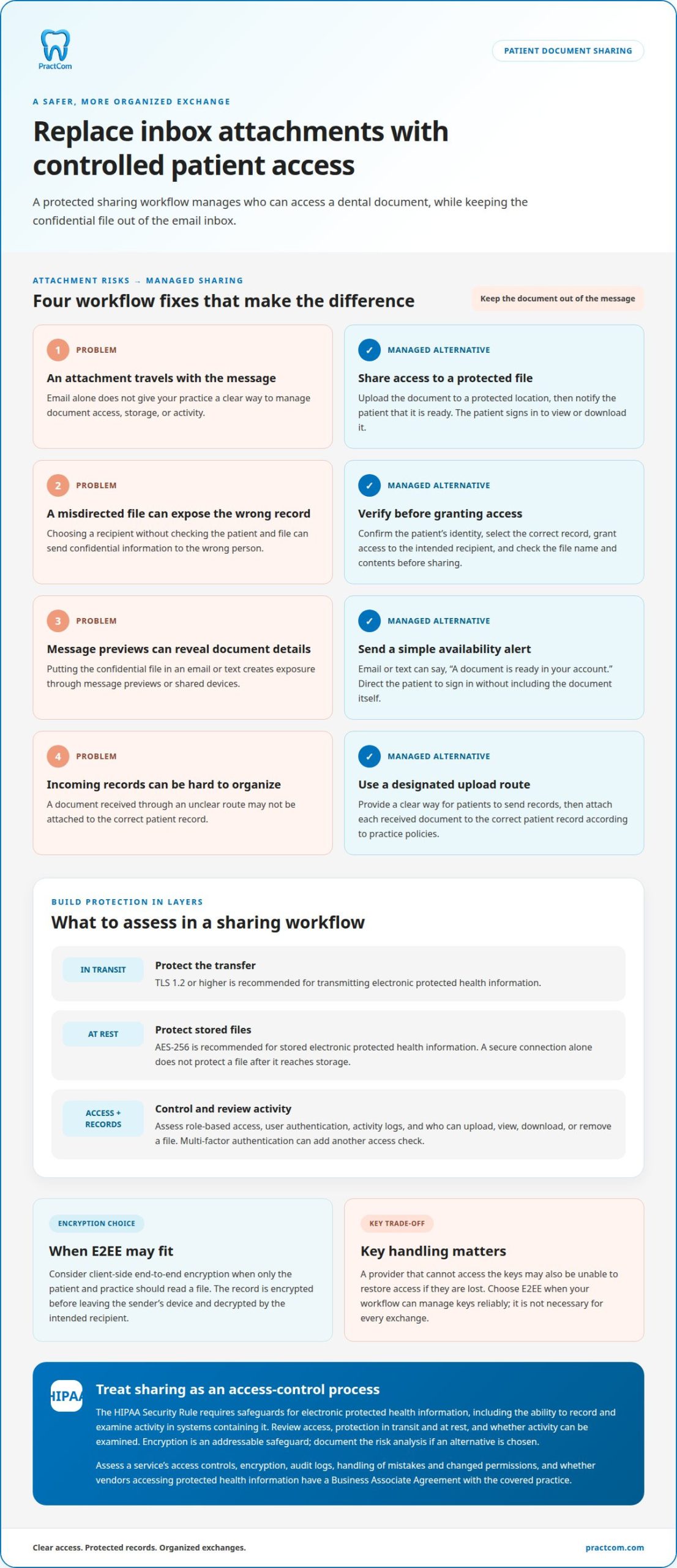
For a portal, assess protection during transmission and at rest, along with role-based access, user authentication, and activity logs. TLS 1.2 or higher during transmission and AES-256 at rest are recommended safeguards for electronic protected health information. Multi-factor authentication can add a further access check. These controls help your team manage a file-sharing workflow without relying on automatic email forwarding or attachment handling.
Is client-side end-to-end encryption (E2EE) really necessary?
Not for every dental document exchange. E2EE can add protection when only the patient and practice should read a file, but it also makes key handling central. With client-side encryption, records are encrypted before leaving the sender’s device and decrypted by the intended recipient. A provider that cannot access the keys may also be unable to restore access if those keys are lost.
For website submissions, protect the form and the information it collects. Use an encrypted connection during transfer, restrict staff access to submitted records, and protect stored files with encryption at rest. TLS 1.2 or higher is recommended for data in transit, while AES-256 is recommended for stored electronic protected health information. A secure connection alone doesn’t protect a file after it reaches storage.
HHS Office for Civil Rights guidance describes encrypting files both at rest and in transit for secure sharing. HIPAA treats encryption as an addressable safeguard, so practices should consider it through a documented risk analysis. Properly encrypted patient information is exempt from HIPAA breach notification when its decryption key or password wasn’t compromised. Protecting keys and establishing staff procedures are therefore part of the decision, not an afterthought.
Choose E2EE when limiting access to the sender and recipient is a priority and your workflow can manage keys reliably. For routine exchanges, compliant file sharing can still protect information through encryption, authentication, access limits, and activity records. Review how providers handle website uploads, stored files, key recovery, and agreements covering access to protected information. The best fit is the method your team can operate consistently. Explore a patient communication workflow as you assess how document exchange fits your practice.
Secure sharing as an alternative to email attachments
A secure sharing workflow replaces a file attached to a message with controlled access to a document. For example, staff upload a treatment plan to a protected location, then notify the patient that it’s ready. The patient signs in to view or download it on a personal device. This keeps the confidential file out of the email inbox and gives the practice a clearer way to manage access.
Give each step in the exchange a clear owner. Confirm the patient’s identity, select the correct record, and grant access to the intended recipient. Before sending, check the file name and contents; “Jordan Lee treatment plan” should never go to another patient by mistake. For incoming records, provide a designated upload route, then attach the received document to the correct patient record according to practice policies.
Email and text notifications can tell patients when a file is available without including the document itself. Keep the alert simple, such as “A document is ready in your account,” and direct the patient to sign in. This reduces exposure through message previews or shared devices. If a patient requests unencrypted email, explain the risks, document the request, and limit the protected information sent.
Assess the workflow as an access-control process, not just a delivery method. Decide who can upload, view, download, or remove a file, and keep activity records for review. A “HIPAA-compliant” label alone doesn’t establish that a file-sharing service suits your practice’s use. Assess how it handles confidential documents from upload through patient access, and how staff manage mistakes, outdated files, or changed permissions. Clear instructions help patients find the right record and help your team avoid sending attachments to the wrong address.
Secure file sharing through a dental patient portal
A portal gives patients a designated place to access records instead of relying on attachments. For your team, it can make document exchanges easier to organize and track.
Secure portal platform options
Which dental patient communication platforms offer secure document sharing? Look for a patient portal that supports protected file access, patient authentication, and activity records. Compare how each system limits access to protected health information and lets staff associate a file with the correct patient. The HIPAA Privacy Rule is designed to control and limit access to electronic protected health information, so access management matters.
To set up sharing, define which staff roles can upload or view documents, how patients sign in, and how access changes when records are outdated. Test the workflow with a sample file before introducing it to patients. A new patient may upload records from a previous provider to the portal, where the new doctor can access them immediately.
Downloading, signing, and returning forms
How can patients securely download, sign, and return dental forms? A practical workflow is to sign in, open the intended form, download or complete it, then upload the signed copy through the portal. Clear file names, such as “medical history form,” help patients choose the right document. The practice should confirm that the returned file is attached to the correct patient record.
Before rollout, explain each step in plain language and show patients where to find their files. Set expectations for using a private device and keeping account passwords confidential. For a patient who cannot use the online route, offer an accessible alternative, such as printed documents, and record the completed form according to established practice procedures.
A portal’s safeguards depend on its configuration and daily use. Assign access by staff role, require authentication, and review activity records as part of routine oversight. Give patients specific instructions: sign in through the practice’s portal, locate the requested document, and avoid sending protected files in a reply email. These steps create a repeatable process for outgoing files and patient uploads.
Set up a secure patient communication workflow to make document access part of a more organized patient experience.
PractCom: Post-Treatment Instruction Library
PractCom’s Post-Treatment Instruction Library helps dental teams share clear aftercare guidance following treatment. Its library includes over 80 post-treatment templates, giving your team ready-made materials to support consistent patient communication.
For practices organizing more of their document workflow, PractCom’s Digital Informed Consent Forms support consent documentation, while its Patient Portal gives patients a dedicated place to access practice communications and documents. The Referral Management System helps organize referral-related exchanges. These tools fit best when your goal is to structure patient-facing documents and communication, rather than manage every practice operation in one system.
Consider which documents your team sends most often, how patients receive them, and where staff need a clearer process. Explore PractCom’s patient communication tools to see how they can support your document-sharing workflow.
Build a sharing workflow your team can sustain
Make secure document sharing with dental patients a clear routine, not an occasional workaround. Start by identifying the document exchanges that create the most friction for your team. Decide who handles each step, how staff confirm the correct patient, and what instructions help patients complete their part. A defined process makes gaps easier to spot and responsibilities clearer as workflows change.
Then consider how patient communication tools can support that routine without adding unnecessary complexity. PractCom offers dental communication tools that can help organize patient-facing documents and related workflows. A conversation can help you consider how those offerings fit the way your practice communicates today. Contact PractCom about secure sharing and take a practical next step toward a more consistent patient experience.
Frequently Asked Questions
How does it work?
Secure document sharing with dental patients usually starts when staff select the correct patient record and make a document available through a protected channel. The patient receives an alert, signs in, and views or downloads the file. Your team should confirm the recipient and document before release, then follow practice procedures to record the exchange. That sequence helps prevent mix-ups between patients with similar names.
Can I prevent recipients from downloading or sharing my industry documents?
You can limit actions such as downloading or forwarding when a sharing system supports those controls, but you can’t fully prevent someone from copying information they can view. A recipient could photograph a screen, for example. For sensitive records, share only what the recipient needs, restrict access where possible, and explain appropriate handling. Treat viewing controls as one safeguard, not a guarantee against copying.
How is the PHI secured?
Protecting protected health information involves more than encrypting a file. Practices should limit staff access to information needed for their roles, secure user credentials, and review activity in systems containing electronic PHI. Staff training matters too: checking recipient details before sending can help prevent accidental disclosure. Include file-sharing systems in risk analyses and address malicious software and contingency planning.
What Safeguards Do I Need?
Build safeguards around the full document workflow. Set policies for electronic, paper, and oral disclosures; train staff to recognize phishing and handle patient information carefully; and limit access to electronic PHI. Include ransomware in risk analyses, maintain contingency plans, and establish a process for reporting suspicious activity. For example, staff should know whom to notify if they send a record to the wrong recipient.
Why Choose Secure File Sharing Feature?
A dedicated sharing workflow can help your practice organize patient documents separately from everyday messages. That matters when a patient needs a treatment plan while staff also manage referrals, forms, and follow-up instructions. Use a consistent process to identify the patient, select the appropriate document, and record the exchange. Clear ownership of each step makes handoffs easier to manage and helps teams spot mistakes promptly.
Is email or text messaging secure for sharing dental documents?
Email or text can notify a patient that a document is ready, while the file itself remains in a protected channel. If a patient requests unencrypted email, explain the risks, document the request, and limit the PHI sent. Keep alerts neutral, since message previews may appear on a shared device. For example, say a document is available rather than including a diagnosis in the notification.

Article by
Cary Ganz DDS
Dr. Cary H. Ganz is a dentist, prosthodontist, entrepreneur, lecturer, and author with more than 50 years of experience in clinical dentistry and dental technology. Throughout his career, he has combined hands-on patient care with a deep understanding of how technology can improve dental practice operations, communication, documentation, and patient outcomes.
In addition to his clinical background, Dr. Ganz has held significant leadership roles in the dental technology industry, including Past Owner and Vice President of Clinical Affairs at DEXIS Digital Radiography and Past Vice President of Clinical Affairs at Denticon Practice Management Software. His business experience includes product development, clinical strategy, dental software innovation, practice management solutions, and educating dental professionals on the effective use of technology in modern dentistry.
Today, Dr. Ganz continues to focus on creating practical technology solutions for dental practices, including PractCom, a comprehensive dental practice communication platform designed to improve patient communication, documentation, compliance support, referrals, and overall practice efficiency. His work reflects a career-long commitment to helping dentists deliver better care while making their practices more organized, efficient, and protected.
No responses yet