
Practice automation is more than a faster way to handle paperwork. The most useful digital tools for modern dental practice connect patient communication, case tracking, appointment management, cloud systems, and routine tasks. That helps information move through the practice in a more organized way. Digital communication may include treatment explanations, consent forms, reminders, and follow-up messages, alongside tools that support clinical planning.
Digital technology can make parts of a busy workday easier, but choosing the right tools means knowing which ones support communication and coordination without adding unnecessary complexity. Start by identifying where information gets delayed, repeated, or missed. This guide explains how automation can reduce repetitive administrative work while keeping the care team central.
We’ll look at patient-facing communication, appointment and case tracking, cloud-based workflows, and practical limits to consider when adopting digital systems. You’ll also see how a connected communication platform can support consent, referrals, post-treatment instructions, and patient follow-ups, helping you pinpoint where a more consistent process could make the biggest difference.
Key Takeaways
- Match patient messages to the appointment and treatment so instructions feel relevant and easier to follow.
- Use case tracking and appointment reminders to keep follow-ups visible and reduce reliance on staff memory.
- For complex implant or esthetic cases, organize the clinical images and details that help communicate the treatment plan.
- Build digital workflows in phases, with attention to secure information transfer, staff training, and system compatibility.
- Explore communication tools for consent, referrals, patient access, and post-treatment instructions when manual processes create friction.
What Is Digital Communication in Dentistry?
Digital communication in dentistry uses connected tools to share treatment information, records, and follow-up messages. Adoption takes planning for software, equipment, and staff training. Glitches or compatibility issues can disrupt workflows, so assess how each tool will fit with existing systems and what staff need to learn before rollout. Ongoing costs depend on the systems selected, implementation needs, training, and support.
Patient Communication and Monitoring
Patient portals, electronic forms, and follow-up messages help practices maintain contact with patients. Clear, timely information helps patients prepare for treatment and understand what to do afterward. For example, a practice can email appointment-specific preparation details, then send post-treatment guidance. Staff can review patient responses and follow up directly when questions need attention.
Treatment Visualization and Patient Education
Digital treatment visualization uses images, scans, or virtual simulations to show a patient possible treatment outcomes. A dentist might display an intraoral scan to explain a tooth concern, or use smile design software to illustrate cosmetic changes. These visuals give patients a clearer basis for discussing options. Interactive diagrams and 3D models can also show how a proposed treatment fits into the patient’s broader care plan.
Digital Records and Data Security
Digital record-keeping stores patient information, treatment plans, and communications in electronic systems. This can reduce duplicate data entry when patients enter information directly through digital forms. Organized records also make it easier for authorized team members to locate relevant details, such as a consent form or follow-up note. According to the U.S. Department of Health and Human Services, HIPAA is an example of health information privacy regulations relevant to protecting dental patient data.
Clinical Accuracy and Patient Experience
Digital tools can help teams capture, review, and explain information consistently. For example, clinicians can examine a digital impression alongside a patient’s oral health concerns. A clear visual may help explain why treatment is being considered, while tailored messages clarify what happens next. Digital impressions and virtual simulations can also make parts of the patient experience more personalized.
Technology still needs careful review. Teams should check digital impressions for complete margins before submitting them, because scan inaccuracies can carry into design and manufacturing. For patients who find traditional impressions uncomfortable, digital scanning may offer another way to capture an impression. Choose tools according to the clinical task, the information required, and the patient’s needs.
Tracking case status and managing appointments
Digital tracking can connect appointment details, case updates, and follow-up tasks in one workflow. For dental teams, that clarifies who owns the next action, from confirming a visit to checking whether a laboratory case has progressed.
Cloud-Based Case Portals
A cloud-based case portal lets a practice view case status and history online. Updates help staff see whether a case is awaiting information, in progress, or ready for review. For example, a team can check a restoration case before contacting the laboratory, then record the update for colleagues. A shared history makes handoffs more consistent and reduces reliance on scattered notes.
Software Integrations for Scheduling and Communication
Communication and scheduling tools can connect patient messages with appointment workflows, sometimes through integration with practice software. The available integrations depend on the systems and their compatibility. Common functions include online booking and reminders by text, email, or voice. Practices often can adopt digital communication without replacing practice management software. The key is to reduce duplicate entry while keeping appointment details accurate across connected tools.
Practice management systems organize scheduling, patient records, and treatment plans. Communication tools can handle specific tasks alongside them. For example, an online booking tool may send an appointment request while the practice system remains the schedule of record. Make clear which system controls each detail. That helps prevent conflicting appointment times and keeps imaging, scanner notes, and patient images associated with the correct case.
Automated reminders give patients a consistent prompt about visits and help staff communicate changes. Text, email, or voice messages can reinforce the appointment date and time. Recall systems can flag patients due for follow-up, helping the team maintain continuity without relying only on memory.
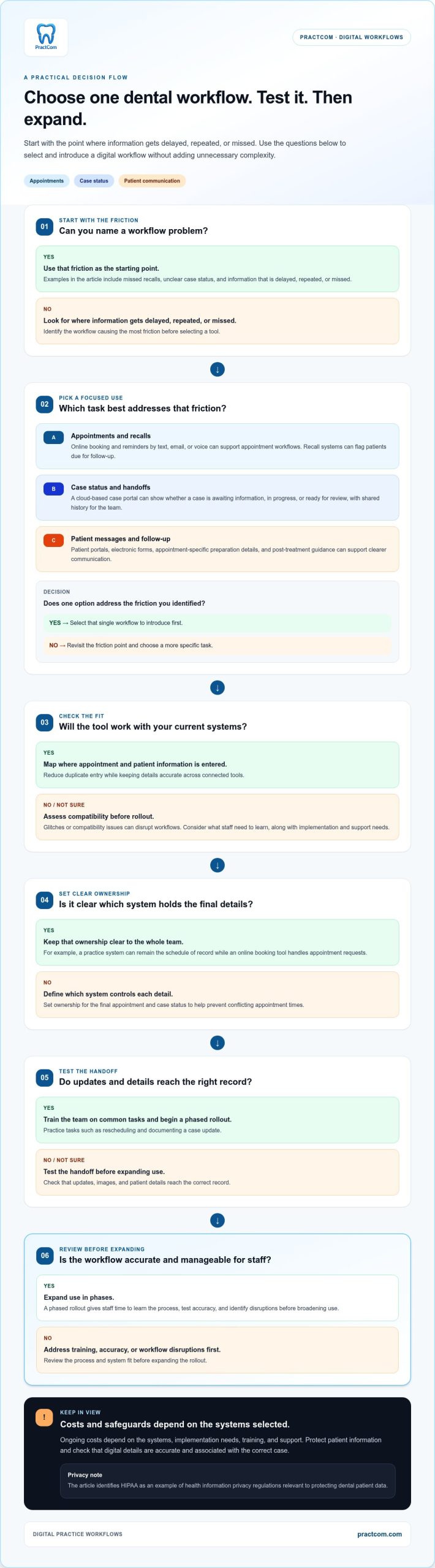
To select and implement dental technology, start by identifying the workflow causing the most friction, such as missed recalls or unclear case status. Map where appointment and patient information is entered, assess compatibility with current systems, and select one workflow to introduce. A phased rollout gives staff time to learn the process, test accuracy, and identify disruptions before expanding use.
- Define ownership: Decide which system holds the final appointment and case status.
- Test handoffs: Check that updates, images, and patient details reach the right record.
- Train the team: Practice common tasks, including rescheduling and documenting a case update.
Cloud systems can support efficiency, but software glitches or compatibility issues may disrupt workflows. A clear process for recording updates helps staff maintain patient comfort and case visibility when a tool is unavailable. To explore a connected approach to dental communication, review the patient communication platform.
Communicating about complex implant and esthetic cases
Complex implant and esthetic procedures depend on shared clinical information between the dentist, patient, and dental laboratory. A clear treatment plan connects diagnostic images, restoration goals, and technical instructions. For example, imaging in an implant case can help the team plan placement and explain the proposed approach to the patient. Clear communication keeps everyone focused on the same case details.
For implant planning, cone beam computed tomography (CBCT) can show dental bone, soft tissue, and nerve pathways. Scan data can help plan an implant’s position, angle, and depth while avoiding critical anatomical structures. Dentists can use these views to explain relevant anatomy and the proposed treatment plan. When a custom restoration is involved, the images also give the dental laboratory useful context.
Esthetic cases need a different but equally precise visual record. Clinical photos of the preparation, adjacent teeth, and the patient’s smile give laboratory technicians context that written notes alone may not convey. For example, a full smile photo shows how surrounding teeth relate to the planned restoration. Early discussion with the laboratory is recommended for challenging implant or esthetic cases.
Before sending a case, organize its visual and written information together. A digital prescription can specify materials, shades, margins, and special instructions. These details help the laboratory interpret clinical goals and identify missing information before design or fabrication moves forward. Review the prescription alongside the images so each instruction matches the correct tooth and restoration.
- Identify the case: Match the patient record, imaging, photographs, and prescription.
- Show the clinical context: Include relevant views of the preparation, adjacent teeth, and smile.
- Clarify the restoration: State the requested material, shade, margins, and case-specific instructions.
- Discuss complexity early: Contact the laboratory before submission when implant or esthetic details need coordination.
Patient communication matters alongside laboratory coordination. A clinician can use CBCT views or smile images to explain why a procedure is proposed and how the planned restoration relates to surrounding anatomy. Pair each visual with plain-language explanations of the treatment sequence and decisions still to make. This gives patients a concrete way to discuss questions before proceeding with dental care.
Digital communication also supports a traceable case handoff. Keep the treatment plan, relevant images, and laboratory instructions together in the same clinical record. If the laboratory requests clarification, document the response with the case instead of relying on a separate message thread. This helps the team maintain a consistent record of clinical decisions and intended outcomes.
Future integration of digital technologies
Digital dentistry increasingly connects imaging, treatment planning, fabrication, and patient communication. The goal isn’t to add software for its own sake, but to make useful information available at the right point in care. For example, a digital scan can inform a restoration design, while saved records can support later treatment planning. Each connection works best when teams understand how information moves between tools.
Artificial intelligence is being incorporated into digital dentistry for image analysis, diagnosis, and treatment recommendations. In a clinical workflow, AI-supported analysis may help a dentist review digital imaging and identify areas for closer attention. The software can support assessment, but clinicians still interpret findings alongside the patient’s history and examination. Documenting how imaging informs a treatment plan helps keep decisions understandable and reviewable.
Saved digital designs can also support future care. For example, a replacement denture may be fabricated from its saved design without taking new impressions. Organized records are therefore valuable beyond the original appointment. Practices need a reliable way to associate each design with the correct patient and case, then retrieve it when replacement work is needed. This depends on accurate record-keeping, not simply storing files.
Computer-guided implant surgery combines 3D imaging with virtual planning to guide implant placement. The planning process can help clinicians assess the intended position before a procedure. Dental 3D printers can complement other digital technologies by supporting workflow control, using existing digital skills, and reducing manufacturing time or cost. For instance, a practice may use a digital design to produce a surgical guide, then keep the related files with the case record.
Other emerging applications include teledentistry, health apps, robotic-assisted surgery, regenerative dentistry using stem cells, and augmented or virtual reality for patient education. Each has a different role. A health app may support patient access, while an AR or VR experience may help explain a proposed procedure. Their value depends on whether they address a real clinical or communication need and fit the practice’s workflow.
Integration works best as a planned process, not a sudden technology switch. Start with one defined workflow, such as linking imaging to treatment planning, then train staff and review how records move between systems. Identify compatibility gaps before adding another tool. Dental professionals should keep learning and adapt to technologies such as AI to maintain patient care. Regular review helps ensure software improves the clinical process rather than creating disconnected steps.
Practice automation and cloud systems
Automation and cloud systems can connect recurring administrative work with clinical workflows. Digital tools for modern dental practice are most useful when they reduce manual handoffs while leaving staff responsible for review and care.
AI tools can analyze dental images, support diagnostic review, and assist treatment planning. Administrative automation can send reminders or organize routine follow-ups. These tools support the practice team and clinical judgment, rather than replacing them.
Automation in Dental Practices
Practice automation uses software to handle repeatable tasks, such as sending appointment reminders or routing follow-up messages. Consistent workflows reduce reliance on staff remembering every routine step. For example, a reminder can go by text, email, or voice while staff focus on patient questions and clinical coordination. The American Dental Association says automation can free teams from repetitive manual tasks without replacing them.
Automation also connects clinical production steps. A digital impression can move electronically to a dental laboratory, simplifying collaboration and record-keeping. In a practice using CAD/CAM, a digital design can feed milling or 3D printing for restorations or appliances. Each handoff needs review. Staff should confirm the correct patient, case, and files before submission. A precise initial scan matters because errors can carry through design and manufacturing.
Cloud systems can transmit impression files through an online platform and make case history and updates accessible to authorized team members. For example, a clinician can review a submitted scan’s status without searching separate emails. The workflow still depends on reliable access, clear file organization, and system compatibility. Glitches or connection issues can interrupt clinical work, so teams need a process for essential tasks during an outage.
Cloud Systems and AI Tools
Cloud systems store or transmit digital records through online platforms, while AI software analyzes information such as dental imaging. Connected data can support treatment planning and diagnostic review. For example, AI may flag an area in an image for clinician review, while cloud storage keeps the image linked to its case. The clinician interprets the finding and makes the care decision.
For administration, automation can route a completed task to the next team member or send a scheduled patient follow-up. For diagnostics, AI can assist image analysis and treatment recommendations, but its output requires clinical interpretation. Ask where each tool fits: Does it reduce repetitive data handling, improve access to relevant images, or support a defined review step? Clear responsibilities prevent software suggestions from being mistaken for final decisions.
Adoption requires investment in equipment, software, and training. A phased approach can limit disruption: choose one workflow, train the staff who use it, test records and file transfers, then review problems before expanding. For instance, begin with electronic lab submissions before connecting additional production steps. Choosing digital tools for modern dental practice workflows works best when each addition addresses a defined need. If your practice is organizing patient communication alongside automation, explore the communication platform.
PractCom: Post-Treatment Instruction Library
PractCom helps dental practices organize patient communication with its Post-Treatment Instruction Library, Digital Informed Consent Forms, Referral Management System, and Patient Portal. The library includes over 80 post-treatment templates, giving teams a consistent starting point for sharing care guidance after procedures.
Practices can deliver instructions and consent forms by email, text, or print in 15 languages. This can help staff provide patients with relevant written information while supporting a more consistent communication process. The Patient Portal and Referral Management System also address patient access and referral coordination, complementing clinical care without replacing a full practice management system.
If clearer post-treatment communication or more organized patient-facing workflows are your next priority, explore PractCom’s tools for dental practices.
Make your next workflow decision with confidence
The next step isn’t adding technology for its own sake. Choose one communication gap to address, then decide how your team will keep the process consistent as patient needs and workflows evolve. A clear focus helps you assess whether a tool supports daily practice or adds another disconnected task.
PractCom offers a Post-Treatment Instruction Library, Digital Informed Consent Forms, and a Referral Management System. These tools help practices organize post-treatment guidance, consent documentation, and referral communication within their wider digital workflow.
As you consider digital tools for a modern dental practice, focus on the process your team wants to make clearer and more dependable. A practical conversation can help you explore whether PractCom’s communication tools fit that need. Contact PractCom to discuss your needs, and take the next step toward a workflow that better supports your team and patients.
Frequently Asked Questions
What digital tools are essential for a modern dental practice?
Start with tools that address daily clinical and communication needs: imaging and records, appointment scheduling, patient messaging, and follow-up tracking. The right mix depends on where information currently gets delayed or entered more than once. For example, a practice with frequent referral handoffs may prioritize referral tracking, while one with inconsistent aftercare messages may start with standardized instructions. Add tools in stages, and define who maintains each workflow.
How do dental practice management systems compare in features and price?
Dental practice management systems generally bring core administrative functions together, while focused tools handle specific tasks such as patient communication or referrals. Compare options by examining scheduling, records, reporting, integrations, and the workflows your team needs. Prices vary by product, features, and practice requirements, so there’s no useful single figure for all systems. PractCom offers communication and documentation tools, not a full practice management system.
What cybersecurity and HIPAA requirements apply to digital tools in dental practices?
Dental practices should handle patient information in line with applicable privacy requirements and protect access to digital records. According to the U.S. Department of Health and Human Services, HIPAA is an example of health information privacy regulations relevant to dental patient data. Practical safeguards include limiting account access to appropriate staff, using secure channels to transfer sensitive files, and having a clear process for reporting suspected exposure or access problems.
Which patient communication and online scheduling tools integrate with dental practice software?
Integration depends on the systems involved and their compatibility. Common tools include online booking and appointment reminders by text, email, or voice. Practices usually do not need to replace their practice management software.

Article by
Cary Ganz DDS
Dr. Cary H. Ganz is a dentist, prosthodontist, entrepreneur, lecturer, and author with more than 50 years of experience in clinical dentistry and dental technology. Throughout his career, he has combined hands-on patient care with a deep understanding of how technology can improve dental practice operations, communication, documentation, and patient outcomes.
In addition to his clinical background, Dr. Ganz has held significant leadership roles in the dental technology industry, including Past Owner and Vice President of Clinical Affairs at DEXIS Digital Radiography and Past Vice President of Clinical Affairs at Denticon Practice Management Software. His business experience includes product development, clinical strategy, dental software innovation, practice management solutions, and educating dental professionals on the effective use of technology in modern dentistry.
Today, Dr. Ganz continues to focus on creating practical technology solutions for dental practices, including PractCom, a comprehensive dental practice communication platform designed to improve patient communication, documentation, compliance support, referrals, and overall practice efficiency. His work reflects a career-long commitment to helping dentists deliver better care while making their practices more organized, efficient, and protected.
No responses yet