
What if the best way to get your dental team to support new technology is to involve them before you choose it? If staff first encounter a tool during rollout, it can feel like one more task added to an already full day. Getting dental team buy-in for new technology starts earlier: with honest conversations about where work slows down and what would make daily routines easier.
Clinical and administrative roles may need different things from a new system. A tool that seems efficient from an owner’s perspective could add steps at the front desk or disrupt a clinical handoff. If past rollouts caused confusion or inconsistent use, staff may also be cautious about another change.
This guide explains how to identify workflow needs with your team, compare technology against real tasks, and introduce a chosen tool with clear ownership, useful training, and regular feedback. A focused pilot and designated team champions can make adoption more manageable, so technology supports communication and documentation instead of adding friction.
Key Takeaways
- Map the current process: note who handles each task, where handoffs happen, and where information gets repeated or delayed.
- When getting dental team buy-in for new technology, compare options against real tasks rather than polished sales claims.
- Assess workflow fit, usability, training, document delivery, and reporting needs with input from the staff who will use the system.
- Keep the first rollout focused: appoint an owner, pilot one use case, train users, gather feedback, and refine before expanding.
- Consider how patient communication tools can support post-treatment instructions, consent, follow-ups, and referral workflows.
Why Getting Dental Team Buy-In for New Technology Starts With Listening
Even technology selected to solve a real problem can feel like extra work when the practice is busy. Staff may need to learn unfamiliar steps while keeping appointments moving and patients informed. Getting dental team buy-in for new technology starts before a purchase or rollout: listen to the people who will use it and understand what their work involves.
Team buy-in means a shared understanding of why a change is needed, paired with a practical commitment to make it work. It doesn’t require everyone to love every feature. Staff should be able to see the purpose, raise concerns, and understand how the change fits their responsibilities. That clarity supports consistent use and can help staff give patients consistent information and manage handoffs.
What dental staff may be worried about
Questions about a new tool aren’t automatically resistance to change. They may point to specific risks: interrupted routines, duplicate data entry, unclear ownership, or too little training time. A dentist may wonder whether a clinical step will interrupt patient care. An assistant or hygienist may be concerned about adding documentation between appointments. Front-office staff may anticipate bottlenecks from new intake or follow-up steps. Each role sees a different part of the workflow, so a decision based on one perspective can miss practical friction.
Separate concerns about the tool from concerns about implementation. A team member may support the goal but worry about when training will happen. Another may like the tool but need clarity about who completes a task. Ask what would make the change workable and record the answer instead of treating hesitation as a verdict.
How to surface concerns before selecting a tool
Hold brief, role-inclusive conversations before comparing options. Invite dentists, assistants, hygienists, and front-office staff to describe current pain points and workarounds. Keep the discussion focused on tasks, not on selling a preferred solution. Health technology can affect care, administrative work, and patient communication, so consider the broader Health Information Technology context as you map the practice’s needs.
Use open questions to draw out specific examples:
- Which task gets repeated, and who repeats it?
- Where do delays or missed handoffs tend to occur?
- What information do staff have to search for or re-enter?
- When do patients seem unsure about what happens next?
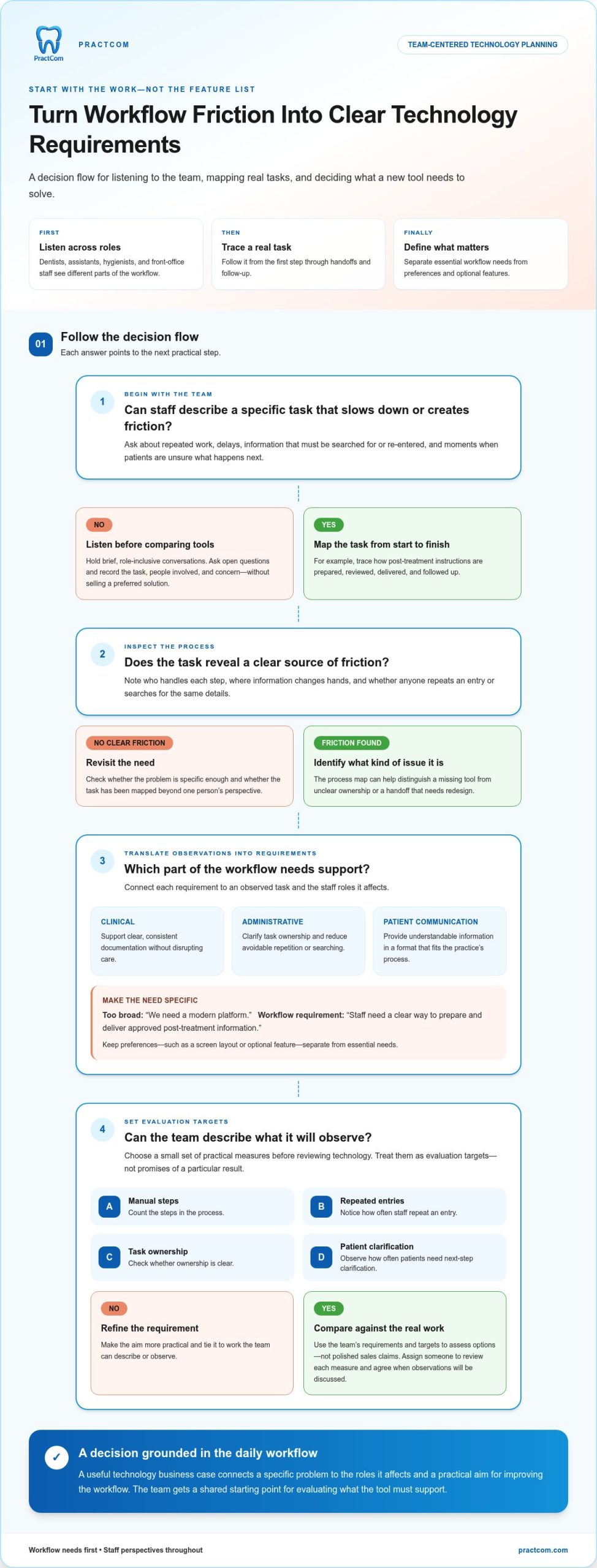
Review the full dental practice workflow, from the first patient interaction through clinical care and follow-up. A recurring workaround may reveal a useful requirement for the next technology evaluation. Record the task, the people involved, and the friction they describe. This gives the team a shared starting point for comparing tools against actual needs rather than assumptions about what staff should find helpful.
Build a Shared Case for Dental Technology Around Workflow Needs
Once staff have described their concerns, turn those observations into a shared picture of the work. Document the current process before discussing a preferred tool. Otherwise, it’s easy to select technology based on an assumed problem and overlook the steps that make the workflow difficult.
Map a representative task from start to finish. For example, trace how post-treatment instructions are prepared, reviewed, delivered, and followed up. Note who handles each step, where information changes hands, and whether anyone has to re-enter or search for the same details. A simple process map can show whether the issue is a missing tool, an unclear owner, or a handoff that needs to be redesigned.
A useful technology business case connects a specific problem to the roles it affects and a practical aim for improving the workflow. That shared statement keeps the evaluation focused on the work rather than a feature list. It also gives clinical and administrative staff a common reason to participate in the decision.
Turn everyday frustrations into requirements
Translate observed problems into requirements the team can use to assess potential solutions. Separate essential needs from preferences, and ground each requirement in tasks staff can describe or observe. Consider the different perspectives involved:
- Clinical: Does the workflow support clear, consistent documentation without disrupting care?
- Administrative: Does it clarify task ownership and reduce avoidable repetition or searching?
- Patient communication: Can staff provide understandable information in a format that fits the practice’s process?
“We need a modern platform” is too broad to guide a decision. “Staff need a clear way to prepare and deliver approved post-treatment information” describes a workflow requirement. Record preferences separately, such as a screen layout or optional feature. This distinction helps the team protect must-haves without letting appealing extras distract from the problem.
Agree on outcomes before comparing options
Choose a small set of practical measures before reviewing technology. These might include the number of manual steps in a process, how often staff repeat an entry, whether task ownership is clear, or how frequently patients need clarification about next steps. Treat them as evaluation targets, not promises of a particular result. Assign someone to review each measure and agree when the team will discuss its observations.
Use existing practice information as a baseline where it’s available. If a reliable count isn’t already tracked, start with staff observations instead of creating a complicated measurement system. Then consider whether a proposed workflow would address the documented issue and what information you’ll need to assess it after introduction. Patient experience belongs in this discussion: clearer communication may matter as much as fewer repeated steps or more visible ownership. The ADA’s Practice Management Resources can also inform broader decisions about staff and practice operations.
This groundwork makes getting dental team buy-in for new technology more concrete. The team can compare options against a documented problem and shared aims. If patient communication and documentation are priorities, review PractCom’s communication tools as one focused option in your evaluation.
Compare Dental Technology Options With Staff-Centered Criteria
Once your team has agreed on the problem and the outcomes it wants to assess, compare options against the same practical criteria. A feature list can’t show whether a tool fits the way your practice works. The right tool addresses an agreed workflow need, not merely adds features.
Use a routine task to evaluate each option. For example, walk through preparing and delivering post-treatment instructions: who handles each step, what information they need, and how the patient receives it. Ask staff to describe where the tool supports the process and where it might add work. Record observations against shared criteria rather than relying on impressions from a presentation.
Evaluate fit across clinical and administrative roles
Include the people who perform, receive, and act on each handoff. A dentist may focus on documentation, while front-office staff need a clear way to manage patient communication. Assistants and hygienists can identify friction in the clinical workflow. Consider patient access, too: communication needs may include language options and a choice of digital or printed delivery.
| Criterion | What staff should assess | Practical test |
|---|---|---|
| Workflow fit | Does it support the agreed task and clarify handoffs? | Trace one real task from start to finish. |
| Usability | Can each role find and complete its relevant steps? | Have representative users try the same task. |
| Training | What does each role need to learn, and when? | List the steps users need to perform independently. |
| Delivery options | Can information reach patients in the formats and languages the practice needs? | Review a real communication scenario and its delivery requirements. |
| Reporting needs | Can the practice review the measures it agreed to track? | Identify the information staff and managers need to assess progress. |
For each criterion, ask staff what worked, what was unclear, and what extra steps appeared during the test. PractCom offers email, text, or printed document delivery in 15 languages. Evaluate those options against your team’s patient communication needs rather than assuming every practice requires the same approach.
Assess integration expectations and product scope
Before choosing, map where information must be entered, shared, or revisited, and identify the roles involved. Be specific about the type of technology you need: focused communication and documentation support, or a full practice management system. These serve different purposes. PractCom supports patient communication and documentation workflows; it is not full practice management software.
Include PractCom’s scope in the same task-based evaluation you use for other options. This keeps the decision grounded in workflow fit and helps staff see how their requirements shaped the choice and what each option is intended to support.
Roll Out New Dental Technology in Stages to Build Adoption
A thoughtful selection still needs a practical rollout. Introduce the technology in a limited, observable workflow first, so staff have room to learn without changing every routine at once. Make clear who owns the rollout, where questions go, and when the team will review what’s working. This turns adoption into a shared process rather than an instruction to simply start using a new tool.
Use this sequence to keep the change manageable:
- Name an owner. Choose someone to coordinate the rollout, communicate updates, and make sure staff know where to raise questions.
- Prepare a focused pilot. Select one recurring use case with a visible workflow need. Set boundaries so the pilot doesn’t expand into unrelated processes.
- Train the people involved. Demonstrate the steps each role will perform, then leave time for questions and hands-on practice before the workflow goes live.
- Gather feedback. Set up a clear channel for staff to report friction as it happens, such as a shared log or brief check-in with the owner.
- Review and refine. Compare team observations and agreed measures with the baseline. Adjust the process before deciding whether to expand use.
Choose a pilot that reflects real practice work
Pick a workflow staff perform regularly, with a pain point that’s easy to describe. Include the roles that handle the task and its handoffs, not just the people who selected the technology. Before starting, agree on what the pilot covers, who owns it, how participants will share feedback, and when you’ll review results. Clear boundaries help staff focus their practice and make feedback easier to interpret.
Train for confidence and reinforce adoption
Build training around actual tasks, not a tour of every feature. Show each role the actions it needs to complete and how the work passes to the next person. Provide concise reference steps for frequent actions and handoffs, and give staff time to try the process themselves. Training is part of the rollout, not a one-time announcement; questions often surface once a tool meets the pace of a real workday.
Expect some learning friction. A user may need repetition to remember a new sequence or find an unfamiliar function. That differs from a workflow mismatch, such as an essential task requiring duplicate entry or lacking a clear owner. Ask staff to describe the obstacle and when it occurs. The rollout owner can then determine whether the team needs more practice, clearer instructions, or a process change.
Don’t expand simply because the pilot has started. Review the measures and staff feedback you agreed to track, then decide together whether the workflow is ready to broaden or needs refinement. For a focused patient communication and documentation workflow, review PractCom’s communication tools as part of your evaluation.
Sustain Dental Team Buy-In With the Right Communication Tools
After your team has defined its workflow needs and compared options, consider whether focused communication and documentation tools belong in the solution. PractCom is a dental patient communication platform, not a full practice management software system. The distinction matters: match a tool to the work the team agreed needs support rather than expecting one platform to address every practice operation.
Match communication capabilities to the team’s agreed needs
Start with the tasks staff identified during evaluation. If the team wants a consistent way to share post-treatment guidance, PractCom’s library includes more than 80 post-treatment instruction templates. If the documented need involves consent workflows, digital informed consent forms may be relevant. Automated patient follow-ups and referral management can also be assessed against the practice’s existing communication and referral processes. For teams targeting in-office patient sentiment and pre-review touchpoints, dedicated tools like Siempre Feedback can streamline micro-feedback collection without adding administrative burdens. Match each capability to a specific task, owner, and handoff.
Delivery options can also be part of the workflow assessment. PractCom documents can be delivered by email, text, or print in 15 languages, giving the team formats to consider when planning how patient information is shared. The patient portal and performance dashboard are also part of PractCom’s tools. Evaluate them when they align with needs the team has identified. Keep the assessment tied to what staff must do and review, rather than assuming a feature is useful simply because it’s available.
Be specific about product scope as you discuss options. PractCom focuses on patient communication and documentation and can complement broader practice operations. It isn’t full practice management software. Clear boundaries help staff understand which workflows a tool is intended to support and where other systems or processes remain relevant.
Keep team feedback part of ongoing use
A launch isn’t the finish line. Once a communication tool is in use, give staff a straightforward way to report recurring friction, unclear handoffs, or steps that don’t match the agreed process. Ask for concrete examples: which task was involved, where the workflow slowed down, and what information or ownership was missing. Specific feedback is easier to assess and act on.
Review the workflow measures selected during evaluation alongside staff observations. If the team tracked repeated steps, task ownership, or patient questions, revisit those same measures rather than introducing unrelated metrics. Discuss what appears to be a training need, what may require a process adjustment, and what should be refined before wider use. Regular check-ins show that staff input still matters after the initial decision and support getting dental team buy-in for new technology over time.
For a broader look at communication tools, explore this dental patient communication technology guide. If PractCom’s focused communication and documentation tools align with your team’s priorities, review PractCom as a starting point.
Make the Next Technology Decision a Shared One
Technology adoption isn’t a single decision your team makes on launch day. It’s an ongoing working agreement: staff understand the purpose, know how to raise concerns, and can see that their feedback shapes what happens next. Keep the conversation open as needs change, so the next improvement can build on practical experience rather than assumptions.
That mindset is at the heart of getting dental team buy-in for new technology. Start with one workflow your team wants to improve, then give staff a meaningful role in deciding what support would fit. PractCom was founded by dental professionals to address clinical communication gaps, bringing a practice-informed perspective to patient communication and documentation needs.
If your team is ready to consider a focused next step, explore how PractCom could fit the communication workflows you’ve identified. Explore a practical starting point for your practice.
Progress doesn’t require changing everything at once. With a clear purpose and a team whose input matters, you can move forward thoughtfully and make the next change feel achievable.
Frequently Asked Questions
Why do dental teams resist new technology?
Dental teams may hesitate because a new tool can disrupt familiar routines, require training time, or arrive after earlier changes have strained staff capacity. Those concerns aren’t evidence of bad faith. A front-office employee may worry that a new intake step duplicates existing work, while a hygienist may need time to learn a different documentation sequence. Identify whether a concern relates to workflow, skills, or change fatigue before responding.
How do you get a dental team involved in choosing software?
For getting dental team buy-in for new technology, involve staff before narrowing the options. Invite each role to describe a task the software should support, then have representatives review the workflow from their own perspectives. Agree on role-based criteria, such as clinical usability or clarity at patient handoffs. Record where views differ, discuss trade-offs, and select against shared needs rather than letting the loudest preference decide.
Can a dental practice test new technology before a full rollout?
Yes. A practice can test a tool in a bounded pilot before expanding its use. Choose one repeatable task, name a person to coordinate the test, and define which staff and steps are included. Give participants a simple way to log questions or snags, then set a review point to decide whether to adjust, continue, or broaden the test. A pilot should inform a decision, not become an informal permanent workaround.
What should you do when a dentist or office manager objects to a new tool?
Start by listening and asking what specifically feels risky or impractical. An office manager may be concerned about duplicate work, while a dentist may question how the tool fits a clinical step. Restate the concern, then compare it with the team’s agreed requirements. Does it reveal a workflow gap, a training need, or a preference? Use a small task test or process review to examine the issue before deciding what to change.
How can you measure whether dental staff are adopting new technology?
Measure adoption through the workflow, not by monitoring individuals. For a selected task, track whether agreed steps are completed, how often a step needs repeating or correcting, or whether handoffs remain unclear. Pair available process information with regular staff feedback, since completion alone may not reveal friction. Review patterns with the team, then use them to decide whether instructions, training, or the workflow itself needs adjustment.
How long does it take a dental team to adopt new technology?
There isn’t one reliable adoption timeline for every dental team. A tool used for a familiar task may require less adjustment than one that changes several handoffs or calls for new skills. Timing also depends on available role-based training and staff experience with similar tools. Instead of setting an arbitrary deadline, agree on signs of readiness, such as users completing core tasks and knowing where to get help.
Does dental communication software replace practice management software?
No. Dental communication software and a full practice management system serve different purposes. Communication tools can support tasks such as sharing patient instructions, documenting consent, managing referrals, or sending follow-ups. A full PMS covers broader practice operations. PractCom provides patient communication and documentation tools; it doesn’t replace full practice management software. Define the workflow gap first, then decide whether focused communication support or a broader operational platform fits the need.

Article by
Cary Ganz DDS
Dr. Cary H. Ganz is a dentist, prosthodontist, entrepreneur, lecturer, and author with more than 50 years of experience in clinical dentistry and dental technology. Throughout his career, he has combined hands-on patient care with a deep understanding of how technology can improve dental practice operations, communication, documentation, and patient outcomes.
In addition to his clinical background, Dr. Ganz has held significant leadership roles in the dental technology industry, including Past Owner and Vice President of Clinical Affairs at DEXIS Digital Radiography and Past Vice President of Clinical Affairs at Denticon Practice Management Software. His business experience includes product development, clinical strategy, dental software innovation, practice management solutions, and educating dental professionals on the effective use of technology in modern dentistry.
Today, Dr. Ganz continues to focus on creating practical technology solutions for dental practices, including PractCom, a comprehensive dental practice communication platform designed to improve patient communication, documentation, compliance support, referrals, and overall practice efficiency. His work reflects a career-long commitment to helping dentists deliver better care while making their practices more organized, efficient, and protected.
No responses yet