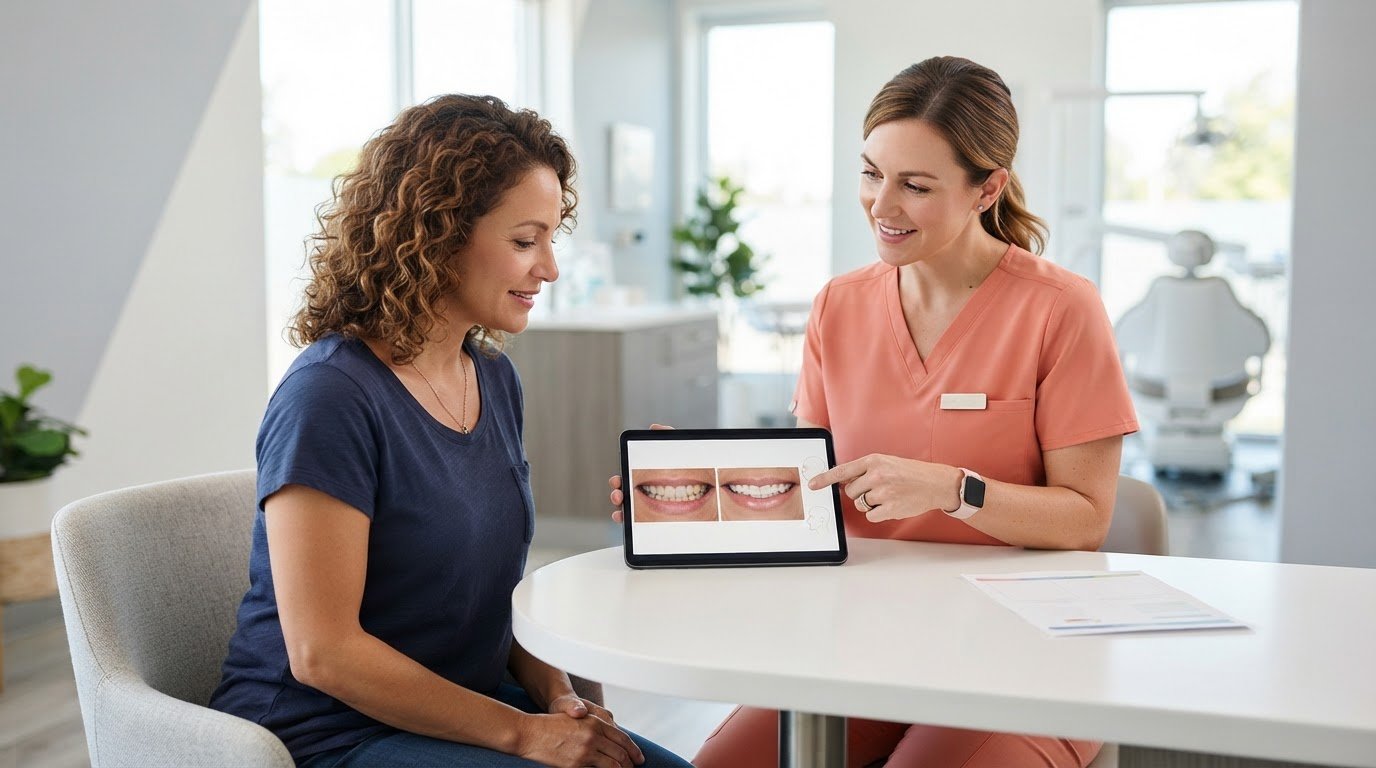
Can a digital preview help you imagine a new smile without promising exactly how treatment will turn out? If you’re unsure which cosmetic changes fit your goals, it can be difficult to make sense of a dentist’s explanation alone. A smile makeover visualization tool gives you a visual starting point, making it easier to describe what you like, what you’re unsure about, and what you want to ask.
The important thing is to understand what the preview is for. It can support a more focused conversation, but it doesn’t determine your treatment plan or guarantee a final result. This article explains what a visualization can and can’t show, how to use one to communicate your preferences, and how a dental practice can use it responsibly. You’ll also learn how PractCom’s smile design tool fits into a broader patient communication workflow, making cosmetic discussions more visual and easier to follow.
Key Takeaways
- Use a smile makeover visualization tool to make cosmetic preferences easier to discuss, not to predict a final result.
- Bring specific goals and questions to the consultation so the preview can help focus the conversation.
- Understand how an illustrative image differs from clinical findings, treatment planning, and completed dental care.
- A responsible practice keeps clinician judgment central, explains limitations in plain language, and clarifies next steps.
- PractCom’s smile design tool supports before-and-after visualization as part of a broader patient communication workflow.
What Is a Smile Makeover Visualization Tool and Its Use?
A smile makeover visualization tool is a visual aid that helps patients and dental professionals discuss possible cosmetic changes. A before-and-after view gives both people a reference for talking about appearance, rather than relying only on descriptions such as “brighter” or “more even.” The preview supports the conversation; it doesn’t establish a clinical treatment plan or confirm what result treatment will produce.
This distinction matters in cosmetic dentistry, which includes procedures such as veneers and whitening, among other options. A visualization can help frame questions about these possibilities, but it doesn’t show every suitable treatment or possible outcome. A clinician considers your oral health, examination findings, and goals before discussing appropriate options.
What does a smile makeover preview help patients visualize?
A before-and-after view can help you point to details that are difficult to explain verbally. For example, you might say you prefer a natural-looking change, want to discuss tooth brightness, or feel uncertain about the appearance of a proposed adjustment. Those reactions make your preferences clearer and give the clinician useful context for the consultation.
The preview is a conversation reference, not a clinical assessment. Your dentist considers it alongside your oral health and other treatment considerations. It may illustrate selected cosmetic changes, but it shouldn’t be taken as a complete display of every option or possible result.
Who can benefit from a cosmetic smile visualization?
Patients exploring cosmetic changes can use a visual reference to explain what feels right and identify questions they want answered. Clinicians can use the same reference to guide a clearer discussion of goals and possible options. It can be especially useful when a patient finds it difficult to picture a change from a verbal explanation alone.
Your preferences help shape the conversation, but they don’t determine whether a treatment is suitable. A professional clinical assessment is needed to evaluate oral health and discuss appropriate care.
For example, if a preview prompts you to ask about whitening or veneers, treat that as a starting point for discussion, not a recommendation. Explain what you like about the image, what concerns you, and what you’d like the clinician to assess. That gives the conversation a more useful focus.
How Does a Smile Makeover Visualization Tool Support a Dental Consultation?
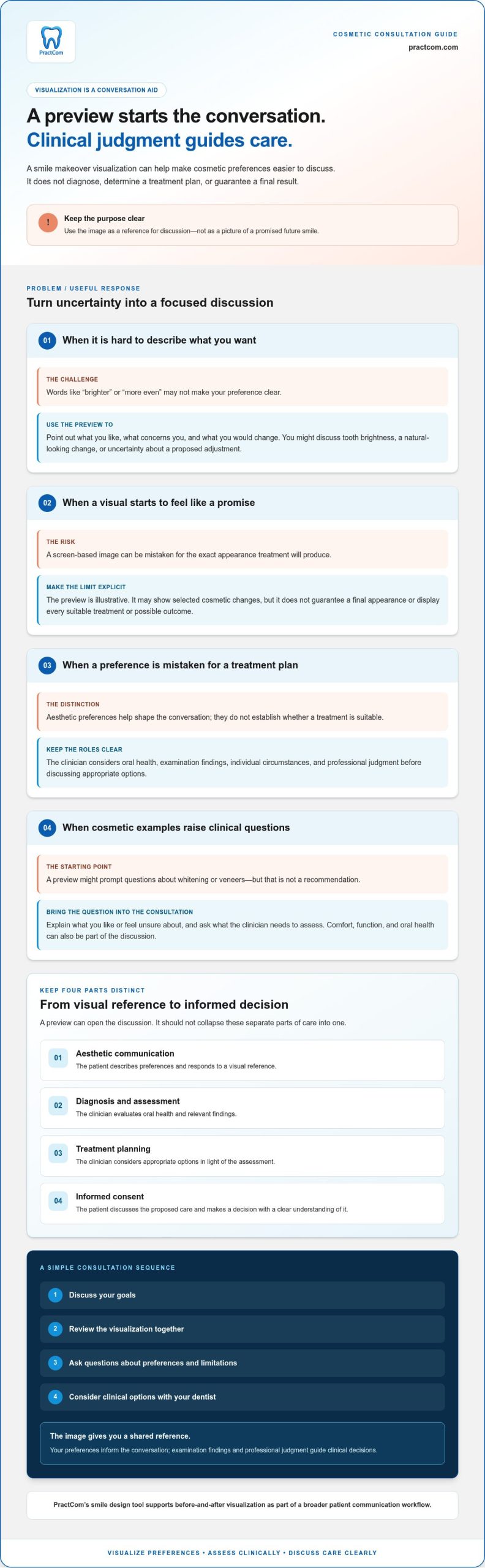
A focused consultation can follow a simple sequence: discuss your goals, review the visualization, ask questions, then consider clinical options with your dentist. The image gives you both a shared reference, but it doesn’t decide which treatment is suitable. Your preferences inform the conversation, while examination findings and professional judgment guide clinical decisions.
A smile visualization is a communication aid, not a guarantee of a treatment outcome. Keeping that distinction clear helps set realistic expectations while making aesthetic goals easier to discuss. Research on Digital Smile Design describes visual methods used in smile-related discussions and planning. A preview, however, doesn’t replace an examination or establish what result a particular patient will have.
What should patients discuss before reviewing a preview?
Start with what matters to you. You might want to explore a brighter appearance, ask about the look of veneers, or explain that you’re concerned a change could seem unnatural. You can also raise questions about comfort, function, and oral health. These priorities help the clinician understand what you hope to achieve, rather than relying on a vague request for a “better” smile.
As you review the image, ask which preferences are aesthetic and which need further assessment. For example, a request to change the appearance of a tooth may lead to a discussion of oral health and possible options before treatment is considered. Note what you like and what you would change so the conversation stays specific.
How should clinicians explain the preview’s limitations?
Clinicians can set clear expectations by describing the image as illustrative and explaining that a screen-based visual can’t guarantee a final appearance. Examination findings, individual circumstances, and the treatment selected all affect what may be achievable. The preview should open a discussion, not close it.
It also helps to distinguish four parts of the conversation:
- Aesthetic communication: The patient describes preferences and responds to a visual reference.
- Diagnosis and assessment: The clinician evaluates oral health and relevant findings.
- Treatment planning: The clinician considers appropriate options in light of that assessment.
- Informed consent: The patient discusses the proposed care and makes a decision with a clear understanding of it.
Keeping these steps distinct helps patients avoid mistaking a preview for a diagnosis, an agreed treatment plan, or a promise. For practices looking to make cosmetic conversations more visual, explore PractCom’s smile design tool as part of the discussion workflow.
Smile Makeover Visualization Tool vs. Final Treatment Result: What Is the Difference?
A preview can help you discuss the aesthetic direction you have in mind. A completed result, however, follows clinical assessment and the treatment you and your dentist agree on. Use a smile makeover visualization tool as a reference for discussion, not as a picture of a guaranteed future.
A smile visualization is not a guarantee of treatment results. The image can make preferences easier to communicate, but it can’t establish what care is appropriate or determine the exact appearance after treatment.
| Consideration | Visualization preview | Clinical care and final result |
|---|---|---|
| Purpose | Supports discussion of aesthetic direction and preferences. | Addresses assessed needs through care agreed between patient and clinician. |
| Inputs | A visual reference used to talk about possible cosmetic changes. | Examination findings, oral health, individual circumstances, and the selected treatment. |
| Clinical role | Helps communicate; it does not diagnose or determine treatment suitability. | Professional assessment informs treatment planning and care. |
| Outcome certainty | Illustrative, not a confirmed prediction of appearance. | The result follows completed care and can vary with clinical factors and treatment choices. |
What can a digital smile preview show, and what can it not show?
A preview can give you and your dentist a common visual reference for discussing whether you prefer a subtle or more noticeable aesthetic change. You can point out what feels appealing, what you’d reconsider, or what you want to understand better. These reactions help make the conversation more specific.
An image alone can’t assess oral health, function, or treatment suitability. It also can’t account for every clinical factor that may shape care. Your dentist interprets your preferences alongside an examination and explains which options may be appropriate.
How can patients keep expectations realistic?
Use the preview to guide questions, rather than choosing a finished result as if it were a final design. Ask which parts are illustrative, what alternatives may be considered, and what clinical factors could affect the outcome. If the image looks different from what you imagined, explain what you’d change and why.
The goal is shared understanding: you communicate what matters to you, and your dentist explains how that preference relates to your oral health and possible care. Treatment planning should follow clinical assessment, with expectations discussed before you make decisions.
How Can a Dental Practice Use Smile Visualization Responsibly?
A responsible workflow keeps the patient’s goals visible while ensuring clinical judgment guides decisions. Ask what the patient hopes to explore, review the visualization together, explain its limits, and agree on clear next steps. This makes a smile makeover visualization tool part of a thoughtful consultation, not a substitute for assessment, diagnosis, or treatment planning.
Patient-centered communication also means asking open questions, checking understanding, and giving patients room to express uncertainty without pressure. For broader context on building trust through clear communication, practices can refer to a dental patient experience guide.
How can a practice make the visualization conversation patient-centered?
Begin with questions such as, “What would you like to change?” or “What feels most important to you?” As you review the preview, invite the patient to describe what they like, what concerns them, and what feels natural. Don’t treat a positive reaction to the image as consent to treatment.
Pause to check understanding. Ask the patient to explain what they think the image represents, then clarify any misunderstanding in plain language. Close by summarizing the priorities you’ve heard, such as wanting to discuss a subtle change or needing more information about an option. A shared summary gives the next conversation a clear starting point.
How can practices keep communication organized after the consultation?
Keep the visual discussion distinct from the clinical record and consent process. Document clinical findings and decisions through the practice’s usual documentation process. Don’t treat a visualization as a diagnosis, treatment plan, or record of informed consent. A preview can capture what the patient wants to discuss, while clinical documentation and consent address separate parts of care. Practices can review guidance on digital dental informed consent to understand that distinction.
Before the patient leaves, clarify what happens next. That might mean discussing clinical options, arranging further assessment, or sharing patient-facing information relevant to the conversation. Follow-up resources should explain the next step in language the patient can understand, without suggesting that the preview has already determined treatment.
PractCom’s smile design tool shows before-and-after cosmetic changes as part of a broader patient communication platform. Paired with clear discussion and documentation, visualization can help make preferences easier to communicate and follow-up more coherent. Explore PractCom’s smile design tool as part of a patient-centered communication workflow.
How PractCom’s Smile Design Tool Fits Into Cosmetic Patient Communication
PractCom’s smile design tool provides before-and-after cosmetic visualizations, giving patients and clinicians a shared reference for discussing aesthetic preferences. A patient can use the preview to explain the kind of change they want to explore, while the clinician clarifies which cosmetic options are appropriate to consider. The visual helps organize the conversation; it doesn’t make clinical decisions or establish a treatment outcome.
What role can a smile design tool play in patient communication?
A visual reference can make it easier for patients to describe preferences that are difficult to put into words. It can also help clinicians ask focused questions, check what the patient means, and explain options in plain language. The clinician remains responsible for interpreting the discussion in light of clinical findings and setting realistic expectations about possible care.
This keeps the role of a smile makeover visualization tool clear: it supports communication, while examination and professional judgment guide diagnosis and treatment decisions. The preview is one part of a patient conversation, not a stand-alone clinical decision-maker.
How can practices explore PractCom’s communication platform?
The smile design tool is one component of PractCom’s broader patient communication and documentation platform. The platform also includes a patient portal, digital informed consent forms, and a post-treatment instruction library. PractCom provides more than 80 post-treatment instruction templates and digital consent forms, delivered by email, text, or print in 15 languages.
For an overview of how these resources fit together, visit the PractCom platform overview. Practices can consider how visual discussion, documentation, and patient communication resources may complement their existing approach, while clinical care and treatment decisions remain under clinician guidance.
To explore PractCom’s patient communication platform, visit the PractCom free trial.
Make Your Next Smile Conversation More Clear
A smile makeover visualization tool can turn hard-to-describe preferences into a clearer conversation. Use the preview to identify what you’d like to discuss, then rely on professional assessment to explore suitable options. The image is a starting point, not a promise of the final result.
For dental practices, the value comes from pairing visual discussion with clear, consistent patient communication. PractCom includes a smile design tool for before-and-after cosmetic visualizations, alongside communication and documentation tools. Its broader resources include post-treatment instructions and digital informed consent forms, supporting communication beyond the initial conversation.
To bring these resources into your patient communication workflow, explore PractCom’s patient communication tools. A thoughtful preview, clear explanations, and organized follow-up can help patients feel more prepared to discuss their choices. Start with their goals and keep clinical judgment at the center of the conversation.
Frequently Asked Questions
Can a smile makeover visualization tool show my exact final results?
No. A smile makeover visualization tool should not be treated as an exact prediction or guarantee. It can help you communicate aesthetic preferences and discuss possible changes with your dentist, but your actual outcome depends on clinical findings, the treatment selected, and individual factors. Ask which parts of the preview are illustrative and how the proposed options relate to your oral health and goals before drawing conclusions.
How does a smile makeover visualization tool work?
A smile makeover visualization tool represents possible cosmetic changes to help patients and clinicians discuss preferences. The process depends on the tool. Ask your dentist what the preview shows and how it relates to potential treatment options. The image can help you describe what you like or want to explore, but it doesn’t replace an examination, diagnosis, or personalized treatment plan.
Is a digital smile makeover preview accurate?
A digital preview can help communicate the general aesthetic direction you prefer, but it shouldn’t be treated as a precise forecast. A visual display can’t establish whether a treatment is clinically suitable or account for every factor that may affect care. Ask your dentist to explain the preview’s limitations and discuss it alongside your clinical assessment before deciding what the image means for possible results.
What treatments can a smile makeover visualization tool help discuss?
A smile visualization may help you discuss the appearance of your teeth while exploring cosmetic options such as veneers or whitening. It helps communicate preferences, but it doesn’t determine which treatment is right for you. Your dentist can assess your oral health, explain potential alternatives, and discuss whether an option suits your needs. Use the preview to prepare questions, not as a recommendation to proceed with a procedure.
Do I need a dental consultation before using a smile makeover tool?
A preview can help you organize questions, but treatment decisions should be discussed with a qualified dental professional. A consultation lets your dentist consider your preferences and oral health while explaining possible options. If you review a visualization, ask what it represents and whether further assessment is needed. Don’t rely on an image alone to decide that a procedure is appropriate for you.
Can dental practices use smile visualization to improve patient communication?
Yes. A visual reference can give patients a clearer way to describe preferences and give clinicians a starting point for discussion. Its usefulness depends on explaining the image’s limitations and relating it to clinical assessment. Invite questions, keep the visualization separate from diagnosis and consent, and record treatment discussions through established clinical processes. This helps ensure the image supports communication without being mistaken for a clinical decision.
Does a smile makeover visualization replace informed consent?
No. A visual preview supports discussion, but it doesn’t explain every relevant risk, benefit, alternative, or detail of proposed care. Informed consent is a separate conversation led by the clinician and specific to the treatment being considered. Follow established consent procedures, explain the proposed care clearly, and give patients the opportunity to ask questions and consider their decision before treatment proceeds.
Article by
Cary Ganz DDS
Dr. Cary H. Ganz is a dentist, prosthodontist, entrepreneur, lecturer, and author with more than 50 years of experience in clinical dentistry and dental technology. Throughout his career, he has combined hands-on patient care with a deep understanding of how technology can improve dental practice operations, communication, documentation, and patient outcomes.
In addition to his clinical background, Dr. Ganz has held significant leadership roles in the dental technology industry, including Past Owner and Vice President of Clinical Affairs at DEXIS Digital Radiography and Past Vice President of Clinical Affairs at Denticon Practice Management Software. His business experience includes product development, clinical strategy, dental software innovation, practice management solutions, and educating dental professionals on the effective use of technology in modern dentistry.
Today, Dr. Ganz continues to focus on creating practical technology solutions for dental practices, including PractCom, a comprehensive dental practice communication platform designed to improve patient communication, documentation, compliance support, referrals, and overall practice efficiency. His work reflects a career-long commitment to helping dentists deliver better care while making their practices more organized, efficient, and protected.
No responses yet