
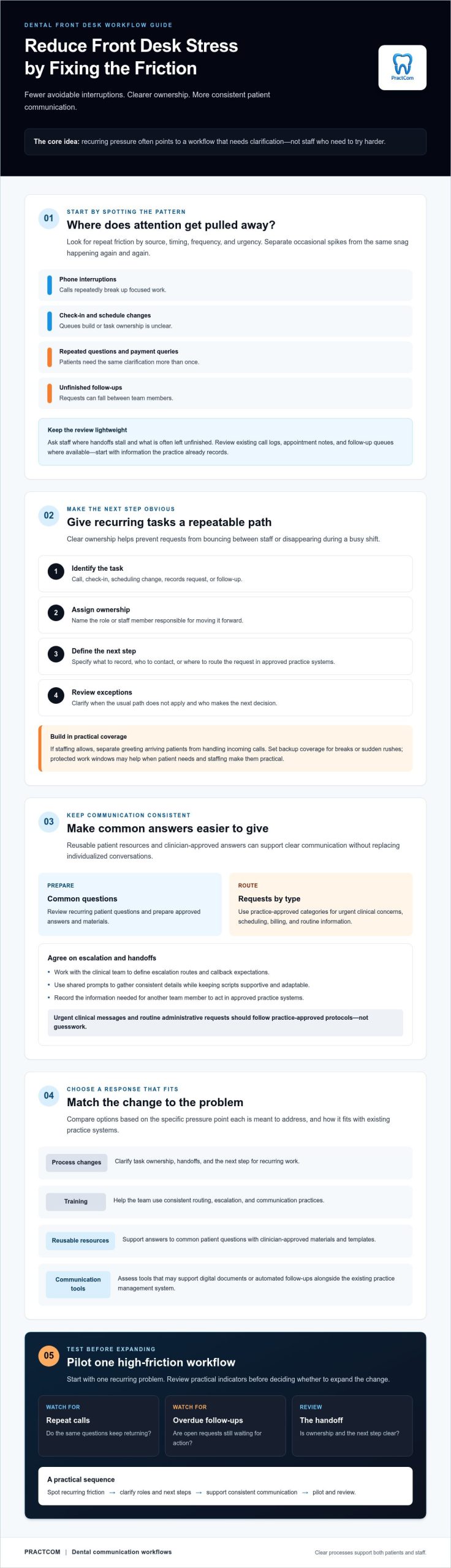
Reducing dental front desk stress starts with fewer avoidable interruptions, not another reminder to work faster. When calls break up focused tasks, staff repeat explanations, and follow-ups depend on memory, even a capable team can feel behind. Redesigning communication workflows can help address those pressure points without asking staff to simply cope harder.
If your team is juggling patient questions alongside administrative work, the pressure isn’t a personal failing. It may signal that routine communication needs more consistency and that workflows need clearer ownership. The goal is to help patients receive timely, clear information while giving staff more room to focus on conversations that need their attention.
This guide explains how to spot recurring pressure points, simplify front desk workflows, and assess communication tools that fit alongside your existing practice management system. You’ll also learn how reusable patient resources, digital documents, and automated follow-ups may reduce repetitive work without replacing clinical judgment or individualized communication.
Key Takeaways
- Reducing dental front desk stress starts with identifying recurring friction, from phone interruptions to follow-up tasks, without blaming staff.
- Clarify who owns each responsibility and define the next step so the team can follow a consistent workflow during busy periods.
- Review common patient questions and prepare clinician-approved answers and materials to support clear, consistent communication.
- Compare process changes, training, reusable templates, and communication tools based on the specific problem each is intended to solve.
- Pilot one high-friction workflow and review practical indicators, such as repeat calls or overdue follow-ups, before expanding changes.
Reducing Dental Front Desk Stress Starts With Finding the Daily Pressure Points
A crowded check-in area, a ringing phone, a schedule change, a payment question, and a reminder waiting to be sent can all compete for attention. That pressure is real, but it doesn’t mean your team is failing. When the same snags keep appearing, they often point to a process that needs clarification, not staff who need to try harder.
Front desk stress is the cumulative strain of operational demands and interruptions that compete for staff attention throughout the workday. It is one form of occupational stress. To reduce dental front desk stress, first identify which demands are predictable and which recurring problems a clearer workflow could ease.
Which front desk tasks create the most avoidable pressure?
Look at interruptions by source, timing, frequency, and urgency. A rush of check-ins at a predictable busy time may call for clearer coverage. Repeated calls asking for the same clarification may instead signal that patient-facing information or handoffs aren’t clear enough.
- Phone interruptions that repeatedly break up focused work
- Check-in queues and scheduling changes that leave task ownership unclear
- Payment questions, repeated patient questions, and duplicated data entry
- Unfinished follow-ups or requests that fall between team members
Handle urgent clinical messages and routine administrative requests according to practice-approved protocols. Make sure staff know how to route each type instead of relying on guesswork during a busy period.
How can a team audit its workload without adding another burden?
Keep the review short. Ask staff which tasks most often interrupt other work, where handoffs stall, and what tends to remain unfinished. Then review existing call logs, appointment notes, and follow-up queues where available. Start with information the practice already records rather than creating a new tracking system before you know what needs attention.
Separate occasional spikes from recurring friction. A one-off schedule change may not need a process redesign; the same unclear handoff happening repeatedly deserves attention. Choose one issue to examine first, then decide what ownership or next step would make it easier to manage. For wider process context, see this dental practice workflow guide.
Build a Calmer Dental Front Desk With Clear Roles and Repeatable Workflows
Once you’ve identified recurring pressure points, define who owns each task and what happens next. Clear roles help prevent requests from bouncing between staff or disappearing during a busy shift. Consistent ownership can reduce avoidable handoffs, while leaving room to adapt when a patient’s needs don’t fit the usual process.
Use a simple workflow for recurring tasks:
- 1. Identify the task. Is it a call, check-in, scheduling change, records request, or follow-up?
- 2. Assign ownership. Name the role or staff member responsible for moving it forward.
- 3. Define the next step. Specify what to record, who to contact, or where to route the request using approved practice systems.
- 4. Review exceptions. Clarify when the usual path doesn’t apply and who can make the next decision.
For example, if staffing allows, one person may greet arriving patients while another handles incoming calls. Set backup coverage for breaks or sudden rushes. Protected windows for records requests or follow-up work may also help when patient needs and staffing make them practical. OSHA’s overview of Workplace stress offers broader context for addressing work-related pressure as an organizational concern.
How should a front desk team triage incoming requests?
Create practice-approved categories for urgent clinical concerns, scheduling, billing, and routine information. Work with the clinical team to define escalation routes and callback expectations. Don’t invent response-time promises. Staff can use shared prompts to gather consistent details, but scripts should remain supportive and adaptable to each patient’s situation.
How can teams make handoffs more reliable?
Agree on the minimum information another team member needs to act, and record it only in approved practice systems. Each open request should have a clear owner and next action, such as contacting the clinical team or following up with the patient. For more on how consistent communication supports trust, explore this dental patient experience guide.
Review the workflow with the people who use it. If your team is considering communication tools to support consistent patient interactions, explore PractCom’s communication resources as one option alongside your existing practice systems.
Reduce Repeated Patient Questions With Clear, Consistent Communication
Patients may call back when instructions are hard to understand, differ from what they heard at the appointment, or don’t explain what to do next. Each clarification takes front desk attention away from other work. Reviewing recurring questions and improving the information patients receive can support reducing dental front desk stress while helping patients feel more prepared and informed.
Start by noting which questions come up repeatedly. Are patients unsure how to prepare for an appointment, what to expect after treatment, or how to complete consent information? Ask clinicians to approve standard answers and patient-facing materials for common topics. Use plain language, make the next step easy to find, and explain when patients should contact the practice for advice specific to their situation.
Which patient communications are most useful to standardize?
Prioritize information patients regularly need, such as appointment preparation, post-treatment guidance, consent information, and routine follow-ups. Standard materials give the team a consistent starting point, but they must align with clinician guidance and each patient’s care plan. Make escalation clear: general resources don’t replace a clinician’s advice, especially when a patient reports a new concern or needs individualized direction.
For more detail on organizing aftercare communication, read the automated post-op instructions guide.
How can digital and printed resources fit different patient needs?
Match delivery to your practice workflow and the patient’s preference. Email, text, or printed documents can make information easier to revisit, but the appropriate option depends on the person and the content. Use accessible language, and have translated clinical instructions reviewed before sharing them. PractCom offers document delivery by email, text, or print in 15 languages.
Templates can help staff provide consistent information without repeating the same explanation from scratch. They support communication, but they don’t replace direct clinical advice or a conversation tailored to the patient. Keep a clear route for questions that fall outside the approved material.
Clear information and realistic expectations can support both patients and staff. The American Psychological Association offers practical suggestions to manage stress at work, including paying attention to workplace stressors. If your practice is reviewing communication options, you can also explore PractCom’s patient communication tools as a layer alongside your existing practice systems.
Compare Process Changes and Dental Communication Tools Before Choosing
The right solution depends on where work is getting stuck. A process change may be enough if staff aren’t sure who owns a request or how to hand it off. Training can help when a workflow exists but team members apply it differently. Reusable templates can support routine explanations, while a communication platform may help organize document delivery and follow-ups.
Start with the problem, then compare options against practical criteria: ease of use, clear staff ownership, patient access, language needs, and fit with your existing systems. A dental communication platform can support patient communication and documentation alongside a practice management system (PMS). Don’t assume it replaces core PMS functions such as scheduling or maintaining practice records.
When is a workflow change enough, and when might software help?
Clarify ownership and handoffs first if requests are delayed because no one knows who acts next. If repetitive delivery, documentation, or follow-up remains burdensome after roles are clear, a tool may be worth evaluating. Compare options against your practice’s actual workflow, and review results rather than assuming a new system will reduce workload.
What should a dental practice ask before adopting a tool?
Ask which recurring tasks the tool supports and which remain in your PMS. Check what staff training is needed, what delivery formats and language options are available, and who reviews patient-facing documents for accuracy. Confirm privacy, security, and compliance details directly with the vendor and qualified practice advisors. Clarify how the tool fits your current processes before making implementation decisions.
Use a comparison framework to weigh features against your team’s priorities, not just a vendor’s feature list. The dental communication platform comparison can help you assess options. Once you’ve identified the workflow needs that matter, explore PractCom’s approach as one possible fit for communication and documentation alongside your existing PMS.
Reducing dental front desk stress is a practical reason to evaluate tools, but the fit should be specific to your practice. Explore PractCom’s communication tools and consider whether they address a recurring task your team has identified.
Roll Out Stress-Reducing Front Desk Changes With a Small, Measurable Pilot
Don’t change several workflows at once. Choose one high-friction task, such as sending post-treatment information or managing routine follow-ups, and pilot a clearer process with the staff who handle it. A focused trial makes it easier to see what works, what creates new friction, and whether the change is practical during a normal shift.
Before the pilot begins, choose indicators your practice can actually review. Depending on the workflow, these might include repeat calls about the same topic, overdue follow-ups, unresolved requests, or staff feedback about interruptions and unclear steps. Compare observations before and during the pilot, then discuss the results as a team. The aim isn’t to prove that a tool works; it’s to identify what needs adjustment.
How can a practice introduce a new process without overwhelming staff?
Name an owner for the pilot, write down the revised steps, and explain when staff should escalate exceptions. Provide brief, task-specific training and give team members a straightforward way to flag problems. Where clinically and operationally appropriate, keep the existing process available during the transition so staff know what to do if the new approach doesn’t fit a particular case.
Use team feedback to refine scripts, responsibilities, or tools. If repeat calls persist, the patient-facing information may need revision. If requests remain unresolved, ownership or the next step may still be unclear. Adjust one part at a time, and continue to follow clinician-approved guidance for patient-specific questions. This measured approach makes reducing dental front desk stress an ongoing practice improvement, not another demand placed on staff.
How can PractCom support patient communication workflows?
PractCom provides communication and documentation tools, not a full practice management system. Its offerings include a library of more than 80 post-treatment instruction templates and digital informed consent forms. Documents can be delivered by email, text, or print in 15 languages. Have patient-facing materials reviewed appropriately before sharing them. These resources can support consistent communication, but they don’t replace clinical judgment or individualized advice.
If a pilot points to a need for more structured patient communication, explore PractCom for your practice as a possible communication layer alongside your existing systems.
Make Your Next Front Desk Improvement One Practical Step
Reducing dental front desk stress doesn’t mean asking your team to absorb more pressure. Start by identifying recurring friction, clarifying who owns each task, and making routine patient communication easier to follow. Then pilot one change and review practical signals, such as repeat calls, overdue follow-ups, unresolved requests, and staff feedback.
That measured approach helps you see whether a process adjustment is enough or whether communication tools could better support the work. PractCom offers more than 80 post-treatment instruction templates, digital informed consent forms, and document delivery by email, text, or print in 15 languages. It supports communication and documentation workflows alongside your existing practice management system rather than replacing it.
Explore PractCom for your practice to consider whether its communication tools fit a workflow your team wants to improve. Small, thoughtful changes can make busy days more manageable while helping patients receive clear, consistent information. Your team can build a calmer front desk one workable improvement at a time.
Frequently Asked Questions
Is it normal for a dental front desk to feel stressful?
Yes, a dental front desk can feel stressful, especially when calls, check-ins, schedule changes, and patient questions arrive at once. Some pressure is part of a busy clinical setting, but constant confusion or repeated work may point to process friction rather than an individual failing. Ask the team which interruptions recur, when handoffs stall, and what routinely remains unfinished. Those patterns can guide a practical improvement.
How can a dental office reduce front desk stress quickly?
To start reducing dental front desk stress, choose one recurring bottleneck, such as repeated questions about appointment preparation. Assign a clear owner and standardize a frequent response using clinician-approved information. Test the change on a small scale, then ask staff whether the steps are easy to follow and note any remaining friction. A focused trial gives your practice useful feedback without promising instant results or changing every workflow at once.
Can automation reduce dental front desk workload?
Yes, automation may support repetitive communication and follow-up tasks, such as sending patient documents or routine follow-up messages. It won’t replace clinical judgment, individualized patient conversations, or core practice management software functions such as scheduling and practice records. Before adopting a tool, identify which tasks it handles, how it fits the existing workflow, and who reviews the content and manages exceptions. Measure the results in your own practice.
What causes the most stress for dental front desk staff?
What creates the most stress varies by practice, but common sources include frequent phone interruptions, unclear handoffs, schedule changes, repeated patient questions, and unfinished follow-ups. These demands can compound when staff must switch tasks or aren’t sure who owns the next step. Before choosing a solution, hold a brief team audit. Review existing call notes or follow-up queues, if available, and identify the friction that recurs most often.
How should a dental practice handle patient calls without overwhelming the front desk?
Use practice-approved categories for incoming requests, such as clinical concerns, scheduling, billing, and routine information. Define who owns each category, when a request should be escalated, and how callbacks are tracked. Don’t create response-time promises without agreement from the practice and clinical team. Clinical concerns should follow established practice protocols, while routine requests can be routed through the appropriate administrative workflow.
Does PractCom replace dental practice management software?
No. PractCom is a patient communication and documentation solution, not a full practice management software system. Its capabilities include post-treatment instruction templates, digital informed consent forms, automated patient follow-ups, referral management, and a patient portal. Practices should confirm how these tools fit alongside their existing systems and which functions remain within their PMS. PractCom supports communication workflows, but it doesn’t replace clinical judgment or individualized patient care.
How can a dental front desk make patient instructions easier to manage?
Use clinician-approved reusable materials for recurring topics, then make them available in formats patients can use, such as email, text, or print. Consider language needs and have translations reviewed before sharing clinical instructions. Include clear guidance about when a patient should contact the practice for individualized advice. Templates can help staff communicate consistently, but they support rather than replace the clinician’s judgment and each patient’s care plan.

Article by
Cary Ganz DDS
Dr. Cary H. Ganz is a dentist, prosthodontist, entrepreneur, lecturer, and author with more than 50 years of experience in clinical dentistry and dental technology. Throughout his career, he has combined hands-on patient care with a deep understanding of how technology can improve dental practice operations, communication, documentation, and patient outcomes.
In addition to his clinical background, Dr. Ganz has held significant leadership roles in the dental technology industry, including Past Owner and Vice President of Clinical Affairs at DEXIS Digital Radiography and Past Vice President of Clinical Affairs at Denticon Practice Management Software. His business experience includes product development, clinical strategy, dental software innovation, practice management solutions, and educating dental professionals on the effective use of technology in modern dentistry.
Today, Dr. Ganz continues to focus on creating practical technology solutions for dental practices, including PractCom, a comprehensive dental practice communication platform designed to improve patient communication, documentation, compliance support, referrals, and overall practice efficiency. His work reflects a career-long commitment to helping dentists deliver better care while making their practices more organized, efficient, and protected.
No responses yet