
Digital forms can make dental intake easier to complete and reduce manual data-entry errors, while paper remains a useful fallback during technology outages. In the comparison of dental paper forms vs digital forms, the better fit depends on your workflow, patient needs and ability to manage secure electronic records.
Paper forms are familiar and require little technology, but they add steps such as filing, scanning, and data entry. Digital forms let patients submit information before an appointment, which can streamline check-in and keep records organized. The transition, however, takes planning.
When comparing dental paper forms vs digital forms, focus less on which format is newer and more on where errors or delays occur in your current process, and which safeguards your team can follow consistently.
This guide compares both approaches for completion, accuracy, storage, security, and downtime. It also explains how to digitize frequently used forms gradually and what dental service organizations should consider when standardizing processes across locations.
Key Takeaways
- Compare how each format affects completion, record handling, and downtime to identify where your current workflow creates friction.
- See how patient-entered digital information can reduce rekeying, and where review is still important for accuracy.
- Plan a gradual transition by starting with frequently used forms and giving staff and patients time to adapt.
- For dental service organizations, consider how consistent processes, access controls, and connected patient communication support dependable records across locations.
What Are Digital Patient Forms?
A digital patient form is an electronic version of paperwork used to collect information before an appointment. Patients can complete it on a phone or computer, often at home, and submit details such as medical history before they arrive. Staff can then review responses instead of sorting handwritten pages during check-in.
Mobile access matters. Forms should have readable text, clear instructions, and fields that work on small screens. For example, a patient entering medications on a phone should be able to review their answers before submitting. Practices can also offer office tablets for patients who prefer to complete forms in person.
Digital form platforms may use encryption, access controls, and audit logs to help safeguard patient information. These measures do not replace the practice’s responsibility to manage permissions and staff access. Review each submitted form and route it to the appropriate patient record. Patient-related data entry must comply with applicable privacy laws, including HIPAA.
Electronic signatures are not automatically valid or invalid for every dental document. Requirements depend on the document and applicable federal and state rules. The practice should capture the patient’s signature and preserve the completed record.
Use readable language, clear instructions, and layouts that work on mobile devices. Provide language support that helps each patient understand questions and consent information, and avoid unexplained clinical terms.
Keep paper records in secure physical storage and limit staff access. Use access controls and backups for electronic forms. Follow the practice’s retention schedule, then securely dispose of records when eligible.
Completing forms before an appointment can reduce check-in steps and front-desk congestion. Staff work shifts from repeated data entry to reviewing submissions and following up on missing answers.
Paper records can be misplaced or damaged; digital records can be exposed through weak access controls or become unavailable during system interruptions. Plan for both risks, including a defined process for using temporary paper forms during downtime.
| Option | Completion | Record handling | Key consideration |
|---|---|---|---|
| Paper form | Completed by hand at home or in-office | Filed, scanned, or entered by staff | Physical storage and retrieval |
| Digital form | Completed on a phone, desktop, or office tablet | Stored electronically for review | Access controls and system availability |
Choose the format that fits your patients’ access needs, staff review capacity, record safeguards, and downtime plan.
Manual data entry and data accuracy
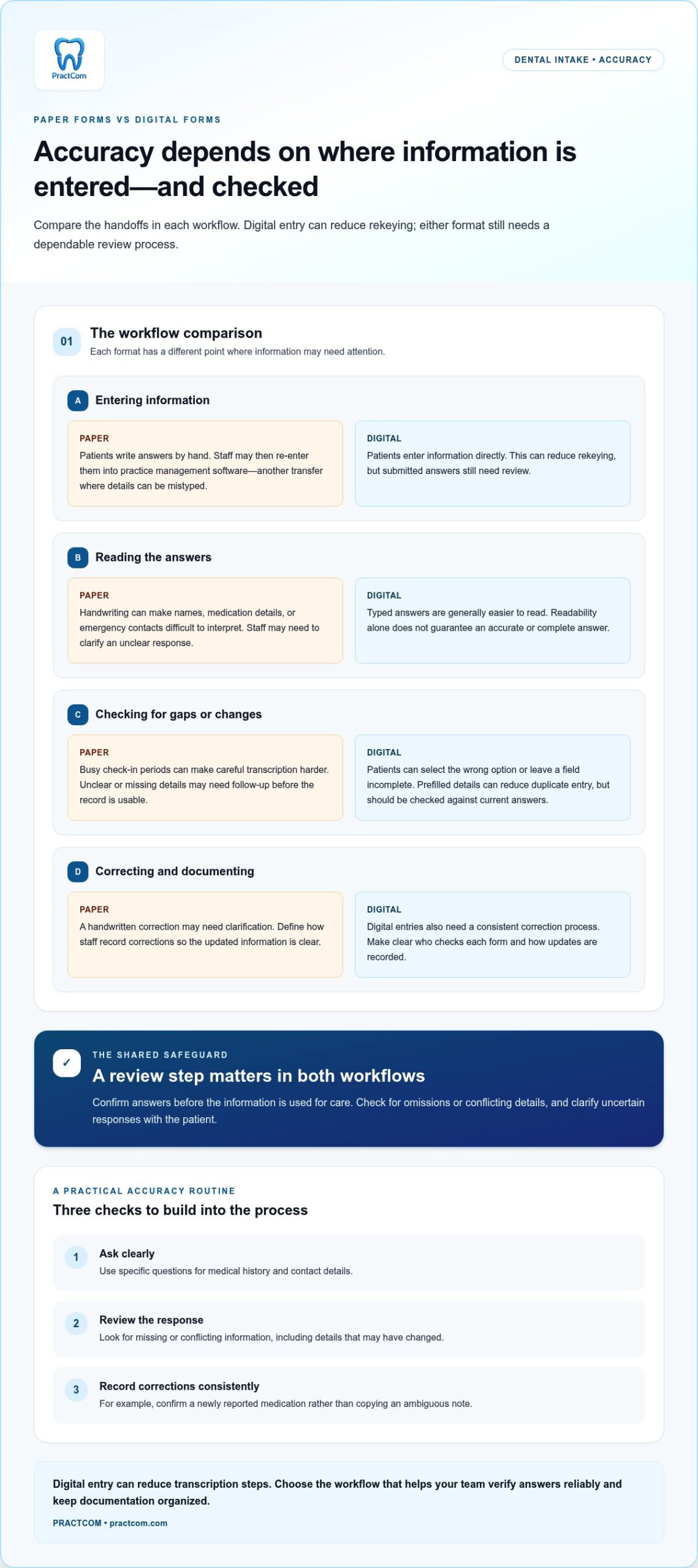
Accuracy depends on both the information patients provide and how the practice records it. To compare paper and digital workflows, look at where data is entered, transferred, and reviewed.
Manual Entry and Human Error
With paper forms, patients write details by hand, and staff may then enter them into practice management software. Each transfer creates another chance to mistype a phone number, transpose a birth date, or record medical history incorrectly. Busy check-in periods can make careful transcription harder. Digital forms reduce rekeying when patients enter information directly, but their answers still need review.
Readability and Data Accuracy
Handwriting can make names, medication details, and emergency contacts hard to interpret. Staff may need to clarify an unclear response before the record is usable. Typed answers are generally easier to read, but readability does not guarantee accuracy. Patients can select the wrong option or leave a field incomplete, so clear prompts and a review step remain important.
Templates can standardize common questions and reduce repetitive typing. A digital platform may also prefill existing patient information, reducing duplicate entry. Staff should compare those fields with the patient’s current answers, especially if contact details or medical history may have changed.
To strengthen documentation in either workflow, define who checks each form and how corrections are recorded. For example, if a patient reports a new medication, staff can confirm its name and update the relevant record rather than copying an ambiguous handwritten note. A consistent review process helps catch omissions before information is used for care.
- Use clear, specific questions for medical history and contact details.
- Review patient-entered answers for missing or conflicting information.
- Keep one correction process for paper records and digital entries.
Digital entry can reduce transcription steps; paper forms may need scanning or manual data entry. Choose the workflow that helps your team verify answers reliably and keep documentation organized. For teams also managing animal health clinics, helpful.vet offers interactive workflow tools and clinic benchmarks to streamline daily practice operations.
Gradual digitization of frequently used forms
A gradual transition lets your team test digital intake without changing every workflow at once. Start with frequently used forms, such as appointment intake or consent, then assess how staff and patients manage the new process.
Choose a form with a clear purpose and repeatable questions. For example, moving medical history updates online can show whether patients understand each prompt and whether staff can review submissions efficiently. Leave less-used paperwork unchanged during this first phase.
- Map the current process. Note who distributes each form, enters responses, files records, and handles corrections.
- Select a frequent form. Identify where paper creates repeated work, such as re-entering contact details or locating signed consent.
- Run a limited pilot. Offer the digital version to a small patient group while retaining the paper option.
During the pilot, gather specific feedback from reception staff and patients. Note whether instructions were clear, which questions were skipped, and where staff needed to help. These observations show what to revise before expanding the process.
Keep paper forms available during the transition. Patients who prefer handwriting, need assistance, or arrive without completing digital intake can still provide information. Decide who enters or scans temporary paperwork, where it is stored, and when it can be securely disposed of.
After the pilot, review completion patterns, staff follow-up, and record accuracy. If a consent form causes confusion, simplify its wording before introducing another digital form. Add forms in manageable stages so training and workflow changes stay clear.
A measured transition can improve the patient experience while reducing avoidable handling. It also gives your team time to establish consistent routines for reviewing digital records, assisting patients, and keeping paper procedures ready when needed.
Digital forms in dental service organizations
For a dental service organization, digital patient intake affects more than one front desk. Shared forms can make information collection more consistent across locations, while clear local procedures help teams address differences in staffing and patient needs.
Start by identifying the forms used at every location, such as new-patient intake, medical history updates, and consent. Agree on common wording and required fields, then define who reviews submissions and where completed records belong. Consistent forms help patients recognize familiar questions and give staff a repeatable process.
Can digital dental forms integrate with practice management and electronic health record software? Yes, digital clinical forms can integrate with these systems and may automatically sync patient demographics, contact details, medical history, insurance information, and signed consent forms. Integration capabilities vary, so map how submitted information should reach the correct record and team.
At organizational scale, the rollout needs clear operational ownership. Assign a lead for form updates, a process for communicating changes, and a way to review completion or routing problems. For example, if one location receives an incomplete consent form, staff should know whether to follow up locally or escalate a recurring issue.
- Standardize: Set shared fields and instructions for common patient intake forms.
- Assign: Define who reviews each submission and handles missing information.
- Monitor: Compare workflow issues across locations and revise unclear forms.
Keep a downtime procedure alongside the digital workflow. Each office should know when to use paper, where temporary forms are stored, who enters or scans the information later, and when pages can be securely disposed of. This helps keep records accounted for during system interruptions.
A coordinated rollout connects patient submissions to review, recordkeeping, and follow-up. If your organization is planning that process, map your digital-form workflow and define how each location will manage it.
PractCom: Post-Treatment Instruction Library
PractCom’s Post-Treatment Instruction Library helps dental teams deliver consistent guidance after procedures. It includes over 80 post-treatment templates, giving staff a prepared resource to share with patients instead of relying on handwritten instructions.
Practices moving toward digital documentation can also use Digital Informed Consent Forms. Documents can be delivered by email, text, or print in 15 languages, supporting different patient communication preferences. A Patient Portal provides another place for patient communication, while the Referral Management System supports referral workflows.
PractCom can support a gradual transition by helping your practice digitize patient communication while retaining printed documents for patients who need them. Its post-treatment instructions and consent forms address specific communication needs without requiring every form or process to change at once.
Explore PractCom’s tools for your dental practice by visiting practcom.com.
Make your next documentation change deliberate
Choose one patient communication task that needs a clearer, more consistent process. Decide who owns it, how patients receive the information, and how your team will keep the resulting records organized. Starting with a specific task makes the choice between dental paper forms and digital forms a practical workflow decision grounded in your team’s daily needs.
PractCom offers a Post-Treatment Instruction Library, Digital Informed Consent Forms, and a Referral Management System. These tools address distinct communication needs, from sharing care instructions to managing consent and referrals. Identify the task creating the most friction for your practice, then explore the tool that fits how your team works.
Contact PractCom to discuss your forms and take a thoughtful next step toward a more organized patient communication process.
Frequently Asked Questions
What are the pros and cons of paper forms vs digital forms in a dental office?
Paper forms are familiar and usable without an internet connection, but they require physical storage and may need staff transcription. Digital forms can simplify submission and record organization, but depend on suitable software, devices, access controls, and system availability. Compare the formats against your patient population, staff capacity, downtime plan, and how reliably each workflow keeps information readable and retrievable.
How much do dental patient intake forms and digital form software cost?
Costs depend on the software’s scope and the practice’s implementation needs. Consider subscription or software fees, setup and integration, devices, staff training, IT support, and ongoing security management. Paper forms also take staff time to print, scan, file, enter, and retrieve. Compare the requirements of each workflow rather than considering only the software charge.
What privacy and security rules apply to electronic dental patient forms under HIPAA?
Dental practices handling protected patient information must manage privacy and security in line with applicable HIPAA requirements. Assess how a system controls user access, authenticates users, transmits and stores data, assigns permissions, and handles backups. Define staff access and vendor responsibilities as well. For example, limit form access to team members who need the information for their work, and include those controls in routine risk management.
How should a dental practice convert paper forms to digital forms?
Convert forms in a controlled sequence. First, map how a selected form is completed, reviewed, and filed. Next, digitize a frequently used form and test its wording and fields with staff and a small patient group. Train the team on delivery, review, and access procedures. Keep paper available during rollout, and establish how temporary pages are stored, entered into records, and securely disposed of.

Article by
Cary Ganz DDS
Dr. Cary H. Ganz is a dentist, prosthodontist, entrepreneur, lecturer, and author with more than 50 years of experience in clinical dentistry and dental technology. Throughout his career, he has combined hands-on patient care with a deep understanding of how technology can improve dental practice operations, communication, documentation, and patient outcomes.
In addition to his clinical background, Dr. Ganz has held significant leadership roles in the dental technology industry, including Past Owner and Vice President of Clinical Affairs at DEXIS Digital Radiography and Past Vice President of Clinical Affairs at Denticon Practice Management Software. His business experience includes product development, clinical strategy, dental software innovation, practice management solutions, and educating dental professionals on the effective use of technology in modern dentistry.
Today, Dr. Ganz continues to focus on creating practical technology solutions for dental practices, including PractCom, a comprehensive dental practice communication platform designed to improve patient communication, documentation, compliance support, referrals, and overall practice efficiency. His work reflects a career-long commitment to helping dentists deliver better care while making their practices more organized, efficient, and protected.
No responses yet