
Busy dental teams need tools that remove work, not technology that adds steps. The most useful time saving tools for dental offices reduce repeat tasks across scheduling, patient communication, clinical workflows, and performance tracking. The goal is a smoother day, with fewer manual handoffs and more time for patient care.
Consistent digital workflows for reminders, forms, and follow-ups can cut the time staff spend repeating routine steps. Automation should support, not replace, professional judgment: clinical decisions and patient-specific care still depend on the dental team.
This guide covers practical tools for preparing appointments, communicating clearly with patients, organizing clinical workflows, and tracking where time goes. It also explains how tools can work together to prevent duplicated effort, so you can choose improvements that fit your practice rather than adding technology for its own sake.
Key Takeaways
- Prepare appointments with consistent reminders and digital forms to reduce avoidable check-in delays.
- Make patient communication easier to manage by organizing instructions, follow-ups, and referral information.
- Standardize team workflows and operatory preparation to reduce interruptions during the clinical day.
- Track practical efficiency measures, such as schedule utilization and patient wait times, to identify where process changes may help.
1. Pre-appointment workflows and automated reminders
Start with a repeatable pre-appointment sequence: send reminders, collect forms, verify information, and prepare for the visit. Automated reminders and digital scheduling can handle routine contact and reduce manual follow-up. Online forms completed before arrival can also streamline check-in and limit last-minute interruptions.
Dental practice management systems differ in how they handle templates, reminders, treatment plans, and batch processing. Compare them by the tasks they automate and the duplicate entry they eliminate, not by feature labels alone. A connected workflow for scheduling, billing, and patient records can reduce administrative repetition and give staff more time for patients.
For U.S. practices, HIPAA governs the privacy and security of patient health information. When forms or reminders contain patient information, use tools with access controls, data backups, and security protections that support your practice’s compliance responsibilities. Ensure that patient-related data entry follows HIPAA and other applicable privacy laws.
Digital intake forms can save staff time by collecting patient details before appointments and organizing responses for review. Use a consistent form for each visit type, then flag missing fields before check-in. This gives the front desk a clear next step instead of requiring staff to collect the same information verbally. For physical paperwork, insurance cards, or printed records brought to check-in, staff can convert them into clean digital files with scantrixpdfscanner.app to prevent paper clutter.
AI and voice tools can turn dictated information into draft notes. Staff should review each draft for accuracy and clinical context before adding it to a patient record. These tools can assist documentation, but they do not replace clinical judgment.
Introduce one workflow at a time, such as appointment reminders, and train staff on the same steps. Check whether the change reduces manual follow-up without creating extra corrections. Because automation can lead to inaccurate entries, missed messages, or duplicate records, assign someone to monitor exceptions.
Automation can also support instrument and inventory workflows. Ultrasonic cleaners and washer-disinfectors can make instrument cleaning more efficient than manual cleaning, while inventory systems can flag restocking needs. Use alerts to plan replenishment and avoid shortages or overstocking, while following consistent instrument reprocessing procedures.
2. Patient experience and communication
Patient communication takes longer when details are scattered across phone notes, email, and separate records. A patient engagement system can show caller information to the receptionist, helping them greet callers personally and route requests efficiently. For example, staff can review a returning patient’s appointment context before transferring a clinical question.
Coordinate messages across the patient journey. Use a consistent process to explain next steps after treatment, answer routine questions, and route clinical concerns to the appropriate team member. Clear, plain-language instructions help patients understand what to do, while organized follow-up can reduce repeat calls asking for clarification.
Marketing can support patient acquisition when it gives prospective patients useful, consistent information. A HubSpot study cited in the research found a 126% increase in leads and a 27% increase in revenue among companies that increased marketing spend. For a dental practice, track which campaigns lead to appointment requests, then focus effort on channels that bring relevant inquiries.
Engagement also depends on how patients understand billing and payment options. An in-office dental plan may charge a fixed amount monthly or annually for preventive services and discounted fees on other procedures. Patients with a benefit plan are more likely to seek care and accept treatment plans. Explain the plan’s terms clearly so patients can make informed decisions without adding repeated clarification calls.
Choose tools that make communication easier to manage, not simply more frequent. Assign ownership of incoming messages, distinguish clinical from administrative requests, and review unresolved items as part of the team’s regular workflow. A patient portal can give patients a structured place to access information and communicate with the practice.
To explore a coordinated approach, see a patient communication platform that brings patient-facing workflows together.
3. Clinical workflow efficiency
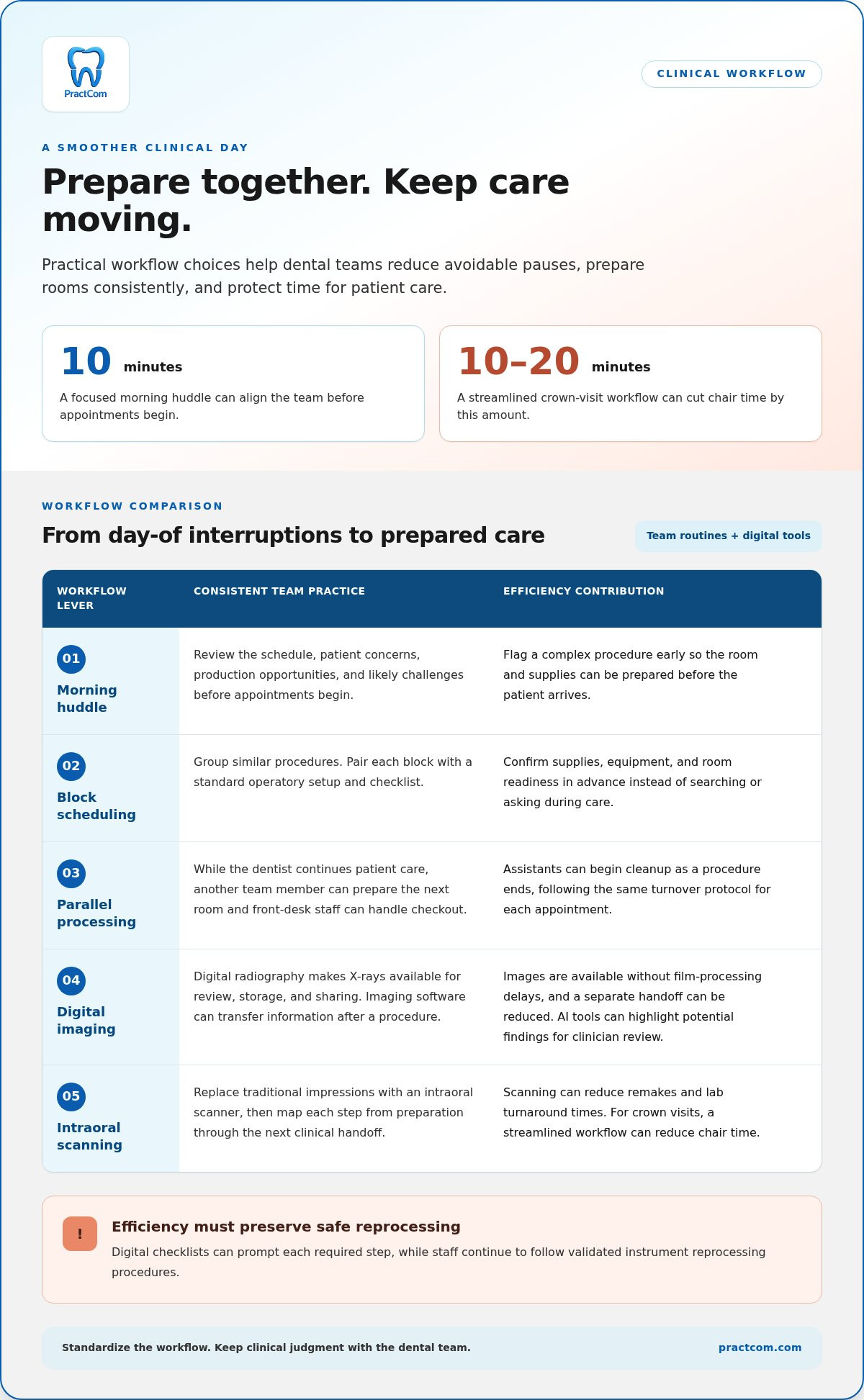
A focused morning huddle lasting ten minutes can align the team before appointments begin. Review the schedule, patient concerns, production opportunities, and likely challenges. For example, flag a complex procedure early so staff can prepare the room and supplies before the patient arrives.
Block scheduling groups similar procedures together, helping teams prepare rooms, instruments, and staff consistently. Pair each block with a standard operatory setup and checklist. Staff can confirm supplies, equipment, and room readiness in advance instead of stopping to search or ask questions during care.
Parallel processing reduces unnecessary waits between tasks. While the dentist continues patient care, another team member can prepare the next room and front-desk staff can handle checkout. Assistants can begin cleanup as a procedure ends, following the same turnover protocol for each appointment.
Digital radiography makes X-rays available for review, storage, and sharing without film-processing delays. Imaging software can transfer X-ray information after a procedure, reducing a separate handoff. AI diagnostic tools can analyze images in real time and highlight potential findings for the clinician to review.
Intraoral scanners replace traditional impressions and can reduce remakes and lab turnaround times. For crown visits, a streamlined appointment workflow can cut chair time by 10 to 20 minutes. Map each step, from preparation through the next clinical handoff, to find avoidable pauses.
Standardization supports efficiency, but must preserve safe instrument reprocessing. Digital checklists can prompt each required step while staff follow validated procedures and equipment instructions. A checklist helps the team complete routine work consistently; it does not replace training or clinical judgment, which can be supported through emergency and CPD programs from First Medical Training Ltd.
Practice software can integrate specialized solutions with the practice management system to reduce duplicate data entry. Alongside clinical routines, standardized setups and checklists can limit interruptions caused by questions or supply searches. Parallel processing lets room preparation, patient care, and checkout happen at the same time rather than one after another. To reduce room turnover delays, combine pre-stocked operatories with consistent cleanup protocols and have assistants begin cleanup as procedures finish. Digital radiography makes X-rays available for review, storage, and sharing without film-processing delays or chemical handling.
4. Efficiency KPIs and technology ROI
Measure workflow changes before deciding whether a tool is worth keeping. Record a baseline for a specific procedure or administrative task, then compare the same measure after introducing the tool. For example, track schedule utilization before and after changing appointment templates. A clear comparison helps distinguish improvement from added complexity.
Dental practices can monitor practical efficiency KPIs, including:
- Production per hour and hygiene production per hour
- Schedule utilization and patient wait times
- Case acceptance and same-day treatment rates
Choose indicators tied to a defined operational goal. If patients often wait between appointments, review wait times alongside schedule utilization. If treatment plans are not accepted, consider case acceptance and same-day treatment rates together. A single metric rarely explains an entire workflow, so compare related measures before changing procedures.
Technology ROI involves more than revenue. Consider the staff time spent on duplicate data entry, repeated follow-ups, and reconciling information across systems. Integrating imaging, scheduling, billing, and analytics can reduce administrative repetition. Compare the task before and after integration, including any extra steps staff must handle. A tool supports efficiency when it reduces friction without creating another manual process.
Review business practices for efficiency and overhead regularly. Identify which tools staff use, where work still slows down, and whether automated processes achieve their intended purpose. For example, if a dashboard shows underused appointment blocks, adjust scheduling practices and review the results in the next period. Base decisions on measurable workflow changes, not feature counts.
Explore tools for improving practice efficiency and connect workflow improvements to measurable performance.
Use KPIs as a connected view, not as individual verdicts. Dental practices can track production per hour, schedule utilization, hygiene production per hour, case acceptance rate, patient wait times, and same-day treatment rates as efficiency KPIs. Compare the measures with the operational question at hand, and note which ones change together after a workflow adjustment.
Examine a change in one measure alongside related indicators before deciding whether to keep the new process. Focus the review on whether the workflow is easier to manage and whether the selected measures support the intended objective. If results are mixed, refine the process and assess it again.
PractCom: Post-Treatment Instruction Library
PractCom’s Post-Treatment Instruction Library helps your team provide consistent aftercare guidance without recreating instructions for common procedures. Staff can select a relevant template and share clear next steps with patients, supporting continuity after the appointment.
For structured consent and referral communication, PractCom offers Digital Informed Consent Forms and a Referral Management System. Its Patient Portal gives patients access to their documents. These tools support patient communication and documentation, but they do not replace full practice management software.
Consider standardized aftercare instructions when guidance varies between team members or patients often need information repeated. PractCom provides customizable post-treatment templates that can be sent by email or text, or printed as handouts. Explore PractCom’s communication tools to see how they fit your practice’s workflow.
Make Your Next Workflow Change Count
Efficiency comes from deliberate choices, not adding technology to every task. Pick one recurring point of friction, assign ownership of the next step, and give your team a clear way to assess whether the new process works. This keeps change practical and helps staff build confidence before adjusting another part of the day.
PractCom offers a Post-Treatment Instruction Library, Digital Informed Consent Forms, and a Referral Management System for dental patient communication workflows. These tools can complement your practice’s wider systems, while your team decides which communication gaps to address first. Starting with a focused need helps put time saving tools for dental offices to work without losing sight of patient care.
Explore PractCom’s patient communication tools and consider which workflow you’d like to improve next. A thoughtful first step can help your team move toward a more organized day.
Frequently Asked Questions
What are the best time-saving tools for dental offices?
The best tools remove a specific bottleneck without creating duplicate work. A practice might prioritize scheduling and patient records in its core software, then add focused tools for communication, imaging, inventory, or instrument reprocessing. Before choosing, map one recurring task from start to finish and identify where staff pause, re-enter information, or wait for a handoff. That reveals which type of tool to assess.
How can dental practice management software reduce administrative time?
Dental practice management software can reduce administrative work by standardizing routine steps and organizing related information. For example, create visit-type templates so staff follow the same sequence when preparing records, routing paperwork, and closing out a visit. Assign clear ownership for exceptions, such as missing information, instead of sending every task into the same queue. Specialized communication tools can complement a PMS, but PractCom is not full practice management software.

Article by
Cary Ganz DDS
Dr. Cary H. Ganz is a dentist, prosthodontist, entrepreneur, lecturer, and author with more than 50 years of experience in clinical dentistry and dental technology. Throughout his career, he has combined hands-on patient care with a deep understanding of how technology can improve dental practice operations, communication, documentation, and patient outcomes.
In addition to his clinical background, Dr. Ganz has held significant leadership roles in the dental technology industry, including Past Owner and Vice President of Clinical Affairs at DEXIS Digital Radiography and Past Vice President of Clinical Affairs at Denticon Practice Management Software. His business experience includes product development, clinical strategy, dental software innovation, practice management solutions, and educating dental professionals on the effective use of technology in modern dentistry.
Today, Dr. Ganz continues to focus on creating practical technology solutions for dental practices, including PractCom, a comprehensive dental practice communication platform designed to improve patient communication, documentation, compliance support, referrals, and overall practice efficiency. His work reflects a career-long commitment to helping dentists deliver better care while making their practices more organized, efficient, and protected.
No responses yet