
A signed HIPAA authorization isn’t always permanent. A patient may revoke a HIPAA authorization form for a dental office at any time, subject to exceptions for disclosures already made and authorizations required for insurance coverage. The patient must submit the revocation in writing to the provider. The form should explain the right to revoke, any exceptions, and how to submit the request.
A signed form is more than a simple permission slip: its scope, recipient, delivery method, and expiration all matter. Clear documentation helps your team understand what information may be shared and what to do if a patient changes their mind.
This guide explains what a dental HIPAA form covers, who may receive records, how signatures and delivery work, and when an authorization expires or can be revoked. It also covers practical points for creating or reviewing a form, so your practice can handle each step consistently.
Key Takeaways
- Distinguish a privacy notice acknowledgment from permission to disclose records for a specific purpose.
- Make the authorization clear about which information may be shared, who may receive it, and how it can be delivered.
- Set out an expiration date or event and capture the signatures needed to document the patient’s instructions.
- Use a practical form checklist to organize required details, acknowledgments, and any additional consent language.
- Keep authorization records organized; HIPAA authorization forms must be stored for a minimum of 6 years, according to the U.S. Department of Health and Human Services.
1. Can a HIPAA authorization be revoked?
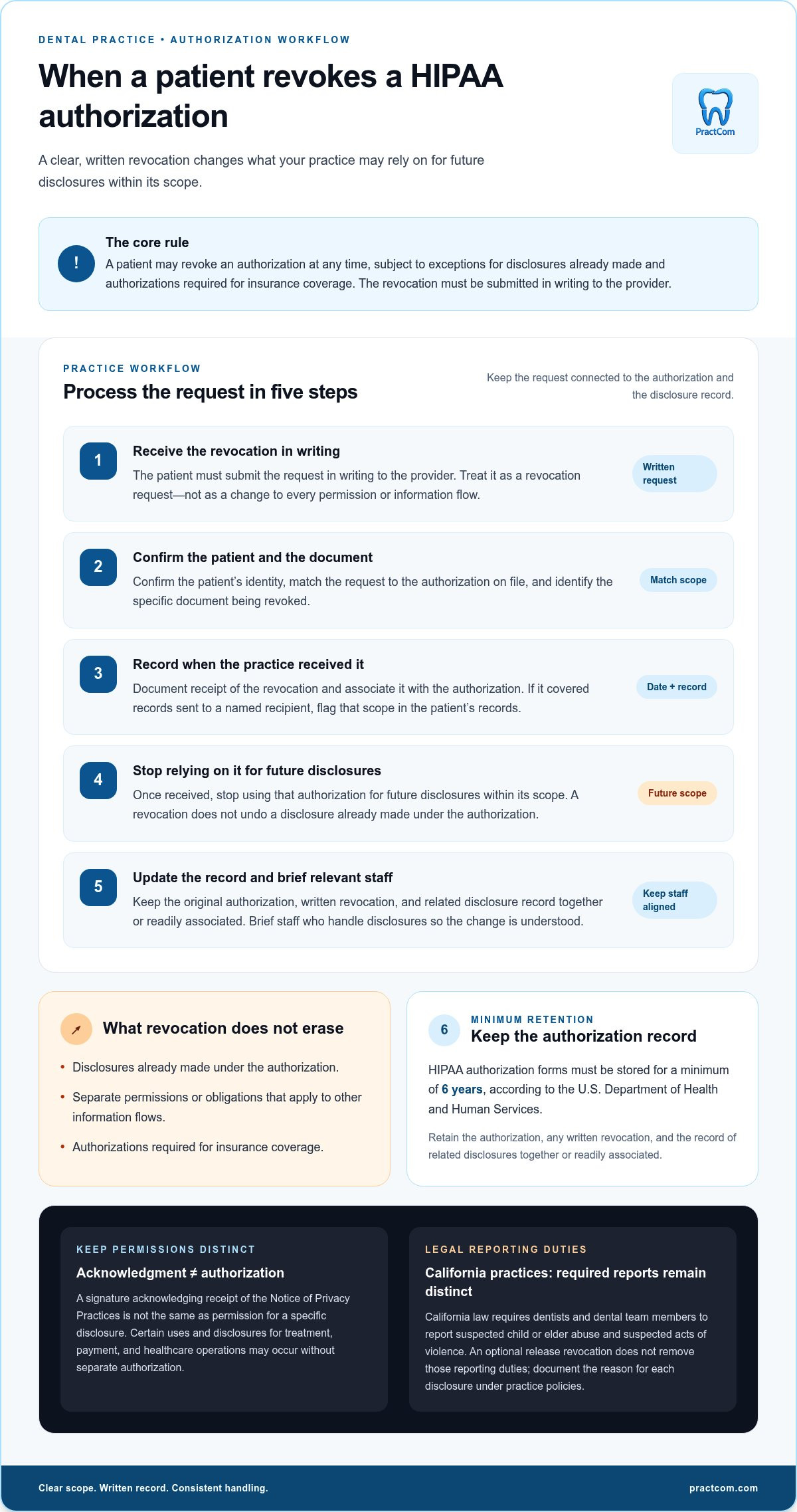
Yes. A patient may revoke or cancel a HIPAA authorization at any time, subject to exceptions for disclosures already made and authorizations required for insurance coverage. The patient must submit the revocation in writing to the provider. Once received, the practice should record it and stop relying on that authorization for future disclosures within its scope.
Keep permission distinct from acknowledgment. A patient’s signature acknowledging receipt of the practice’s Notice of Privacy Practices isn’t the same as authorizing a specific disclosure. HIPAA permits certain uses and disclosures for treatment, payment, and healthcare operations without separate authorization. A release to another recipient for a different purpose may require a valid authorization. Make clear what the patient agreed to, so staff don’t mistake a general acknowledgment for blanket consent.
When processing a written revocation, match it to the authorization on file. Confirm the patient’s identity, identify the document being revoked, and record when the practice received the request. If the authorization covered records sent to a named recipient, flag that scope in the patient’s records. Revocation doesn’t undo a disclosure already made under the authorization, nor does it erase separate permissions or obligations that apply to other information flows.
California practices must also account for disclosures required by state law. California law requires dentists and dental team members to report suspected child or elder abuse and suspected acts of violence. A patient’s revocation of an optional release doesn’t remove those reporting duties. Staff should distinguish patient-directed disclosures from legally required reports and document the reason for each disclosure under the practice’s policies.
For a patient under 18 years, the page advises that a legal guardian sign the dental authorization. A parent or legal guardian must also sign a form authorizing a non-legal guardian to consent to a minor patient’s dental treatment. These documents serve different purposes: one concerns disclosure of health information; the other concerns consent to treatment. Keep the signer’s role and the document’s purpose clear in the patient file.
Retention still matters after permission ends. HIPAA authorization forms must be stored for a minimum of 6 years, according to the U.S. Department of Health and Human Services. Keep the original authorization, any written revocation, and the record of related disclosures together or readily associated. That record helps staff distinguish what was authorized, what was revoked, and which disclosures had already occurred.
A reliable workflow is straightforward: receive the written request, link it to the correct authorization, update the patient record, and brief staff who handle disclosures. This respects the patient’s choices while keeping the practice’s documentation clear.
2. What is a HIPAA Form?
A dental HIPAA form is a set of documents, not one universal permission slip. It may include the practice’s privacy notice, the patient’s acknowledgment, and an authorization for a specific disclosure. HIPAA privacy rules cover protected health information in electronic, paper, and spoken communications. A signed acknowledgment confirms receipt of the notice; it doesn’t automatically authorize every release of patient information.
HIPAA allows certain uses and disclosures for treatment, payment, and healthcare operations without separate authorization. For another purpose, an authorization may be required under 45 CFR §164.508 when the disclosure falls outside the permitted purposes described in 45 CFR §164.506. The distinction matters: sending relevant records to support a patient’s care is different from releasing records for an unrelated purpose. Staff need to identify the purpose before choosing which document applies.
A usable authorization gives staff clear, specific instructions. Include the covered entity and its business details, patient information, dates, and requested disclosure. Identify the information covered, recipient, purpose, and expiration terms. Add the patient’s signature and date, along with required statements and acknowledgments. For example, “send dental imaging and treatment records to the named provider” is clearer than “release my records.”
- Identify the patient and the dental practice.
- Describe the health information to be disclosed.
- Name the person or organization receiving it.
- State the purpose and relevant dates or expiration terms.
- Include the patient’s signature, date, and required authorization statements.
Patient consent should be informed and documented. Patients should be able to distinguish an authorization from a notice acknowledgment, understand which records it covers, and see who will receive them. A template should explain that a recipient may redisclose information and that HIPAA protection may no longer apply if the recipient isn’t a covered provider or health plan. Psychotherapy notes generally require separate authorization from other dental records.
Patients can request dental records from the practice and authorize their release to another provider by identifying the records and recipient in a signed request. Staff should match the request to the patient file and document what was released and how it was delivered.
Disclosing records without valid authorization risks exposing protected information beyond the patient’s permission and may prompt a complaint, investigation, or enforcement consequences. A fixed penalty can’t be inferred from the disclosure alone. The practical response is to contain the disclosure, document what happened, and follow the practice’s incident procedures.
Train every staff member who handles health information to distinguish routine care-related uses from disclosures requiring authorization. A short workflow can prompt staff to check the recipient, purpose, records covered, and signature before sending anything. For practices standardizing consent steps, a structured digital consent workflow can help keep the process organized.
3. Authorization expiration dates and signatures
A HIPAA authorization remains valid until its stated expiration date or event, unless the patient revokes it earlier. Patients may revoke authorization at any time, subject to exceptions for disclosures already made and authorizations required for insurance coverage. The revocation must be submitted in writing to the provider.
Set the endpoint clearly. A date works when permission is needed for a defined period; an event can fit a specific purpose, such as completing a transfer of treatment records. Avoid vague wording that leaves staff unsure whether permission still applies. The authorization must also explain the patient’s right to revoke, any exceptions, and how to submit the revocation, as addressed in 45 CFR §164.520.
A signature documents the patient’s authorization and connects it to the information, recipient, purpose, and expiration terms in the form. Before sending records, staff should check that each detail matches the requested disclosure. For example, an authorization for treatment records sent to a named provider shouldn’t be treated as permission to send unrelated records to someone else.
Electronic signatures may be used, but digital signatures on a HIPAA release form must comply with the Electronic Signatures in Global and National Commerce Act. Keep the signed form in a retrievable record and associate it with the disclosures it permits. A clear electronic record helps staff distinguish the signed version from drafts or forms awaiting completion.
- Confirm the patient or authorized signer completed the applicable signature fields.
- Check that the recipient, information, purpose, and expiration terms are specific.
- Confirm the signature is attached to the completed authorization, whether electronic or paper.
- Record the date received and make the authorization accessible to staff handling disclosures.
- When written revocation arrives, link it to the relevant authorization and update the record.
Covered entities and patients don’t need to sign HIPAA forms annually. A new signature is needed if significant changes are made to the notice. Keep the authorization and notice version connected in your records, so staff can identify which terms the patient acknowledged or authorized. A calendar reminder alone doesn’t replace reviewing whether the form’s terms remain applicable.
Separate the authorization’s expiration from the practice’s record-retention process. A form can expire or be revoked while its documentation remains important. Use a consistent filing process for the signed authorization, any later written revocation, and the related disclosure record. This helps staff confirm whether permission applied on the date information was sent.
Before each release, compare the requested disclosure with the authorization’s scope and expiration. If the stated event has occurred, the date has passed, or the patient’s written revocation has been received, don’t rely on that authorization for a new disclosure. Document the review so the next team member can follow the same decision trail.
4. Disclosure recipients and delivery methods
A signed authorization should identify the recipient clearly enough for staff to route records correctly. Name the receiving provider or organization, describe the information covered, and state the purpose. “Send dental records to the patient’s new dentist for treatment” gives clearer instructions than “share my information.” Before disclosure, compare the request with the signed form and confirm that the recipient and scope match.
Delivery method matters because dental records may be shared electronically, on paper, or verbally. A patient may request a paper copy, while a treating provider may receive records electronically. For each method, staff should verify the destination before sending: confirm the mailing address, check the electronic recipient, or verify the identity of the person receiving information by phone. HIPAA security regulations apply to electronic transmission of protected health information.
Use a consistent release workflow for every channel. First, locate the authorization and check its scope, recipient, purpose, and expiration terms. Next, prepare only the records authorized for disclosure. Then verify the destination and record what was sent, when, and by which method. For example, if a form authorizes imaging and treatment notes for a named provider, don’t include unrelated records or route them to another office.
- Match the signed authorization to the named recipient.
- Confirm the requested records fall within its stated scope.
- Check the destination before electronic, paper, or spoken disclosure.
- Document the date, method, recipient, and records released.
Not every disclosure relies on a written authorization. Under 45 CFR §164.510, the HIPAA Privacy Rule allows patients the opportunity to agree or object to certain disclosures. For example, a practice may need to address whether information can be shared with a family member involved in a patient’s care. Staff should follow the applicable process rather than treating that situation as an unrestricted release.
Explain the recipient’s role in plain language before the patient signs. An authorization form should warn that a recipient may redisclose protected health information. If the recipient isn’t a covered healthcare provider or health plan, HIPAA may no longer protect the information after redisclosure. This matters when a patient chooses to send records to a relative or an organization outside those categories.
Keep the practice’s privacy notice separate from the authorization itself. The notice explains privacy practices; the signed authorization documents permission for a particular disclosure. If staff discover that records went to the wrong recipient, treat it as an incident: preserve the authorization and transmission details, document what was sent, and follow the practice’s incident procedures. A clear record helps the team understand the disclosure and respond consistently.
5. HIPAA form template for dental practices
A useful dental HIPAA template separates acknowledgment of the privacy notice from authorization to disclose records. The acknowledgment records that a patient received the practice’s Notice of Privacy Practices. The authorization documents permission for a defined disclosure. Keeping these steps distinct helps staff avoid treating a general signature as permission for every release.
Build the authorization around the required elements in 45 CFR §164.508. Identify the patient, the information covered, the person or organization authorized to disclose it, and the recipient. State the purpose, expiration date or event, and how the patient can revoke permission. Include the patient’s signature and date, plus the required statements. For a representative signing, record their authority to act for the patient.
A practical template should make each field easy to complete and review:
- Practice name and relevant business details.
- Patient name and identifying information.
- Specific records, such as dental images or treatment notes.
- Recipient name and disclosure purpose.
- Expiration terms, revocation instructions, signature, and date.
- Required notices, acknowledgments, and additional authorization statements.
Use plain language beside each field. For example, “send dental images to the provider named below” tells patients what they’re approving. Explain that a recipient may redisclose protected health information and that HIPAA protection may no longer apply if the recipient isn’t a covered provider or health plan. The form should also state that refusing to sign won’t affect treatment, payment, enrollment, or eligibility for benefits.
Keep insurance and treatment workflows separate from optional releases. HIPAA permits certain uses and disclosures for treatment, payment, and healthcare operations without separate authorization. A template shouldn’t imply that patients must authorize an unrelated release to receive dental care. Disclosure accounting also isn’t required for disclosures made for treatment, payment, or dental care operations, among listed exceptions.
Before adopting a template, compare it with applicable state requirements and your practice’s procedures. The ADA advises dental practices to check their state dental practice act so patient record-keeping forms remain accurate and up to date. The CDA provides a sample form for obtaining patient consent to use or disclose information under HIPAA and state law. Use samples as a starting point, then align each field with your practice’s workflows.
Finally, test the form with a real administrative scenario: a patient authorizes a named provider to receive specified images. Confirm staff can identify the recipient, select only those records, and document the release. To organize patient-facing forms and communications, explore a structured digital workflow.
PractCom: Post-Treatment Instruction Library
PractCom’s Post-Treatment Instruction Library helps dental practices organize routine patient guidance after care. It includes over 80 post-treatment templates, delivered by email, text, or print in 15 languages. Use it when your team wants consistent instructions patients can refer to after a procedure, while keeping those materials distinct from permissions to disclose protected health information.
PractCom offers Digital Informed Consent Forms and a Patient Portal to support patient communication. These tools can complement your workflow, but they don’t replace a HIPAA authorization or determine whether a specific records disclosure is permitted. Keep authorization review and post-treatment communication as separate, documented steps.
To explore how PractCom’s tools may fit your dental practice, contact PractCom or visit PractCom online.
Make Your Authorization Workflow Easier to Maintain
Build a dependable process into everyday work rather than leaving it to memory. Assign clear ownership for intake forms, define how staff route requests, and review the workflow when practice procedures change. This makes the authorization process easier to follow during a busy day and straightforward to revisit later.
A HIPAA authorization form for a dental office is one part of patient communication. PractCom’s Digital Informed Consent Forms support consent workflows, while its Referral Management System helps organize referrals. The Post-Treatment Instruction Library supports communication after care. Keep each tool aligned with its purpose and maintain your practice’s own review of authorization and disclosure procedures.
If you’re ready to explore how these communication tools could fit your practice, contact PractCom to discuss your next step. A clear, consistent workflow can help your team move forward with confidence.
Frequently Asked Questions
What is a HIPAA Form?
A HIPAA form may explain privacy practices, record an acknowledgment, or authorize a specific disclosure of protected health information. These purposes are related but distinct. For example, signing a notice acknowledgment confirms the patient received the notice; it doesn’t automatically permit the practice to send records to an employer. Identify the form’s purpose before asking a patient to sign, so the signature documents the intended action.
Can a HIPAA authorization be revoked?
Yes. A patient can revoke an authorization by submitting a written request to the provider. The revocation applies to future disclosures covered by that authorization, but it doesn’t reverse information already disclosed or remove an authorization required for insurance coverage. For example, if a patient cancels permission to send records to a named person, staff should attach the request to that authorization and avoid using it for later disclosures.
Do HIPAA Forms Need to Be Signed Annually?
No. HIPAA forms don’t generally require an annual signature from the patient or covered entity. A new signature is needed if significant changes are made to the notice. Keep the notice version and acknowledgment connected in the patient’s file, so staff can identify which version the patient received. A new intake visit alone doesn’t mean the patient must sign every existing form again.
Is Dental Care Protected by HIPAA?
Dental information can be protected health information under HIPAA. A dental practice must comply when it meets the definition of a covered entity, including when it electronically transmits certain health information. Whether an individual dentist is covered depends on the circumstances. For instance, an office that submits dental claims electronically may need to assess its HIPAA obligations as a covered healthcare provider.
What is a HIPAA authorization form for a dental office?
It’s a written document recording a patient’s permission for a dental practice to disclose specified protected health information for a stated purpose. For example, a patient might authorize selected treatment records to be sent to a named provider involved in ongoing care. The form helps staff distinguish that patient-directed release from routine disclosures for treatment, payment, or healthcare operations.
When does a dental office need a signed HIPAA authorization to disclose patient information?
A signed authorization is generally needed when a disclosure is for a purpose outside the uses and disclosures permitted under 45 CFR §164.506, as addressed in 45 CFR §164.508. Routine disclosures for treatment, payment, and healthcare operations may not require separate authorization. Before releasing records for another purpose, staff should identify that purpose and determine whether a valid authorization covers the requested information and recipient.
What information must a HIPAA authorization form include?
A valid authorization should identify the information to be disclosed, who may disclose it, who may receive it, and the purpose. It also needs an expiration date or event, the patient’s signature and date, and statements explaining revocation rights and applicable exceptions. For example, “dental images for the named provider’s treatment” is more useful than an open-ended request for all patient information.
Can a dental office use its own HIPAA authorization form or a standard template?
A dental office can use its own form or adapt a template, provided the authorization meets HIPAA requirements under 45 CFR §164.508 and applicable state law. The form should reflect the practice’s actual release process, including how staff identify recipients and document disclosures. The California Dental Association provides sample language for patient acknowledgments and consents, which practices can use as a reference when reviewing their documents.

Article by
Cary Ganz DDS
Dr. Cary H. Ganz is a dentist, prosthodontist, entrepreneur, lecturer, and author with more than 50 years of experience in clinical dentistry and dental technology. Throughout his career, he has combined hands-on patient care with a deep understanding of how technology can improve dental practice operations, communication, documentation, and patient outcomes.
In addition to his clinical background, Dr. Ganz has held significant leadership roles in the dental technology industry, including Past Owner and Vice President of Clinical Affairs at DEXIS Digital Radiography and Past Vice President of Clinical Affairs at Denticon Practice Management Software. His business experience includes product development, clinical strategy, dental software innovation, practice management solutions, and educating dental professionals on the effective use of technology in modern dentistry.
Today, Dr. Ganz continues to focus on creating practical technology solutions for dental practices, including PractCom, a comprehensive dental practice communication platform designed to improve patient communication, documentation, compliance support, referrals, and overall practice efficiency. His work reflects a career-long commitment to helping dentists deliver better care while making their practices more organized, efficient, and protected.
No responses yet