
What if a consent form is signed but difficult to retrieve when your team needs it? Paper documents can be hard to organize and track, while repeated data entry and missing details add pressure to an already busy day. The right dental consent form software can help your team manage documentation, but it should support the clinical conversation, not replace it.
When weighing digital forms, look beyond convenience. Consider whether the workflow helps staff select and share the right document, whether patients have a clear way to review it and ask questions, and how your practice handles privacy and records.
This guide explains what dental consent form software can do and how to compare options against your practice’s clinical, operational, and privacy needs. You’ll learn what to assess in document handling and patient access, and how to introduce digital forms in manageable steps. The goal is a dependable process that supports your team while keeping professional judgment and meaningful patient communication at the center.
Key Takeaways
- Dental consent form software should help your team prepare, deliver, and organize consent documents without replacing the clinical conversation.
- Use a consistent workflow for selecting forms, answering patient questions, recording completion, and retaining documentation.
- Compare options by customization, delivery methods, language support, record handling, and staff usability, not automation alone.
- Map your current process, pilot a small set of forms, and refine the workflow using staff and patient feedback.
- PractCom supports digital informed consent with document delivery by email, text, or print and documents in 15 languages.
Why dental consent form software matters beyond replacing paper
Dental consent form software helps a practice prepare, deliver, and organize digital consent documents. Its value isn’t simply that a patient can complete a form on a screen. A well-planned workflow makes it easier for staff to share the appropriate document, track whether it has been completed, and locate it for review. This can reduce paperwork friction, but it can’t guarantee that consent is complete, legally valid, or based on a patient’s full understanding.
Consent involves more than a completed document. The clinician still needs to explain the proposed treatment in language the patient can understand, discuss relevant risks and alternatives, and respond to questions. A signature or digital completion marker doesn’t show on its own that a meaningful conversation took place. Keep the form connected to the clinical discussion and record, rather than treating it as a substitute for either.
Quotable takeaway: Dental consent software can organize the paperwork, but the clinician remains responsible for the conversation that makes consent informed.
Which consent tasks can software support?
Software can support a repeatable administrative sequence: prepare a procedure-specific form, share it with the patient, and organize the completed document so the team can retrieve it for review. Standardizing these steps gives staff a defined process instead of leaving each person to remember what to do next.
For example, a practice might prepare a consent document for a planned procedure and share it before the appointment. Staff can then see whether the patient has reviewed the information and bring unanswered questions to the clinician. The clinician remains responsible for discussing treatment and documenting relevant clinical details. The form supports that process; it doesn’t make clinical decisions.
Dental consent documents are one part of broader dental software, which can also support patient record management. When comparing tools, focus on whether the consent steps fit into a clear, usable process, not simply whether the software offers digital forms.
Where digital forms fit in the patient journey
Timing matters. Sending a form at the right point gives patients a chance to review it before they arrive, while preserving time for questions and discussion during the consultation. A simple workflow helps staff know what to do next:
- Before treatment: Share the relevant form in advance when appropriate, giving the patient time to review it and avoiding unnecessary paperwork at check-in.
- During consultation: Discuss the proposed care, clarify questions, and address concerns. The form should support, not rush, that conversation.
- After the discussion: Record completion and retain the form with the appropriate patient records, following your practice’s established procedures.
Clear timing can ease last-minute administrative pressure and help the team spot unfinished documentation before it disrupts an appointment. It also gives patients a more predictable experience: they know what to review, when they can ask questions, and how the discussion connects to the document. For a closer look at the patient-facing process, see a guide to digital dental informed consent forms.
How dental consent form software supports a consistent workflow
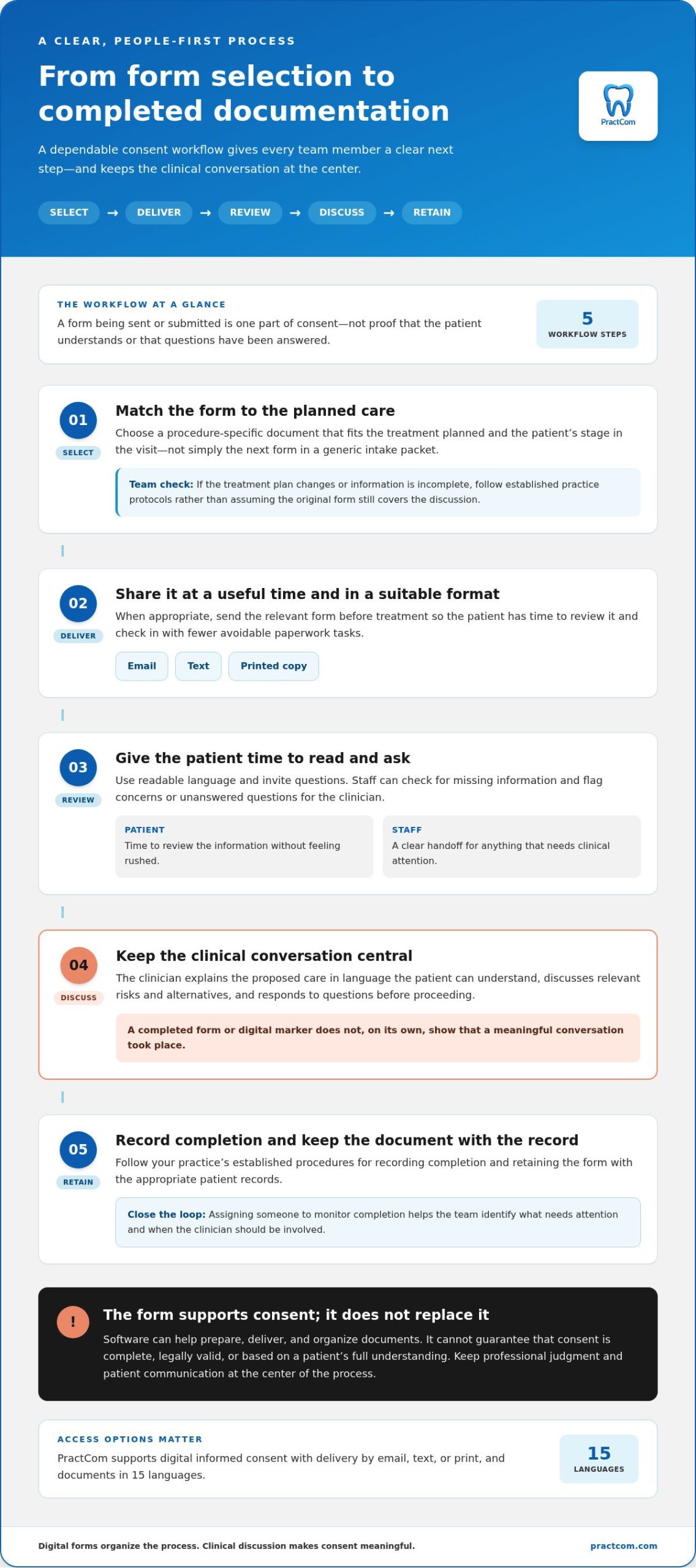
A dependable workflow makes clear who handles each step, from choosing the document to retaining the completed record. Dental consent form software can help organize and deliver forms, but staff review and clinician discussion remain essential. Think of it as a shared process with defined handoffs, not an automatic path from “sent” to “informed.”
A practical sequence keeps the team oriented:
- Select: Match the form to the planned procedure and the patient’s stage in the visit.
- Deliver: Send it by email or text, or provide a printed copy, based on what works for the patient and practice.
- Review: Give the patient time to read it and invite questions. Staff can flag concerns or missing information for the clinician.
- Discuss: The clinician explains the proposed care and responds to questions before proceeding.
- Document and retain: Follow practice procedures for recording completion and keeping the document with the appropriate patient record.
From form selection to completed documentation
Choose a form based on the planned procedure, not simply because it is the next item in a generic intake packet. If the treatment plan changes or a form is incomplete, staff should follow established practice protocols rather than assume the original document still covers the discussion. Assigning someone to monitor completion helps the team identify what needs attention and when to involve the clinician.
For example, a patient may review a form at home but raise a question during the appointment. Staff can direct that question to the clinician, who can address it before the consent process continues. The workflow should leave room for this conversation instead of treating a submitted form as the finish line.
Making consent information accessible to patients
Use readable language and give patients enough time to review information without feeling rushed. Email, text, and print options let a practice adapt delivery to different communication preferences. Language options can also make documents more accessible, but a translated form alone doesn’t establish that a patient understands the treatment. Invite questions and check understanding through conversation.
PractCom supports documents in 15 languages and offers delivery by email, text, or print. These options can help practices fit consent documents into a broader patient communication workflow while keeping the clinical discussion central. Form delivery is an administrative step; informed consent depends on the patient’s review and the clinician’s discussion.
As you define your process, write down who selects the form, who monitors completion, and how staff handle questions or changed plans. This quick reference makes handoffs more predictable for the whole team. For an overview of PractCom’s patient communication tools and how they support a dental consent workflow, take a closer look at PractCom.
How to compare dental consent form software without overvaluing automation
Compare tools by how well they support your actual consent workflow, not by the number of tasks they claim to automate. A form can be easy to send yet difficult to adapt, locate, or use during a busy appointment. Assess the practical handoffs: can staff select the right document, deliver it in a suitable format, and find the completed record when needed?
Use a consistent set of criteria to compare options side by side:
| Area | What to assess |
|---|---|
| Form customization | Can forms be tailored to the procedures and details your practice needs to communicate? |
| Delivery channels | Does the workflow support email, text, and print where appropriate for your patients? |
| Language options | Are documents available in languages that support communication with the patients you serve? |
| Record handling | Can staff locate completed documents and review their status using a clear process? |
| Staff usability | Can the team complete routine tasks without unnecessary steps or confusing handoffs? |
Which features matter in daily practice?
Evaluate common tasks rather than relying on a feature list. Ask staff to walk through selecting a procedure-specific form, sending it through a preferred channel, and locating the resulting document. Note where steps feel unclear or require duplicate effort. If you already use a practice management system, consider whether a patient communication platform complements your existing setup rather than assuming it replaces core practice systems.
Delivery choice matters, too. Email, text, and print can accommodate different patient preferences, while language options can make documents more accessible. Treat these as communication capabilities, not proof that every patient has understood the information.
What software cannot decide or guarantee
Software can help manage forms, but it can’t determine what a specific patient needs explained or whether their questions have been answered. Clinicians remain responsible for the treatment discussion and for deciding what belongs in the clinical record. A digital signature or completed form alone doesn’t establish that informed discussion occurred or automatically prove legally sufficient consent.
Separate verified product capabilities from legal conclusions. If your comparison discusses HIPAA, ESIGN, or UETA, review those statements against current authoritative guidance and appropriate professional advice. Don’t infer that a software feature by itself establishes compliance or legal validity.
For a focused look at format trade-offs, compare paper and digital consent processes alongside the software criteria above. PractCom’s digital informed consent forms are part of a broader dental communication and documentation suite, with documents available by email, text, or print and in 15 languages. The best fit is a workflow your team can use consistently while keeping clinical judgment in human hands.
How to introduce dental consent software with staff and patients
A smoother rollout starts with the process your team already uses, not a sudden switch to every digital form. Before changing delivery timing or responsibilities, map how consent currently moves from form selection to patient review and record handling. Note where staff repeat steps, where questions need a clearer handoff, and how incomplete forms or treatment-plan changes are managed.
Use that map to agree on a written workflow before configuring dental consent form software. Specify who maintains form content, who monitors completion, when a clinician should be involved, and how exceptions are documented. Keep a separate checklist for reviewing form content, so rollout planning can focus on roles and workflow without trying to cover every clinical detail in one procedure.
Prepare the team for a controlled rollout
Assign an owner for form maintenance and workflow updates, and identify who will answer staff questions during the pilot. Train front-desk staff on delivery and status checks, and train clinical staff on reviewing patient questions and handling exceptions. A small pilot with a limited set of forms can reveal confusing handoffs before the process expands across the practice.
Choose forms used in a familiar, manageable part of the workflow. During the pilot, gather specific feedback: Could staff locate the right form? Was the delivery step clear? Did the record-handling procedure work as intended? Record issues as they occur, then adjust instructions, responsibilities, or timing before introducing additional forms. This makes the rollout a learning process, not a test of individual staff performance.
Set patient expectations clearly
Tell patients when to expect a form, how they can review it, and whom to ask if they have questions. Keep a print option available for patients who prefer paper or need another way to review the document. Explain that submitting a form doesn’t replace the conversation with the clinician, and give patients a clear route to raise concerns.
Written procedures should also explain what staff do when a form is incomplete, a patient has questions, or the planned treatment changes. Follow established clinical processes rather than improvising at check-in. Record exceptions according to practice procedures, and bring clinical questions to the clinician instead of treating a missing response as routine paperwork.
After the pilot, review staff and patient feedback together. Look for patterns: repeated confusion about timing may call for clearer patient instructions, while repeated retrieval delays may point to a record-handling step that needs refinement. Update the written workflow and train the team on any changes so improvements become consistent practice.
PractCom’s digital informed consent forms are part of a wider patient communication and documentation suite, with documents delivered by email, text, or print. The platform’s communication tools can be considered as part of a more organized digital consent workflow: explore PractCom’s patient communication platform.
How PractCom supports digital dental consent and patient communication
Choosing dental consent form software is ultimately about building a workflow your team can use consistently. PractCom offers digital informed consent forms as part of a broader dental communication and documentation suite. Practices can deliver documents by email, text, or print, with support for 15 languages. These formats give your team options for sharing information, and the choice can reflect each patient’s communication preferences.
Consent forms remain one part of patient communication, not a replacement for clinical judgment or a full practice management system. PractCom focuses on communication and documentation tools that can sit alongside the systems your practice uses for other core operations. This distinction sets practical expectations: the platform supports document sharing and related patient interactions, while your team remains responsible for clinical discussions and its established record-handling procedures.
Connect consent forms with patient communication
Consent documentation can sit alongside PractCom’s patient portal and automated patient follow-ups, bringing related communication tools into a wider workflow. Delivery formats let practices share documents in different ways, and language support can help make communication more accessible. These capabilities support the process, but they don’t establish patient understanding or replace a clinician’s discussion.
Aftercare is another point of continuity. PractCom includes a library of more than 80 post-treatment templates that practices can use as a communication resource after care. For example, a team can consider how consent discussions before a procedure connect with clear post-treatment instructions afterward. These resources serve distinct stages of care, while the practice determines what information is appropriate for each patient.
To strengthen that transition, review your aftercare communication alongside the consent workflow. A focused guide to post-operative dental instructions can help your team consider what patients need to know after treatment, without confusing those instructions with consent documentation. Consistent communication across these stages can make the patient experience feel more organized, while clinical decisions remain with the care team.
Take the next step toward a digital workflow
As you evaluate PractCom, consider how digital informed consent forms, delivery choices, language support, the patient portal, and follow-ups could fit your practice’s communication process. Start with the points that address your current administrative friction, then define how staff will use them within existing procedures. A well-organized workflow supports reliable document handling without promising legal compliance or guaranteed outcomes.
Digital tools can make communication and documentation easier to coordinate, but they don’t replace professional judgment or the conversation that informs a patient’s decision. PractCom’s patient communication platform brings these tools together to support a practice’s digital consent workflow.
Explore PractCom’s patient communication platform
Make your next consent workflow more intentional
The strongest next step isn’t digitizing every form at once. Choose one point of friction your team encounters, then decide how a clearer process could help patients and staff move through it with less uncertainty. A focused change gives your practice a practical way to assess whether dental consent form software fits the way care is discussed and documented.
Keep the human purpose in view as you refine the process. Technology can help organize communication, but trust is built through clear explanations, thoughtful answers, and time for patients to make informed decisions. With those principles guiding implementation, your team can shape a digital workflow that supports care rather than distracting from it.
PractCom brings digital informed consent into a wider patient communication and documentation platform, alongside resources that support communication before and after treatment. To see how the platform could support your practice’s workflow, explore PractCom’s patient communication platform.
Frequently Asked Questions
What is dental consent form software?
Dental consent form software helps practices prepare, deliver, and organize consent documents for patient care. For example, a team might use it to send a procedure-related form before an appointment and locate the completed document during the visit. The software manages the document workflow, not the clinician-led process of explaining treatment, alternatives, and risks. Capabilities vary, so assess forms, delivery methods, record handling, and patient accessibility rather than assuming the tool makes consent complete.
Is digital dental consent legally valid?
It depends on applicable law, the circumstances, and how the consent process is conducted. A digital signature alone shouldn’t be treated as a universal guarantee that consent is legally sufficient. Electronic documentation and informed discussion are related but distinct. For a jurisdiction-specific question, check current authoritative guidance and consult your practice’s legal counsel. Avoid relying on a software feature or vendor statement as a substitute for advice about your practice’s circumstances.
Can patients complete dental consent forms before an appointment?
Some workflows let a practice send forms before a visit, giving patients time to read them and note questions. For instance, a patient could review a document for a planned procedure at home and bring questions to the consultation. The clinician should still discuss relevant treatment details before care proceeds. Set procedures for incomplete forms, treatment-plan changes, and patients who prefer paper so advance delivery doesn’t create confusion at check-in.
What should dental consent form software include?
Useful capabilities may include forms suited to planned procedures, understandable patient-facing language, practical delivery choices, organized access to completed documents, and language options. Consider a realistic task, such as finding the correct form for a scheduled visit, and assess whether staff can complete it clearly. The right feature set depends on your workflow and patients. No single feature proves compliance or replaces clinical judgment.
Does dental consent software replace a practice management system?
Not necessarily. Some platforms focus on patient communication and documentation rather than managing the full range of practice operations. Clarify the tool’s scope before adopting it, then consider how it fits your existing processes. PractCom is a dedicated dental communication and documentation solution, not full practice management software. This distinction helps practices plan how consent documents will work alongside their established systems and responsibilities.
How can a dental practice improve patient understanding of consent forms?
Use clear, patient-friendly language, allow time for review, offer an accessible way to receive the document, and invite questions. For example, ask the patient what they’d like clarified before moving forward, rather than relying only on a completed form. Translated documents can support communication but don’t establish comprehension on their own. Clinicians should adapt explanations to the patient and treatment, then document the discussion according to practice procedures.

Article by
Cary Ganz DDS
Dr. Cary H. Ganz is a dentist, prosthodontist, entrepreneur, lecturer, and author with more than 50 years of experience in clinical dentistry and dental technology. Throughout his career, he has combined hands-on patient care with a deep understanding of how technology can improve dental practice operations, communication, documentation, and patient outcomes.
In addition to his clinical background, Dr. Ganz has held significant leadership roles in the dental technology industry, including Past Owner and Vice President of Clinical Affairs at DEXIS Digital Radiography and Past Vice President of Clinical Affairs at Denticon Practice Management Software. His business experience includes product development, clinical strategy, dental software innovation, practice management solutions, and educating dental professionals on the effective use of technology in modern dentistry.
Today, Dr. Ganz continues to focus on creating practical technology solutions for dental practices, including PractCom, a comprehensive dental practice communication platform designed to improve patient communication, documentation, compliance support, referrals, and overall practice efficiency. His work reflects a career-long commitment to helping dentists deliver better care while making their practices more organized, efficient, and protected.
No responses yet